Bekijk terug alle berichten.
The bigger plan of my Amiga-Javascript projects
The past years I have been slowly tinkering on various Amiga Projects.
Mostly in JavaScript, mostly to unlock various parts of the huge Amiga ecosystem: parsing ancient filesystems and fileformats, reading and writing Amiga files with new tools, ...
Slowly all these various tidbits are coming together in the big plan: to break the Amiga out of it's emulated container and to seamlessly integrate in a modern OS.
That modern OS is platform independent. It runs on everything and it is accessible from everywhere.
For me, this translated to an OS that is web based. It runs in your browser and it lives in the cloud.
There have been many approaches to such an OS, some of them - like FriendUP - clearly have their roots in the Amiga system.
One of the most interesting ones is Amibian.js. It's also inspired by the Amiga and it runs in javaScript: Node.js on the backend, browser in front.
I've been talking with Jon - the creator of Amibian.js.
It's a HUGELY ambitious project, ranging from custom compilers in various programming languages to a recreation of an Amiga-like OS, complete with compatible system library calls and more.
When doing a modern Amiga inspired OS, one of the big questions is how you handle legacy software.
The Amiga has an old but super mature ecosystem of programs but sadly all that software doesn't run anymore on modern systems.
The solution is to emulate that old hardware so you can still run all that old software.
The most used Amiga Emulator is WinUAE, a glorious and ultra-advanced piece of code.
Rupert Hausberger did the daunting task of porting it to javascript.
The drawback of emulating an Amiga is that it is a contained black-box system that has no knowledge of the larger system it's running on. WinUAE handles this quite elegantly by allowing a shared filesystem, but in your browser there's no such thing.
This is where I stepped in: an emulated boxed Amiga running in your browser is cool, but wouldn't it be even cooler to break it open?
You could use Amiga software to seamless edit/play your local files,
or launch modern non-Amiga tools from within the Amiga,
or compile a program for Amiga with today's tools and launch it directly on an emulated 68k CPU
or ....
All this directly available on whatever system you use and wherever you are.
In the end, the underlying technicalities shouldn't matter.
It shouldn't matter what OS a program was written for, or where your files are exactly, or even who's physical machine you are using. Just launch your space and mold it to your liking.
Amibian.js already tries to break the barriers between the browser and your local system.
Browser or native? It shouldn't matter.
I will gladly help and try to break the barriers between the emulated environments and the native ones:
Emulated or native? It shouldn't matter.
The top video is a first demo of the progress. It shows various aspects of building such a system.
Most notably a shared filesytem so both systems (emulated and native) can access the same files.
Everything you see is running in the browser.
The (emulated) Amiga is on the right, the host system is on the left.
We're still doing babysteps: trying out stuff and laying the foundation for the bigger plan.
The concept is always the same: a seamless integration where it doesn't matter anymore where your files are or on what platform your program is running on.
Tags: Commodore Amiga, in English, Programming, Scripting, TinkeringGeef je reactie (0)Stievie kijken op je PC en op XBMC/Kodi
Stievie is best lollig.
Het is natuurlijk ook veel te duur en bevat veel te veel gaten in de programmagids, maar als concept is het prima.
Jammer alleen dat je perse een tablet of telefoon moet gebruiken en dat je het niet met XBMC/Kodi kunt gebruiken.
Dat zal best 1 of andere rare prehistorisch reden hebben, maar zuiver technisch zal die reden niet zijn.
Ik hou niet zo van apps, zo van die dichtgesmeerde gepolijste bolletjes waar je enkel datgene mee kunt wat de appmaker wil dat je kan.
Waarom kan niet gewoon alles wat meer open en flexibel zijn zodat je het beter kunt afstemmen op je eigen wensen?
Natuurlijk kan dat wel!
Enter de Stie-viewer: een webapplicatie die je lokaal draait en waarmee je alle programma's die op Stievie staan gewoon in je browser kunt bekijken.
Als extraatje zit er een kleine XBMC/Kodi component in waarmee je een programma ook op XBMC/Kodi kunt afspelen.
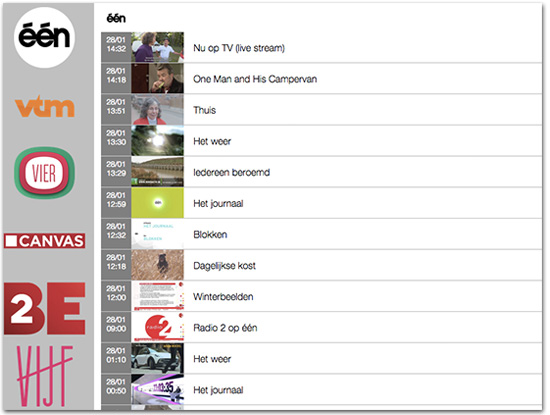
Je vindt het op https://github.com/steffest/Stieviewer
Het is dus NIET iets waarmee je zomaar de Stievie beveiliging kunt omzeilen:
- Je hebt nog steeds een geldige Stievie account nodig
- Je kan nog steeds niet op meer dan 1 toestel tegelijk kijken
- Je kan geen programma's bekijken die niet op Stievie beschikbaar zijn (die uitgegrijsd zijn of meer dan 7 dagen oud zijn)
Kortom: Bekijk het als een onschuldig scriptje dat Stievie iets aantrekkelijker maakt, niet als iets dat bedoeld is om Stievie te ondermijnen.
(Met andere woorden: don't sue me, i'm not attacking your product, just presenting some added value :-) )
De installatie is wat geeky: je hebt node.js nodig. Als je dat nog niet geinstalleerd hebt, vind je dat op http://nodejs.org/
Download de applicatie via https://github.com/steffest/Stieviewer - ga via de command line naar de plaats waar je het uit hebt gepakt en type
npm install
daarna kun je het starten via
node server.js
en is de applicatie beschikbaar via http://localhost:8000 in je browser.
De eerste keer dat je de Stieviewer opent dien je een geldige Stievie login in te vullen.
Je login wordt niet opgeslagen.
Ze wordt enkel gebruikt om de Stievie authenticatie server te conctacteren.
Daarna krijg je een access token die in je local storage wordt bewaard.
Je kan dan alle zenders doorbladeren en het programma in je browser bekijken. Vermits de meeste browser het video formaat van Stievie niet gebruiken, wordt er op de meeste browsers een flash-fallback gebruikt om de video af te spelen.
Je kan natuurlijk ook de url van de video stream kopiëren en bv. afspelen in VLC of QuickTime.
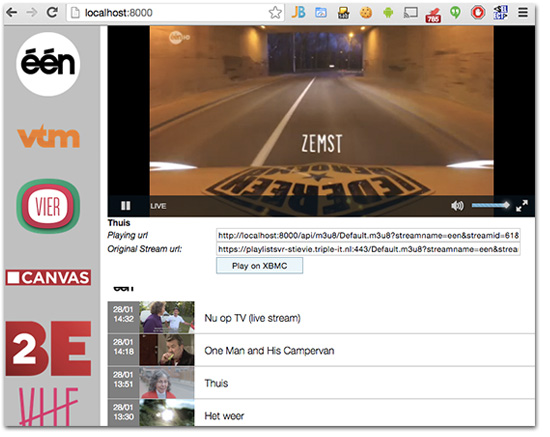
Wil je het programma via XBMC/Kodi bekijken dan klik je op "Play on XBMC".
Kijk dan wel eerst even na dat je de http interface van XBMC hebt aanstaan.
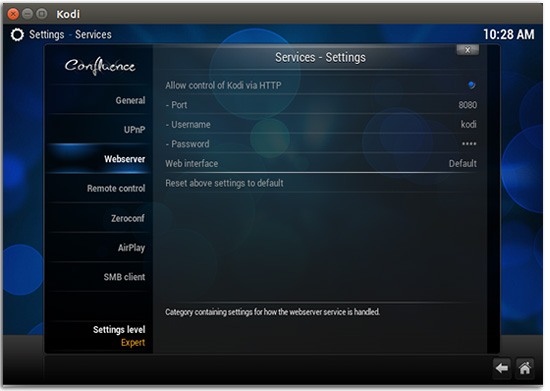
Je vult het ip adres en poort van XBMC in, samen met je login en paswoord en klikt op "Send".
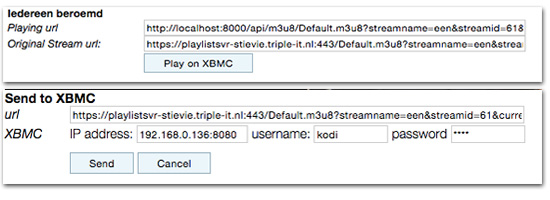
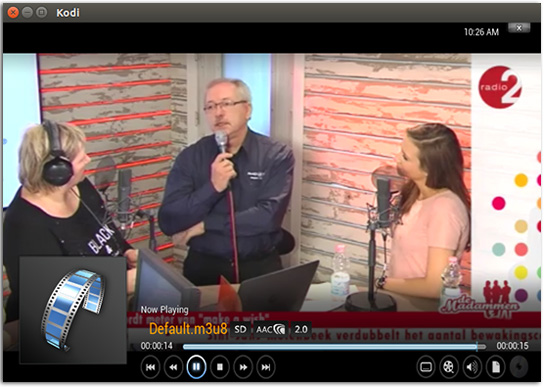
Daarna heb je je PC niet meer nodig: XBMC speelt rechtstreeks de video af vanuit Stievie.
Hoe werkt het?
Je start via Node een lokale webserver op.
Deze doet zich voor als echte "Stievie App" en communiceert met de Stievie server om alle gegevens op te halen.
Daarna verpakt de applicatie deze gegevens een beetje anders zodat je er iets mee kunt doen in een webbrowser.
Om de video af te spelen wordt (meestal) Flash gebruikt.
Om de Same-Origin restricties van een webapplicatie te omzeilen wordt alles via de lokale webserver gesluisd zodat Flash de video kan afspelen.
XBMC/Kodi kan (sinds kort) ook Http Live Streaming videos afspelen, maar heeft blijkbaar nog wat moeite met Adaptive Streaming.
Daarom wordt er op het moment dat je iets naar XBMC stuurt eerst de HLS index playlist opgevraagd en wordt de eerste "echte" playlist die daarin staat naar XBMC gestuurd ipv. de adaptive playlist.
Meer info en de volledige broncode vindt je op https://github.com/steffest/Stieviewer
Het is nog wat ruw en niet echt bedoeld als gepolijst product voor de eindgebruiker, maar toch al bruikbaar.
De Stieviewer is op geen enkele manier gerelateerd met Stievie, Medialaan en/of Triple-IT.
Enjoy and be nice!
Opening Up Stievie
Misschien heb je er iets van opgevangen: er is een nieuwe coole TV-kid in town: zijn naam is STIEVIE en het is een samenwerking tussen de VRT, VMMA en SBS.
Jawel! Wie had gedacht dat die 3 partijen netjes konden samenwerken?
Het werd met veel fanfare aangekondigd en je kon je inschrijven om testkandidaat te worden.
70.000 mensen vulden een hele enquete in en gisteren werden de "uitverkorenen" op de hoogte gebracht.
10.000 mensen mochten binnen.
Dat wil zeggen dat 60.000 mensen wel hun hele TV profiel mochten opgeven, maar daarvoor niets in de plaats kregen.
60.000 mensen die dan als reactie hebben "Wat? Ik ben niet exclusief genoeg? Steek het dan maar diep in uw g*t"
Goe bezig :-)
Afin - voor alle duidelijkheid, ik was er ook niet bij hoor, bij die "gelukkige 10.000"
Maar niet getreurd! Waar een wil is, is een weg.
Tijd om eens te onderzoeken hoe die Stievie app in elkaar steekt.
Ze is gemaakt door het Nederlandse Triple-IT. Vroeger heette dat platform "Rumble", maar nu is het opnieuw gelanceerd als "Vinson"
Overigens: naar het schijnt bestaat er ver ver weg, aan de andere kant van de wereld, een vreemde woestenij met als naam "La Wallonie". Naar het schijnt hebben ze daar ook TV, iets van RTBF of zo?
Die slimme Hollanders van Triple-IT hadden hun applicatie al eens aan de RTBF verkocht, en die is al een tijdje beschikbaar als "TV Nomade" en meer: ge kunt dat zelfs helemaal gratis uitproberen.
Maar dit terzijde want wat over de taalgrens gebeurt bestaat niet voor de Vlaming en Triple-IT hebben hun app nu ook verkocht aan de Vlaamse media als "Stievie"
hups - open met die netwerksniffer (of eigenlijk de Charlesproxy: zeer gemakkelijk omdat die meteen ook HTTPS verkeer decrypteert)
Als je wil inloggen op de stievie app wordt er een verbinding gemaakt met http://rumble-vrtvmmasbs.triple-it.nl/
Uiteraard lukt dat niet want ik heb helemaal geen Stievie login, maar het geeft ons wel het eerste aanknopingspunt.
Nu wil het toeval dat Vinson ook een demo app heeft in de appstore.
Mijn boerenverstand zegt dat Stievie en Vinson helemaal identiek zijn en inderdaad.
Vinson maakt verbinding met http://rumble-vinson.triple-it.nl/
En even later zie je de video playlist opgehaald worden van https://playlistsvr-vinson.triple-it.nl
en voorwaar: een search/replace van vinson door de vrtvmmasbs van de login url geeft ons werkende stievie urls:
http://rumble-vrtvmmasbs.triple-it.nl/V1Api/Config/GetConfig/
en nog veel interessanter:
http://rumble-vrtvmmasbs.triple-it.nl/V1Api/Program/GetOverview
wat een nette programmagids in JSON oplevert. handig! 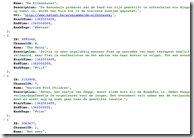
Wat verder gesnuffel aan de video urls zelf geeft ons moeilijke dinges als "session keys" en "urlvalidities" and "channel identifiers" en meer mumbojumbo maar dat blijkt allemaal maar een aanloopje te zijn naar het echte werk: de playlist:
https://playlistsvr-vrtvmmasbs.triple-it.nl/default.aspx?streamname=een&streamid=1
¤ttime=1362448835&urlvalidity=2400&streamduration=14400&userid=0
&key=FFF3335268D63D6F9E5E6DB9616AC235E25772BF&index=0
Dat ziet er nog lastig uit, maar Triple-IT heeft het ons gemakkelijk gemaakt en een beetje trial and error leert ons dat ge al die moeilijkdoenerij gewoon kunt overslaan:
https://playlistsvr-vrtvmmasbs.triple-it.nl/default.aspx?streamname=een&streamid=1 blijkt namelijk een werkende video stream van EEN te zijn.
Update: Het zijn rappe kerels hoor, daar bij Triple-IT: het gat is inmiddels gedicht. TOP!
(onderstaande urls gaan dus niet meer werken)
Handig gemaakt van Triple-It! Eerst een hele muur bouwen en dan vergeten de poort op slot te doen.
https://playlistsvr-vrtvmmasbs.triple-it.nl/default.aspx?streamname=vtm&streamid=9 is de stream van VTM
https://playlistsvr-vrtvmmasbs.triple-it.nl/default.aspx?streamname=vier&streamid=13 is de stream van VIER
Dus voor die 60.000 niet-geselecteerden:
Als ge via een iPad of iPhone surft, zoud ge normaal gezien gewoon op onderstaande logos moeten kunnen klikken.



op een recente Android (4.1 of hoger) en op safari op OSX zouden onderstaande links mogen werken.
De rest van de zenders moogt ge zelf uitzoeken.
Het zijn gewoon standaard HLS video streams (weliswaar met AES encryptie) die ge met eender welke player die dat ondersteund kunt afspelen.
op OSX en iOS is dat standaard, op windows kunt ge VLC gebruiken, op een recente Android wordt dat ook ondersteund.
Ziet dat hier eens properkes spelen. 
En ook op Android, gewoon zoals het hoort: in de browser
(en ja, ge kunt dat uiteraard ook op full screen zetten, maar dan is de screenshot niet veel zeggend hé) 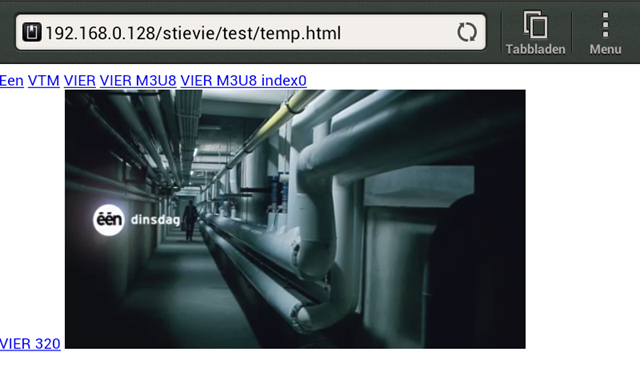

grappig eigenlijk:
default.aspx: hun platform draait op ASP.NET... Microsoft technologie dus. Toch vreemd voor een bedrijf dat zo hard op IOS en Apple gericht is.
Allez, tot zover Stievie ...
Ik vermoed niet dat het lang zal werken, hoor ... dus niet echt de moeite om er een Android appke rond te zetten.
De mannen van Tripple-IT zullen het gat wel rap dichtsmeren zeker? (Update: inderdaad: het gat is inmiddeld gedicht)
Allez hup: werk aan de winkel, of had ge heel uw security op https gebaseerd?
De S van https staat voor secure, inderdaad, maar https dient om uw eindgebruikers te beschermen tegen afluisteren, het doet niets-nada-noegabollen-noppes om uw applicatie te beschermen.
Aan de mensen van de VRT, VMMA en SBS : ge moet niet kwaad zijn op mij, hé - don't shoot the messenger - ge moet kwaad zijn op Triple-IT : zij hebben u een lekke applicatie verkocht.
Voor de volledigheid: hun VOD urls heb ik nog niet gevonden.
Ik vermoed dat die op https://rumble-vrtvmmasbs.triple-it.nl/V1Api/Category/GetOverview/ staan. Als iemand zijn Stievie login eens efkes wil uitlenen, dan wil ik gerust eens piepen. :-)
Efkes hé ... een mens heeft namelijk ook nog iets anders te doen dan de godganse avond voor de TV te hangen, nietwaar?
Enjoy!
Update 2: Die lieve stievie mensen gaven me een loginneke cadeau.
Ziedewel: mijn loyaliteit en goodwill zijn gewoon voor een appel en een ei te koop. :-)
Merci!
Opening up Telenet Yelo: TV on your android
Part 2 in the Telenet Yelo series. (following this and this)
Update:
Due to a formal complaint from Telenet I have edited this post and removed all references to their internal API and closed down the demo program.
Telenet is working on an Android app for Yelo. Yes, but when will they release it, if ever?
Luckily, there's no need to wait.
As the Android platform get more and more mature, also the streaming video app gets better.
The HTTP Live streaming format that Apple invented and Yelo is using can now also be played on non iOS platforms like Android.
The only thing we need is the URL for the TV stream.
After some sniffing, here's a super easy way to get them.
the front door is located at *removed*
Where you replace *yourlogin* and *yourpass* with your telenet credentials.
You get a little XML in return stating something like
*removed*
That code in the response tag is your session ID.
You'll need that as the TV-streams are tied to your telenet account (you didn't think you're watching anonymous, did you?)
What TV channels are available is located at *removed* (it's an XML, so you might need to do a "view source" to see them)
Every channel has an ID.
e.g.
*removed*
The livestream then is contructed as *removed*
for the example above, that would be *removed*
That's it, nothing more to it.
if you copy that url into your browser on your iPhone or IPad it will play.
on Android 3.0, this should also work (theoretically, never tested it) but as most of us are on Android 2.2 or less, we need an extra tool.
Thankfully, BelgianWaves (who's also from Belgium, could you tell?) did the INCREDIBLE job of writing a http live stream player from scratch and released it as Mirage.
This has nothing to do with Yelo, it is a generic video player (and an Airvideo client, I might add - again: INCREDIBLE work by BelgianWaves) and it happens to play the yelo streams just fine.
Ok, this works, but copy/pasting urls and sessioncodes around is annoying and should be automated.
I wrote a little script that does exactly that: it takes your login and pass as input and returns a list of urls of all TV channels available.
The script is *removed*. nothing fancy just a quick 1 file script.
As a demo - and for my own personal use - I wrapped in a little webfrontend at http://www.stef.be/projects/yelo/ (*offline*)
It works fine on any iOS device and on Android (with the help of Mirage)
Theoretically it might work on Safari on a recent (Snow Leopard) Mac, but that's untested.
In fact... I only tested it with my own login, but there's no reason it wouldn't work for all Telenet users.
One big note: the Yelo streams are tied to your IP address too and they only work when you're connected using a Telenet connection. It won't work on any other provider (yet ... but more on that another time)
Here are some screenshot from iOS 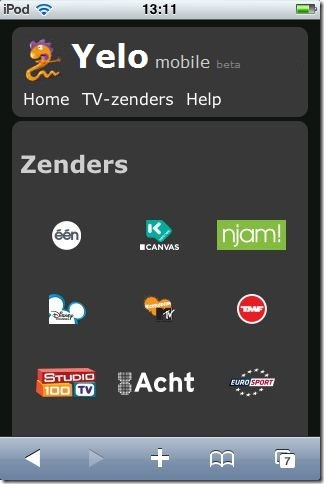
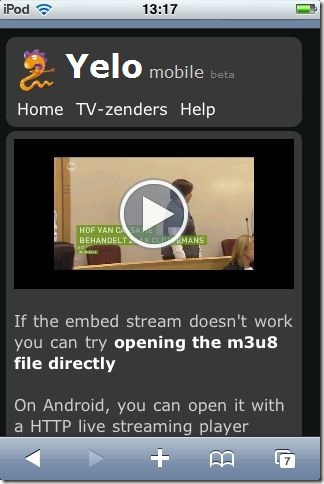
And an Android device playing Yelo TV 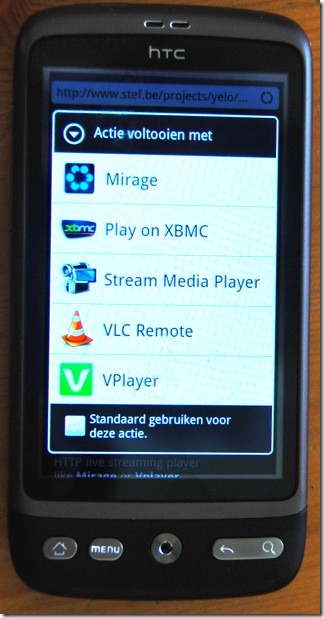
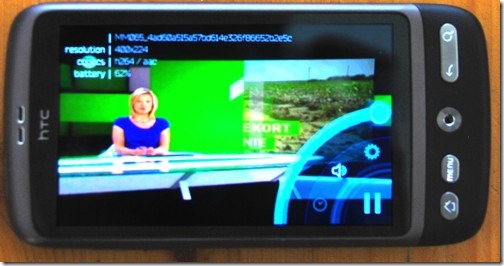
Have fun with it, and - for peeps sake - DON'T go entering your Telenet credentials in any webform you see, if you have any doubt that this or this is not safe, get the url's manually as described above. (or write your own script of course)
Probably for their (future) Android Yelo App, Telenet is using a different video streaming technology but in my opinion, maybe they should reconsider that.
HTTP Live streaming is turning into a valid video streaming technique for multiple platforms.
Android 3 has native support for it and Mirage supports it to.
You should think that Telenet is happy with that development, no?
They already have a decent HTTP Live streaming backend in place, serving their iPhone and iPad users.
It would be common sense to use that same backend for other devices, right?
That's not what Telenet must be thinking. On the contrary: they contacted the Mirage author and specifically asked them to stay away from Yelo.
Argh ... instead of saving themselves lot's of time and effort, they bully a small developer to halt his activities.
Come on, Telenet: the internet is open by design: locking your web services to your apps and your network only doesn't work and will never work. Someone will ALWAYS find a way around it.
Do yourself a favour and license the Mirage technical core, wrap it into your Yelo service and release it as Android client: it will be far far cheaper (and faster) than developing your own solution.
Anyway: now with Yelo usable on Android devices, the next step is to make it usable from anywhere, even outside the Telenet network.
More on that in part 3.
Enjoy!
PS. Why is this post in English? Darn, I have written too much code lately :-)
Javascript library: 9-dot Pattern Lock
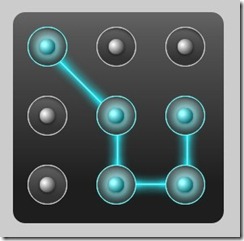
You have probably seen this on a touchscreen smartphone: to unlock it, instead of typing a password you are presented with 9 dots and you have to draw a pattern.
It works great: drawing a shape on a small touch screen is far easier than typing on those bl**dy small keyboards AND far easier to remember too.
Once you've got used to it, typing passwords in general gets pretty annoying: you want to swipe your way through every login screen you see.
For my own mobile web apps, I wanted to replace that standard password box with a familiar pattern lock, but was surprised I couldn't find one that was targeted towards web apps.
Maybe it does exist but i missed it?
Oh well, Do It Yourself! : my never ending mantra that I keep repeating over and over and over and over again :-)
Enter the 9-dot pattern lock javascript library.
It's pretty much drag-n-drop: just include the JS file and give your password box the class "patternlock" : It will be replaced with a nice touchy patternlock.
I wanted it to be free of any dependencies on frameworks like jQuery or Moo so it's completely standalone.
A live demo is at http://www.stef.be/dev/javascript/patternlock/
It's targeted towards large touchscreen devices such as Android phones/tablets, iPhone and IPad, but it works fine on any major desktop and mobile browser.
The idea is that each dot is a number from 1 to 9, when you draw a pattern, you're actually entering numbers into the password box.
It's free and open source, grab it here if you find it useful.
Parameters
- it has 2 parameters
- patternlock.autoInit
If set to true all input elements with the className "patternlock" will be replaced
If set to false you have to manually initiate it by patternlock.generate(IDofElement) - patternlock.autoSubmit
If set to true your form will be submitted when you stop drawing the pattern
If set to false the user will have to submit it manually
- patternlock.autoInit
Possible enhancements for the future:
- maybe rewrite it as a jQuery plugin ?
- it would be much cooler to use the HTML5 canvas element to draw the dots and lines in runtime instead of using images. But since that's not supported on all browsers, I used images to keep it compatible.
Known issues
- the default Android browser has a really slow "ontouchmove" trigger: if you draw very fast on your android phone, you will miss some dots. (I hate to admit it but the iOS browser clearly is the most potent mobile browser for touch stuff at the moment)
- If you draw outside of the box you can connect non-adjacent points. allthough that's perfecty fine, no lines will be drawn between those points.
- Using multiple patternlocks on the same page probably won't work.
If you bump into other issues or have any improvements: let me know!
Tags: in English, Mobile, Programming, ScriptingGeef je reactie (9)Snuffelen aan je ipad apps
Deze week was ik te gast bij de Tech45 podcast - als je wil herbeluisteren kan dat hier .
Het was naar aanleiding van deze blogpost en Jan's reactie erop.
Mijn achterliggende stelling was dat (ik hoop dat) al die iPad en iPhone en Android en wat-nog-al-niet-apps een tijdelijke hype is.
Begrijp me niet verkeerd, mobile gaat super hard ontploffen, maar qua applicaties zal het gaan zoals op de grote PC's: eerst was alles een lokaal programma, en toen evolueerde het zodat je bijna alles in je browser kan doen.
Natuurlijk zullen er steeds toepassingen blijven die op je PC lokaal moeten staan, zoals tekenprogramma's of games bijvoorbeeld, maar de tendens is wel duidelijk: software is steeds meer online. Hup naar de cloud!
Voor al die mobiele toestellen zoals de iPad en je telefoon zal dat hetzelfde zijn: de "App" zal na verloop van tijd naar "browser" evolueren.
Nu is het nog even super hip om een iPad app te lanceren, maar dat slijt er wel af.
De grote Apple baas blaast dat de App HET opperste goed is voor de gebruiker, maar dat zegt hij natuurlijk vooral omdat hijzelf met zijn hebberige vingers tussen de Appverkoop zit en bij de browser niet.
Vooral "media consumeren", dat is iets waar de browser goed in is: lezen, filmpjes kijken, foto's bekijken ...
Kun je het je inbeelden dat "De Standaard" een Mac applicatie zou lanceren speciaal voor de krant te lezen? natuurlijk niet, daar heb je een website voor.
Kun je het je inbeelden dat Telenet een Windows applicatie zou lanceren speciaal om TV te kijken? natuurlijk niet, ook streaming video loopt veelal via de browser.
Waarom ze dat voor iPad wel doen is me een raadsel (niet echt natuurlijk, vanuit technisch oogpunt)
Die apps zijn niet meer dan veredelde browsers die ingesteld zijn om maar 1 "website" te tonen.
Geen woorden maar daden!
Laat ons bijvoorbeeld de Telenet Yelo applicatie eens bekijken.
Maar eh .. hoe doe je dat eigenlijk?
De iPad is via je wifi netwerk verbonden met het internet.
Alle gegevens passeren naar je wifi router en gaan van daar verder.
Als je precies wil weten wat een applicatie allemaal online gaat zoeken (en terugkrijgt), zou je eigenlijk in je router moeten gaan afluisteren.
Gelukkig bestaat er ook een truukje om die "router" iets gemakkelijker te maken.
Elke PC die zowel een ethernet als wifi heeft, kan ook als wifi router dienst doen.
Erg gemakelijk en een gratis programma zoals Virual Router maakt het in 1 klik waar. 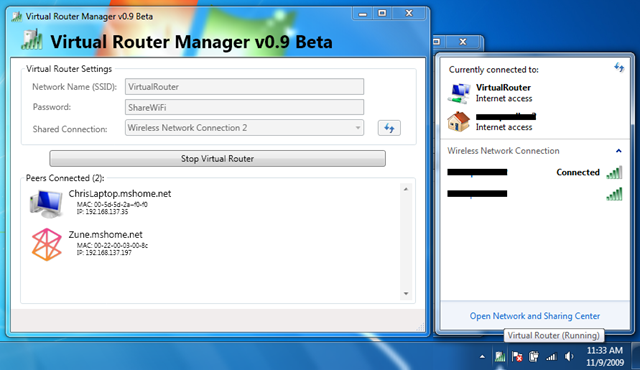
Even op de startknop klikken en er is een nieuwe draadloos netwerk in de lucht waar je bijvoorbeeld met je iPad op kan connecteren.
Je PC doet nu dienst als router en geeft alle gegevens dia van je draadloze toestellen komen door.
Fijn, maar hoe doe ik daar nu iets mee.
Daar komt de FANTASTISCHE ONGELOOFLIJKE FENOMENALE tool Wireshark om de hoek kijken.
Wireshark is het lievelingetje van elke computer netwerk mens - het zwitsers zakmes van de netwerken.
Wireshark nestelt zich in je netwerk en bekijkt alles wat er passeert. Met een druk op de "record" knop, begint hij alle gegevens bij te houden zodat je later rustig kunt bekijken wat er gebeurd is op je netwerk.
Elke website die je opent, elke verbinding met het internet die elk programma maakt - ALLES - wordt zo gelogd.
Wireshark biedt bovendien nog veel middelen om later ook nog wijs te worden uit die enorme hoop gegevens.
Mooi! Laat ons dan eens kijken wat die Telenet Yelo app zo allemaal online gaat zoeken. 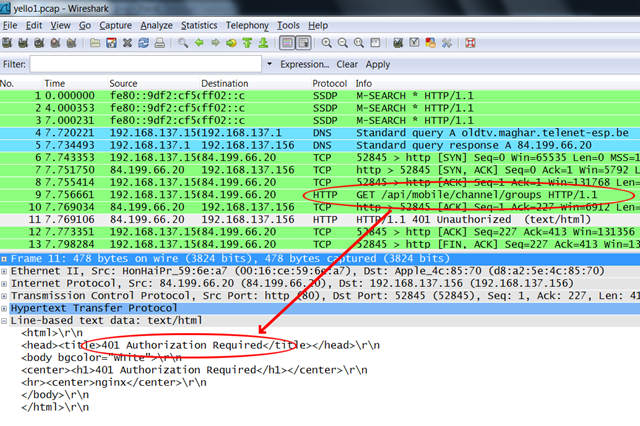
Je ziet hier dat de App eerst http://oldtv.maghar.telenet-esp.be/ gaat opzoeken en daar naar http://oldtv.maghar.telenet-esp.be/api/mobile/channel/groups gaat kijken.
Ha! een API ... dat is altijd leuk.
Helaas krijg je een loginscherm voorgeschoteld als je op bovenstaande link klikt.
Maar die applicatie geraakt er wel op, dus nog even verder kijken.
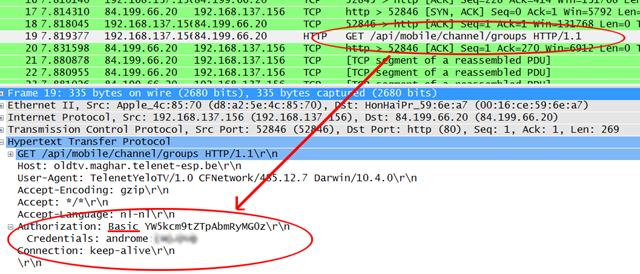
Wireshark laat ook de inhoud van elk verzoek zien, en hier zien we dat de login gevens als "Basic Authorization" worden verstuurd.
Dit wil zeggen dat login en paswoord als leesbare tekst worden verstuurd en inderdaad: we kunnen dat hier lezen.
voor de : staat de login, erachter het paswoord.
de login is "androme" en het paswoord ... heb ik even vaag gemaakt, dat zul je zelf even moeten opzoeken.
Dat werkt.
We kunnen nu via de browser zelf opvragen wat de Yelo app achter de schermen doet.
En wij krijgen zaken te zien als
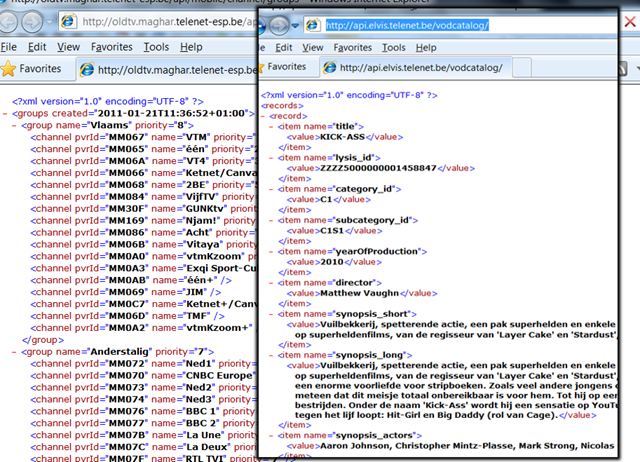
Schone propere XML waarvan een developer blij wordt. Daar kunnen we mee aan de slag.
Wat verder snuffelend leren we dat hun API blijkbaar "ELVIS" heet, de meeste aanvragen gaan naar
http://api.elvis.telenet.be/livechannels/ en zo van die dingen.
Dit zijn allemaal "publieke" gegevens die voor iedereen hetzelfde zijn: de TV-gids, de info van elke programma, welke kanalen in welke categorie zitten ...
de Telenet Yelo app kan echter ook je eigen opnames instellen, en daarvoor heeft het je login nodig, die de applicatie ook naar de telenet servers zal moeten sturen.
Oeps! Wat zien we daar! 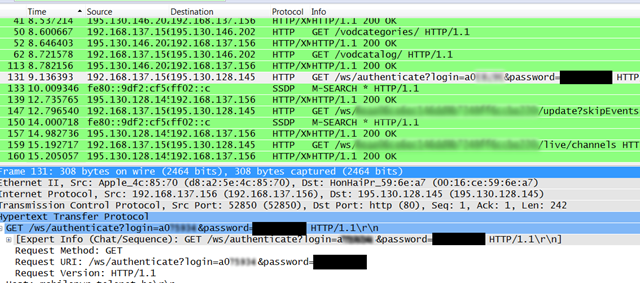
De applicatie gaat aankloppen bij http://mobilepvr.telenet.be/ws/authenticate
en verstuurd mijn login en wachtwoord niet eens als "basic authentication" maar gewoon hopla in de URL ...
Dat is wel niet zo netjes hé Telenet.
Draadloze netwerken stoppen niet bij de buitenmuur van je huis. Dan maar hopen dat je buurman geen al te grote GEEK is en aan het meeluisteren is ...
Ik poste dit ook op twitter en ik moet zeggen dat Telenet goed luistert en supersnel was met hun reactie.
Dit gaat in de volgende versie opgelost zijn. Blijkbaar was Telenet wat gehaast om deze app uit te brengen hebben ze hier en daar wat hoekjes afgesneden.
Update: Plots staat er vandaag een artikel over in de standaard:
Ze vermelden "Een Twitter-gebruiker signaleerde onze redactie dat de login-gegevens in de Yelo-app niet beveiligd zijn"
Ik hoop eigenlijk niet dat ik die twittergebruiker was :-)
de Standaard maakt er hier een opgeklopt verhaal van.
Je wil eigenlijk niet weten hoeveel applicaties en websites de logingegevens op soortgelijke manier onversleuteld versturen en ach ... zooooooo'n groot probleem is dat nu ook weer niet, het is gewoon een beetje slordig van Telenet, meer niet, en ze zullen dat wel rechtzetten ... geen reden tot paniek ... nothing to see, move along.
en along moven doen we door te komen waar we willen zijn:

We komen bij de URL's waar de livestreams van hun TV kanalen opstaan.
Het zijn .m3u8 bestanden, wat eigenlijk een soort playlists zijn van allemaal hele korte video bestandjes die door de player naadeloos aan elkaar worden geplakt.
"HTTP live streaming" noemen ze dat bij Apple - en jawel - eigenlijk is dat best een goede uitvinding.
Als je deze URL neemt en je plakt die in een browser (op iPhone of iPad) , opent de standaard mediaplayer zich en speelt de video af.
Voor de films die je kunt huren is dat hetzelfde.
Alles wat je in de Yelo applicatie ziet, past prima binnen een browser.
Maar ja, "TV kijken op je iPad" klinkt nu eenmaal veel cooler dan "TV kijken in je browser" en is het ingegeven door hippe marketing om nu te kiezen voor de App.
Het lijkt me echter niet meer dan logisch dat Telenet op den duur deze functionaliteit mee in hun online www.tv.be en m.tv.be aanbod stopt zodat het ineens overal en op elk toestel werkt.
Voor Android en andere toestellen gaan ze enkel een ander formaat videostream aan moeten bieden, maar dat is geen struikelblok.
En als Telenet dat niet doet ... tja, dan zullen we het zelf moeten maken, natuurlijk :-)
Mocht je morgen naar Barcamp VRT Brussel komen, dan zal ik je graag mijn eerste opzet daarvan laten zien.
Tags: in 't Nederlands, Programming, ScriptingGeef je reactie (6)
Open Source Telenet Digicorder API
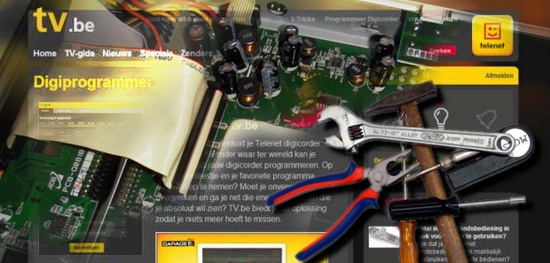
A few months ago, Telenet finally made the jump and opened up their digicorder devices to be controlled through their TV web portal TV.be.
Nice!!!
Finally you could schedule your TV recordings from anywhere using a web browser instead of a infrared remote and the dorky digicorder interface.
Controlling media devices through web interfaces happens to be one of my sweet spots so the first thing I did was firing up Firebug to see what kind of communication was going on between their various web applications.
They've done a really good job, as they created an internal API to talk to the digicorder.
Figuring out how the API works has the same attraction as seeing a crossword puzzle in a newspaper: it tickles your mind but at the same time it's not too hard and with some time and logic the puzzle is quickly solved.
So, let's get to work to create a more open API to control your TV recordings from any software package you want instead of only through the tv.be website.
First step: login
Telenet uses a single-sign-on system, providing a token that authorises you as "logged in" and that you can take with you to other sites.
It sends you on a redirect path towards multiple domains - telling each domain you have logged in.
The script just recreates that path and makes sure to collect and pass all cookies to the next step. (That's really easy in .net - just use the same cookiecontainer for each request)
After that you can use the Telenet remotePVR API from the script as an authenticated user.
One problem though: to schedule a new recording you need the eventID of the program you want to record.
That's where tv.be and some good old screenscraping comes in: a Channel listing for each day is requested on the tv.be website and the EventID codes get extracted and saved to a local cache (so we don't have to hammer the tv.be site more then we need to)
Technically that might be against Telenet's Terms of Use policy, but hey - we're all in favour of free and open data, aren't we?
That's it.
I created a more simple API as .net wrapper class with the following syntax
Dim tvbe as new tvbe
tvbe.login()
tvbe.logout()
tvbe.recordings()
tvbe.reminders()
tvbe.zenders()
In a webapp that translates to URLs as
/login
/logout
/boxes 'gets info on your digiboxes and digicorders
/recordings 'gets a list of your scheduled and completed recordings
/recordings/schedule/ID ' schedules a new recording, ID is an eventID provided by tv.be
/recordings/delete/ID ' deletes a recording, ID is an eventID provided by tvbe/recordings
/reminders/ 'gets a list of your scheduled reminders
/reminders/schedule/ID ' sets a new reminder, ID is an eventID provided by tv.be
/reminders/delete/ID ' deletes a reminder, ID is an eventID provided by tvbe/reminders
/zenders ' (short)list of available channels
/zenders/channelname ' program guide of the channel with name "channelname"
/zenders/channelname?date=dd-mm-yyyy ' program guide of the channel with name "channelname" of a given day
The sourcecode can be found here.
After a (very friendly) request from Telenet I'm taking the sourcecode and the demo application offline.
However I do hope I can contribute following their open invitation to help unlock their digital services towards a more open communication (API?) in general and mobile devices in particular.
To be continued ...
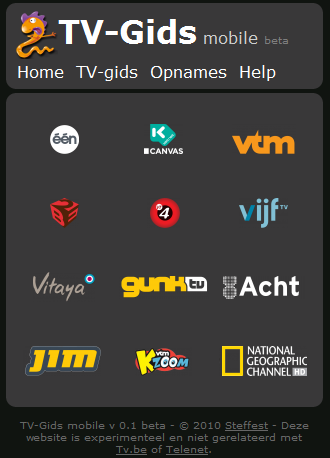
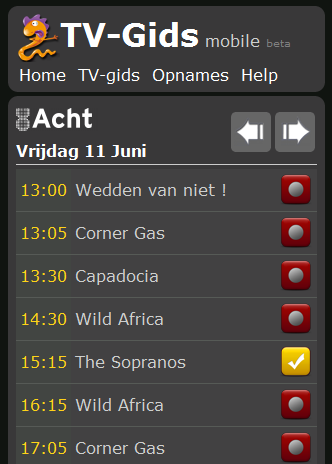
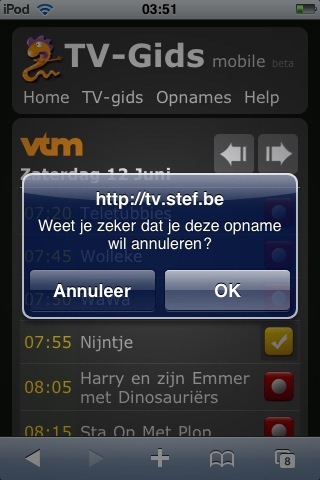
As a demo I created a little frontend for the API for use on mobile devices.
http://tv.stef.be it is.
You can use the TV guide without login in, but if you want to manage your recorders you have to create an account at tv.be (and be a Telenet Digital TV customer of course)
It's a bit of a trust-issue to enter your telenet credentials in a "rogue" app like this, but i can assure you it's safe: your credentials are not stored anywhere and are only used to pass through the Telenet login sequence.
If you're still hesitating to enter your login, you can grab the source and try it on your own machine.
Here are some screenshots. 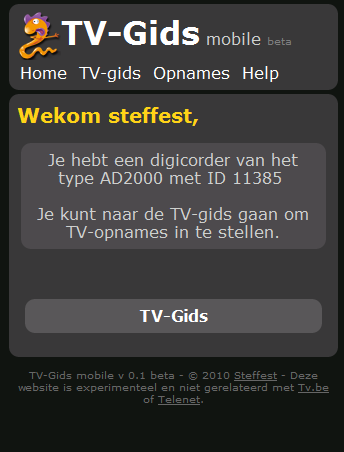
The API still has some holes, mostly because not all tv.be content is easily available.
Most important i would love a simple system to convert EventID's to program names and vica versa, maybe if i ask the tv.be people nicely? :-)
Also it's not really suited if you have more then one digicorder.
A search function would be nice ... maybe I'll implement that.
Of course it works fine as long as Telenet doesn't change their internal API, which is always a risk, but well, then the cat and mouse game can continue.
I was planning to build an Android app for it but actually http://tv.stef.be works very well on mobile devices and since you still would need a data connection to talk to your digicorder, why would you create a native app when a webapp will do?
Happy recording!
Usenet-o-matic for your mobile
"Usenet indexer Newzbin has lost its MPA court case."
Maybe that doesn't ring a bell but anyone who's been digging into to "downloading stuff from the net" will soon find out that Usenet is the place where it's at: your one stop shop for all the movies, TV shows, music and apps you can chew.
The only problem: it's too much and as is the case with the torrent trackers - Usenet is also flooded with crap: virus infested apps, password protected files, DRM loaded pay-movies,...
Not very easy to find the good stuff.
That's where Newzbin came in: their system of user-generated and verified reports made it a no-brainer to find clean and high quality releases - nicely packaged in so called nzb files,which are a list of all the binary chunks you need to download from a Usenet server in order to rebuild the files you want.
AND they have a very nice API for developers like me so they can script and automate their download flow.
Not anymore: starting from March 31, no new reports are being added. The service is not broken, but without updates it's pretty darn useless.
So there i was: sitting in my bathtub, sipping my red wine and hitting the play button, only to find the latest episode of Lost wasn't there.
No fun!
Especially since I was not in the position to jump up, run to the keyboard and quickly find another source.
As these things go, it's a classic case of "the King is dead, long live the King".
NZB sites are not hard to find and I quickly updated my scripts to use NZBMAtrix as an alternate source.
One of those scripts is a mobile optimised search tool to quickly find a TV-show (or whatever it is you're looking for) and tell your homePC to download it.
The idea is that you use your mobile phone to initiate a download, your homePC downloads the file using a fast internet connection and streams it back to your mobile phone. Very easy and very fast: e.g. downloading a TV episode takes a minute or 2 after which you can use Relocally - or something like Air Video - to stream it to your device.
The script is called Usenet-o-matic. It will be part of Relocally, but if you want you can use it yourself.
It's available at http://usenetomatic.codeplex.com.
In this first release it supports Newzbin and NZBmatrix as index sources and SABnzbd as download server.
This means that in order to get it working, you need a Newzbin premium account or a NZBmatrix VIP account and a SABnzbd installation. (and a decent Usenet provider obviously - like Giganews)
I admit: those are a lot of things to set up (and are not free) so probably the target group of a script like this is pretty narrow, but once you get everything inline, download Walhalla is yours :-)
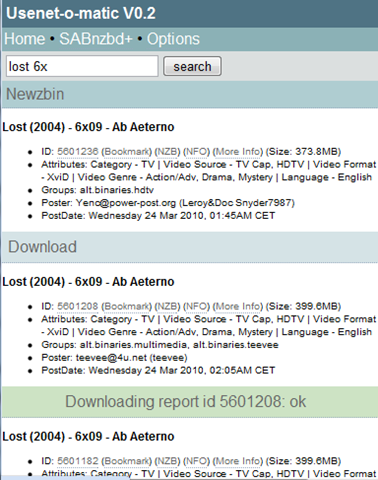
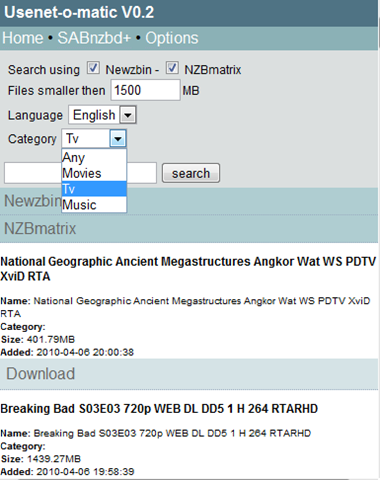
Sorry, no live demo but here are some screenshots: (Yeah yeah, I know: it looks like crap, I left the design part for you to add :-) )


Google maps/latitude/twitter/blog mashup
Vorig weekend ging ik nog eens een wandelingetje maken, als voorbereiding op deze tocht, weet u wel.
40 km stond er op de planning. Het was tevens de eerste grote test voor mijn real time google maps/latitude/twitter/blog mashup (een hele mond vol, maar het gaat dus over de kaart die u hieronder zit)
- voor de RSS lezers die de iframe-kaart niet zullen zien: het is deze.
Ik ben al een tijdje bezig mijn mijn locatie te loggen. Ik gebruik daarvoor voornamelijk Google Latitude: mijn telefoon weet waar ik ben en geeft dit door aan Latitude. Door om de zoveel tijd deze locatie op te vragen en op te slaan in een database krijg je zo een geo-log waar je overal bent geweest. Het handige is dan dat je van alles waarvan je weet WANNEER je dit deed, je ook ineens weet WAAR dat gebeurde.
Als je bijvoorbeeld een tweet stuurt, of een foto maakt en upload, dan kun je ineens op een kaart tonen waar je was.
Dit doe je dan van tijdstip A (je vertrek) tot tijdstip B (je aankomst) en voila! je hebt een routekaart van je tocht met geografisch aangeduid waar (en wanneer) je bv een foto postte of iets op twitter zei. (je kunt op de icoontjes klikken om de tweet/foto te zien)
Het mooie is dat dit dus realtime gebeurd (of kan gebeuren).
Als backup heb ik ook een GPS-logger bij, om achteraf de locaties wat bij te schaven en dat is eigenlijk wel nodig ook.
Google latitude is eigenlijk niet bedoeld om je route te tracken, maar om je huidige locatie te tonen.
Het maakt af en toe rare locatie-sprongen want zelfs als de gps van je telefoon continu aan staat, stuurt latitude soms toch de geïnterpoleerde gsm-mast locatie door en die is veel minder accuraat.
Op je route lijkt het dan soms alsof je heen en weer springt.
Ook ergerlijk is dat er geen mogelijk is om exact te bepalen wanneer Latitude de nieuwe locatie doorstuurt en ik heb al gemerkt dat dit best lang kan duren.
Langs de andere kant is het wel een erg mooie applicatie die bovendien ook erg vriendelijk is voor de batterij van je telefoon - niet te onderschatten tijdens lange tochten.
De "real-time" kaart is dus niet zo accuraat, pas bij terugkomst wordt de route 100% juist na het importeren van de GPS-logger gegevens.
Tijdens de tocht bleek alweer dat "social media" als twitter effectief wel "social" is: ik was in mijn enthousiasme vertrokken zonder geld of drinken - dom natuurlijk, en dat had ik meteen maar op twitter gezet.
Gelukkige was er een vriendelijke twitteraar die zeer juist deduceerde dat ik wel eens in zijn buurt kwam te passeren en bood aan dat ik bij hem wel mocht komen lunchen - WAUW! - nogmaals een dikke merci! (jajajaja twitter is ECHT cool)
Je ziet op de kaart dat ik op een gegeven moment rechtsomkeerts maak om nog even langst Broechem te passeren - waardoor de tocht uiteindelijk 45 km lang werd.
Ik moet zeggen dat ik blij was dat ik de finish bereikte - het viel eigenlijk wat tegen en ik voelde me echt een oude zak.
Dat beloofd ...
Dit weekend staat er weer een 45-km tocht op de planning - dit keer in groep, wat meestel iets minder snel vooruitgaat.
Uiteraard wordt deze ook getrackt!
Mobile podcatcher
As the tv-season is on hold during the summer months, I had to switch to another type of "media" to consume during longish train/bus rides, so I picked up some podcasts again I like to listen to.
These days mobile devices are also more and more "connected" to the web and downloading music and/or podcasts to your mobile device seems so tiresomely old ... so: streaming audio for the win !
There are several really good streaming audio clients on the various mobile platforms, but heck, I found it was really frustrating to get the updates from your favourite podcast and get your device to play the darn thing.
Most annoying, especially as it was not a technical issue but an "ease of use" and "interface" issue.
Conduits Pocketplayer does a semi-decent job, but that thing is bloated and painfully slow to load as it tries to rescan your local music library AND your feeds at every move you make. (besides that, it's not free)
As always, the "If you want it done better, do it yourself!" mantra made me tinker to create a very simple and fast way to reach my favourite podcasts. no need to reinvent the weel and create a player; a small web application would do to fetch the latest mp3 url's and feed it to a player.
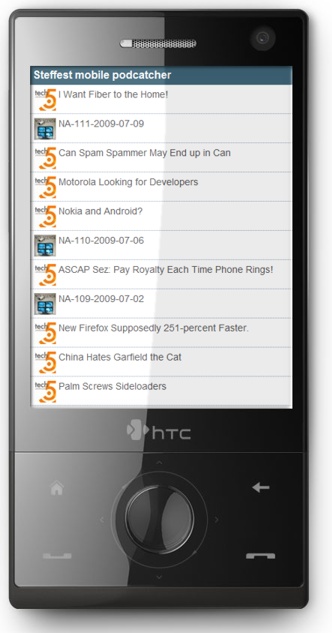
tadaaa!: http://m.stef.be/pod (works in every browser but it's optimised for your mobile device)
Keeping track of various RSS feeds yourself in any application is a bit a pain in the behind: you have to scan, validate and cache each feed at regular intervals which can quickly cause some major strain on your server.
This time i took the smarter route and created a connection to a system that does RSS aggregation better then anyone else in the world: Google Reader.
in Google Reader I label the podcasts i want with a tag "mobilepodcast" , then my podcatcher script simply fetches the 20 latest items of all feeds with that label.
I'll post the code for the Google Reader connection later, it's really an easy way to get a feed and you still get to process them the way you want.
Depending on your mobile device and the software your prefer, the application presents the audio files as a PLS playlist, a ASX playlist or a direct link to the mp3 file.
You can modify this by clicking the "settings" button to choose your preference.
On my mobile, I've setup Coreplayer to open .pls files automatically. It's hands down the best media player for windows mobile.
Future improvements might be to connect this with my mp3 library at home, allowing for streaming audio from the home pc, or with this collection, but we'll see about that ...
In the mean time: http://m.stef.be/pod it is.
Tags: in English, Mobile, Programming, Scripting, Tinkering, Web 2.0Geef je reactie (0)
Inca09 - The Game
My first submission to the inca-award contest is about ready.
Old scool gameplay for the win!
Woo the jury and collect als much good ideas as you can.
Show your clever tricks by solving the puzzles.
Create your own levels using the online leveleditor, So if you ever wanted to create a game starring Bnox, Dries Buytaert, Robin Wauters, Bart Becks or Luc Tayart, here's your change.
More info at http://www.stef.be/projects/inca Tags: in English, Programming, ScriptingGeef je reactie (0)
How to cheat on online polls like #MCMG
Vorig weekend opende Imke Dielen de "Most cute Male Geek" verkiezing.
Eigenlijk wilde ik dat alles gewon negeren, want - en ik mag dat zeggen he Imke - ik vond het vooral wat aandachttrekkerij, tot ik vrijdagavond zag dat @wolfr 9000+ stemmen achter zijn naam had staan.
Onder het motto "Allaai gast, alsge trisht, doegedan injees goe" oftewel "Wasdana, nen antwaarpenaar kan toch beter trishen dan die Netlash-gasten zekers" heb ik vrijdag dan toch eens een scriptje gemaakt om een mede-antwerpenaar van wat stemmen te voorzien. (Vooral ook omdat imke zelf zeer uitnodigend was)
Hier een kleine handleiding:
Stap 1 bij elke webapplicatie is altijd dezelfde: rechts klikken en "view source" kiezen.
Daar lezen we <noscript> <a href="http://answers.polldaddy.com/poll/1357963/">View Poll</a></noscript>
Wat de url is van de quiz op polldaddy.
Het meeste interessante op die pagina is de "vote" knop, die stuurt immers de actie door naar de webserver.
de actie is javascript:vote(1357963,0,0,1,10);
OK, dan even kijken waar die javascript staat.
in de HTML code staat <script type="text/javascript" language="javascript" src="/js/common.js?x=35">
<script src="js/common.js?x=35" type="text/javascript">
dus de url waar de javascript code staat is http://answers.polldaddy.com/js/common.js?x=35
daarin staat (in versimpelde versie)
function vote(id, poll_other, rand, poll_type,u)
{
for(i=0; i {
if(document.formPoll.elements[i].checked)
{answerString +=document.formPoll.elements[i].value + ',';}
}
location.href = '/vote/?va='+u+'&pt='+poll_type+'&r='+rand+'&p='+ id +'&a='+ answerString +'&o='+ otherText;
}
aha
de code location.href zegt tegen de browser om naar en bepaalde url te gaan.
en welk url dat is wordt mede bepaald door de variablelen die we aan de functie vote meegeven.
De "vote" knop roept javascript:vote(1357963,0,0,1,10)op, waardoor we al de url /vote/?va=10&pt=1&r=0&p=1357963&a='+ answerString +'&o=
om de waarde van answerstring te kennen, kijken we weer naar de HTML broncode van de poll waar we <input type="checkbox" id="PDI_answer6978941" value="6978941"></input> atog terugvinden.
answerString vervangen we door "6978941," wat de waarde is van de checkbox voor atog + een komma (dat is het + ',' stuk in de vote functie)
de volledige string wordt dan http://answers.polldaddy.com/vote/?va=10&pt=1&r=0&p=1357963&a=6978941,&o=
en inderdaad: Als we deze url oproepen in de browser, zien we dat er 1 vote bij atog is bijgekomen.
We zouden dan als een gek op refresh kunnen gaan klikken, maar na een paar 100 keer heeft polldaddy ook wel door dat er iets niet klopt en weigert dan nog nieuwe stemmen te tellen van je PC.
Je krijgt dan het volgende
Als je nu een andere PC zou gebruiken, zou je met die URL wel weer verder kunnen stemmen, maar handig is dat niet.
Gelukkig zijn daar verschillende oplossingen voor, en een oplossing die voor url-oproepen goed werkt is een zogenaamde "cgi proxy"
Dit is een script dat op een webserver draait, en als doorgeefluik dient voor webpagina's, zodat de doelwebserver (polldaddy) niet kan zien waar het verzoek eigenlijk vandaan komt.
Bovendien past zo'n proxy script nog wat slimmigheden toe om zich telkens als een andere "pc" te vermommen, waardoor het veel minder kans heeft ook geblokeerd te worden.
Je kunt zo'n script zelf op je server zetten, maar er zijn ook lijsten met publieke cgi proxies (die zijn vrij te gebruiken, al moet je er wel een kwak reclame bij nemen)
de URL http://anonymouse.org/cgi-bin/anon-www.cgi/http://answers.polldaddy.com/vote/?va=10&pt=1&r=0&p=1357963&a=6978941,&o= bijvoorbeeld roept de polldaddy stem pagina op via zo'n proxyscript zodat je zelf buitenschot blijft.
Je kunt zoveel proxy scripts tegelijk gebruiken als je wil, de webserver zal ze immers als verschillende verzoeken aanschouwen.
Dan is het nog zaak dat om de zoveel tijd automatisch te laten herhalen via een cron of een autorefresh en klaar, de tijd doet de rest.
Ik heb het script ongeveer 40 uur laten lopen en in die tijd heeft het ruim 100.000 stemmen uitgebracht.
en voor alle duidelijkheid: atog had niets te maken met deze valsspelerei - hij is uiteraard de eerlijkheid zelfve (EN een terechte winnaar! :-) )
Dit was natuurlijk maar een leutigheids-poll, maar de bottomline is: als je een online tool of spel gebruikt waarbij er ECHT iets belangrijks te winnen valt ... spendeer dan meer dan de helft van je resources aan de beveiliging ervan, want gegarandeerd dat er hopen nerds rondlopen die niets liever doen dan je actie om zeep te helpen door het systeem te kraken.
Tags: in 't Nederlands, ScriptingGeef je reactie (6)