Steffest Digitale Pulptuur

Tag: Gadgets

24 berichten

Microsoft Surface

Vorige woensdag woonde ik een Windows Mobile Smackdown bij met mooie sneak-preview over windows mobile 6.5.
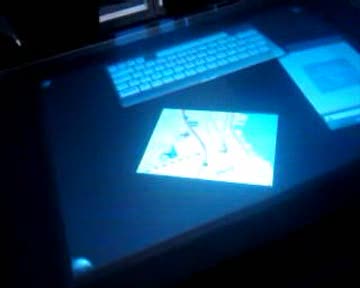
Later daarover meer, maar even leuk was dat we ook konden spelen met de Microsoft Surface PC: Een soort koffietafel scherm met een groot multi-touch oppervlak.
Naais .... VERY naais.
Ik zou er supergraag wat applicaties voor willen ontwikkelen, maar met een prijskaartje van 11.000 euro plus een extra 2.000 euro voor de developmentkit zal dat nog niet voor in 't kort zijn Smile
(Sponsors mogen zich uiteraard altijd aanbieden)

Video preview
Download the original video (FLV)

Hier  een korte video impressie.
't gefilmd met mijn GSM, dus behoorlijk crappy.
Veel betere videokwaliteit vind je bij LVB.
Misschien moet ik mij toch eens zo'n flip HD aanschaffen voor dergelijke instant-shots

Gadgets, in 't NederlandsReacties (1)

USB LED graphic equaliser

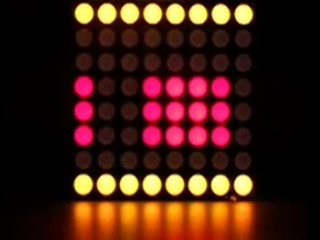
Another demo of the LED-matrix screen.
This time I created a program that monitors the audio levels of your PC and renders a graphic equaliser or a simple VU meter on the LED-panel.
Of course the scrolling text is also still present.

Video preview
Download the original video (FLV)


Much to my surprise the hardest part was how to capture the audio information of your PC.
After some digging I ended up with the most excellent BASS audio library of Un4seen.
It's very well documented and very easy to integrate in your own projects.
Luckily some examples where included how a graphic equaliser works because that stuff gets pretty theoretical very fast ! (and I had no clue)

The idea is to build a large - but low-res - custom LED wall (or hey ... a T-shirt you know) to replace the current 8x8 LED matrix. I have something wandering my mind of a panel, 60cm width and 240 cm high, with 8x16 or even 16x32 RGB led-boxes.
We'll see what resolution I can achieve and what will run out first: my mind, my time or my budget :-)

Gadgets, in English, ProgrammingReacties (0)

Twitter on a tiny LED display

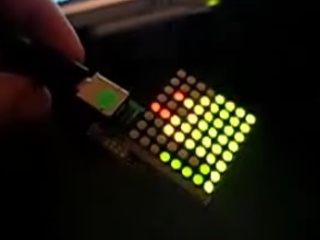
As a small exercise in my progress towards to ultimate tweetshirt, I created an interface for a 8x8 LED matrix display.
It doesn't do much at this moment: a program runs on the PC, fetches your latest tweet and controls the USB attached LEDs to show it as scrolling text.

Video preview
Download the original video (FLV)

The hardware is from Byvac and is cheap and easy, but also a bit limited.
The software is by me and uses their IASI-2 protocol
The scrolling is in fact much smoother then appears in the video.
Maybe I'll rework the hardware interface to control a 4x4x4 LED cube.
I ordered an Arduino today, which will allow much more low level processing and control for these kind of things
a 8x8 RGB display seems a nice project to start with, hoping to scale up to a 16x16 grid if things are going well.

Gadgets, in English, Programming, TwitterReacties (2)

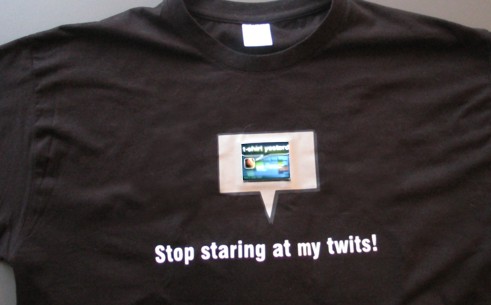
Tweetshirt

tweetshirt.jpg

Yesterday I gave a demo of my TWEET-SHIRT at Barcamp Gent.
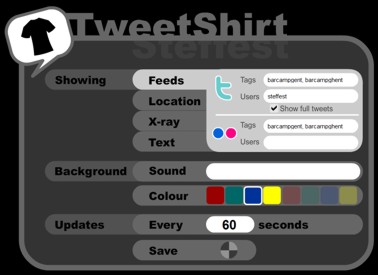
A tweetshirt is a web connected t-shirt with an embedded display that can be configured through a web interface to diplay a.o. live Twitter feeds, Flickr pictures, custom texts ....
Every t-shirt has a web-interface that allows one to configure what is shown on the display.
www.tweetshirt.net

Big fun!
The demo was done with a prototype I just finished the day before, pieced together with old cellphone parts, a 2,5 inch video display and lots of duct tape.

It still has some design flaws, mainly the heat produced by the display (it's comfortable the first 10 minutes but it actually gets VERY hot).
Also the battery drain is excessive: I walked around fully wired with a 9-volt battery in my pocket and used about 4 of them during 1 day.

It's a concept, but it's a concept I want to take further so I gues I'm on the lookout for hardware partners or other interested partners to get this thing to a finished wearable product.
Thanks bnox for spreading !

I started the project as a real-life case for the use of Flash (Lite) as development platform for mobile devices. So everything (including the webinterface) is written in flash lite (meaning you can also control your T-shirt with any flash-lite enabled mobile phone)
Everying runs both on the mobile device as in standard websites, so you can just as easily put the widget on your site as some form of twitter/flickr display.


Below are the slides of my presentation. (also made in Flash lite - just click to proceed)


These kind of ideas have a "networked" way of growing, So thanks to Dorien for the inspiration, Clopin for the slogan and also maeseele for a very cool add-on idea: (the X-ray:  connect a mini-camera at the back of the T-shirt, so you'd have a see-through effect when looking at the front display.)

Gadgets, in English, Mobile, Programming, Twitter, Web 2.0Reacties (3)

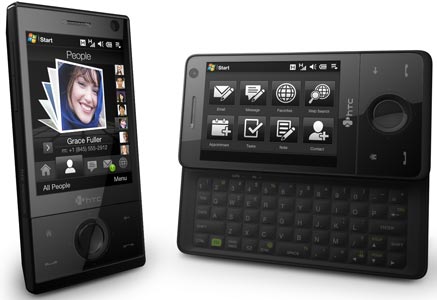
HTC Touch Pro review

htc-touch-pro-main.jpg

Yeah!

It’s finally available in europe.


I’ve been waiting for the HTC touch pro from the moment it was announced, so I was first in line to get one. Here’s a quick review.
No unpacking video as I ripped open the box the moment I was outside the store.

The Pros

  • Awesome keyboard: the slide out keyboard was a must have for me and it doesn’t disappoint: with 5 rows of keys you can do some serious writing on the move. Tactile feedback is good and the spring-aided slide-in/slide-out  feels snappy.
  • Extremely sharp screen: although its only 2,8 inch, its 640 x 480 pixels which makes it one of the sharpest screens I have ever seen.
  • Touch Flo: I was expecting my First step would be to install SPB mobile Shell, but the Touch Flo 3D interface works really well. The finger gestures are nicely expanded in the applications: to zoom in a picture you draw a circle around the detail you want to enlarge. Zoom out is a double tap.
    The round button in the middle doubles as as 5-way navigation button and as a  iPod-like scroll button (usually also to zoom in/out)
  • Features features features features. About any possible option you can think of is present. The even didn’t forget the FM-radio, which is an option I use all the time personally.
  • The one thing I can’t think of that is not there is an infrared-port.
  • Eye for details. A great deal of effort has been put into the finishing touches: things like how the status light under the navigation button flashes to indicate whats happening, things like the packaging and the interface changes to make a better one-hand use experience. Even the power adapter is very stylish and smart.
    When you hook it up to your PC with a standard mini-USB cable; you get 3 options: Function as Active Sync, Remote storage or as external modem. (Ok, the Nokia devices had this for ages, but still: nice to know it can function as standard remote storage wherever you are)
  •  Enough graphic and processing power for smooth full screen video and large datasets (like the TomTom Western Europe Map)

The Cons
No big flaws but nevertheless some little points that could be better, although that’s probably more due to personal taste that something else.

  • Lack of hardware buttons: My previous device had some dedicated buttons for camera, email, browser, connection status. The HTC touch pro has none of those, which makes sense aesthetically … but I’ll miss them.
  • No standard 3,5 inch audio socket. The phone only has 1 port: a mini USB that triples as audio socket, data port, power in and TV-out. Off course you have a nice stereo Bluetooth audio, but a standard 3,5 inch audio socket would be nice.
  • The screen is a bit small(ish) – it could cover more of the phone
  • Multitasking – well, since when is multitasking a flaw? Ok, it’s great that you can check your email, find your way, watch a video and be a wifi hotspot all at the same time, but it’s so easy to have a slew of programs running at the same time that it’s equal easy to drain your battery and notice some sluggish performance. Offcourse that’s an OS-feature, but still … you have to actively remember to close some programs once in a while.
  • That TV-out is all and well but where can you buy the frigging cable for that?
  • The switch from landscape to portrait still is a bit slow at times and it doesn’t work equally well in all applications. (Like the Youtube player: the main interface always is in portrait, the video always plays in landscape)
  • The Touch Flo interface in Landscape mode is bit weak. Or rather nonexistent. In general the Touch Flo interface lacks a bit of customizability.

Battery Life

  • Battery Life will always be a weak point for very active mobile people and this battery still is a lot smaller then e.g. the Tytn or TytnII battery … hmmm …
    Off course Bluetooth, 3G and Wifi are all known to drain your battery and it’s too early to have some real-world experience with the device but I expect it to only last a day – which is reasonable. (nevertheless, I usually keep a spare battery in range)

GPS

  • It seems that a lot of people think this an overkill-feature, but not for me.
    It works great with Google Maps and Geo-tagging your pictures with Shozu is a breeze.
    I installed TomTom7 on the device, which worked flawlessly: the internal GPS was found automatically and a fix was reached very fast.

Video Playback

  • Luckily the Touch pro doesn’t suffer from the same lack of drivers as the TytnII did: video playback is very smooth. A “normal” size DivX file (720×576 pixels) is played back smoothly, seeking is fast. (I use the free TCPMP player, which plays about anything you throw at it, including flv flash video)
    Transcoding your video to play on a mobile device really is something of the dark ages.
    I purchased an 8 GB MicroSD with it, which is big enough to hold the entire Chick Carter, Detective collection in good quality Divx. Chick Carter rules!

Camera

  • 3,2 Megapixel … well … a bit disappointing. The autofocus is slow as hell, and the actual capture is even slower. (faster than the iPhone though …)
    The LED flash light is rubbish – as all LED flash lights are.
    Here are some pics shot with the phones camera(daylight,indoor and nighttime)


  • The maximum video resolution is CIF ( 352x288 pixels)
    Here are some video’s (daylight and nighttime)


Power-usage

  • Windows mobile has it good points and weak points and out of the box it lacks some applications.  (for a complete list of must have applications, see this post)
    For some reason, the remote desktop client is not installed, but you can get it from here.
    This is where especially the screen really excels: connect to your home PC or your server from anywhere over 3G, and you get a snappy 640x480 desktop on your device that’s fast enough to be fun to work with
  • Mobile TV is all the craze these days; but why should you pay your mobile operator extra for that service if you’re already paying for a data-subscription?
    If you have a slingbox or Windows media center at home, you can live-stream your cable-TV signal, or any other video source you connect to it, straight to your mobile. Sweet.
  • WMWifiRouter: just active this app and your phone will build a bridge between Wifi and your 3G connection, so that any Wifi enabled device can connect to the internet through it.

All in all I’m extremely happy with this device. It really was worth the wait. I’m pretty certain it will hold up well in real-life usage. My only concern is that with so much high tech in such a small package, some issues sooner or later are bound to appear. So: Please don’t break!

Oh, and one more thing … this entire article was typed on … a HTC Touch Pro

Gadgets, in English, MobileReacties (2)

Plurk2twitter

Allez vooruit ... ik kon het toch niet laten.
Plurk is leuk, maar Twitter is ook leuk.
Zucht, en kiezen is moeilijk!
Maar dikwijls is kiezen ook helemaal niet niet nodig!
Plurk heeft helaas (nog) geen API, maar wel een RSS (Atom) feed waar we iets mee kunnen doen, bijvoorbeeld: posten naar twitter.

Dit is het script:
Het scant de Plurk RSS feed en post elke nieuwe plurk naar twitter.
(kheb uiteraard wel mijn paswoord eruit gehaald)
Quick & Dirty (jummie !)
maar werkt goed genoeg voor 1 persoon.


Gadgets, in 't Nederlands, Programming, Scripting, Twitter, Web 2.0Reacties (0)

1 woordje

Apple_lady.jpgDeze zeer mooie jongedame zat tegenover me op de trein en sprak me aan. (Haar gezicht was in't echt uiteraard wat minder wazig)

Dat lijkt misschien flaterend, maar dat is het niet, hoor.
Op treinen wordt ik doorgaans voor 2 redenen aangesproken.
1: ik heb iets ongemerkt laten vallen (en dat gebeurt zeer frequent)
2: 1 van mijn gadgets heeft de aandacht getrokken.

Vroeger - toen ik nog krullen had - gebeurde het nogal eens dat een oud bommake mij aanzag voor 1 of andere acteur uit familie, maar dat is al lang geleden. (en die acteur doet ook niet meer mee, geloof ik)

Afin, dit keer was het reden 2.
"Is dat een iPhone?" vroeg ze, terwijl haar vinger naar mijn mobieltje wees.
Ik was gelijk op mijn teen getrapt, want alhoewel ik enthousiast op mijn touchscreen zat te touchen, en dat ding ook een grote knop onderaan heeft, lijken een dopod en een iPhone toch geenszins op elkaar.
Het gedacht alleen al dat ik met een ding zou rondlopen dat met "i..." begint!

"Nee" Antwoorde ik, "het is een Pocket PC"
"Windows mobile" voegde ik er nog behulpzaam aan toe.

Duidelijk een fout antwoord. Haar interesse daalde naar nul, en haar ogen dwaalden weer naar haar iScherm.
nog altijd even behulpzaam zei ik "De iPhone komt in mei in België uit"

"Ja," zegt ze "ik las het net, ik ga er zeker 1 kopen"
Dat was dus duidelijk ook een verkeerd antwoord, want gelijk wil ik opspringen, haar goed door elkaar schudden en roepen "NEEEEEEEE !!!!!! NIET DOEN !!!! Smijt uw geld liever gewoon op straat, zodat een arme gelukzak het daar nog kan vinden, of stuur het naar die zielige kindjes in Louisiana, of zoiets!"
Maar - zoals meer gezegd - ben ik een beleefde mens en ik bedwing mijn goedbedoelde driften.

"Oei" zeg ik.

Ze kijkt even vreemd en buigt zich definitief terug over haar iBook.
Misschien heb ik haar toch een beetje beledigd.

Maar het druipt er ook af hé, iBook op de schoot, witte draadjes naar haar iOren, ...
Als ik ondertussen iets heb geleerd dan is het nooit in discussie te gaan met een Mac-gebruiker.
Dat is als praten met een Jehova-getuige: langst en over elkaar heen.

Als ik tegen mezelf spreek, kan ik er echter uuuuuren over doorgaan: Je moet namelijk weten: "Apple = EVIL"

Hier volgt een optionele rant over hoe Evil dan wel niet.
Echt lang, dus als ge die wilt lezen dan moet ge hier klikken.


Afin - genoeg geventileerd.
Einde Rant.

Héhé - dat lucht op.

Stel je voor dat ik dat allemaal aan die mooie jongedame had moeten vertellen, ze had vast opgestaan om ergens anders een plekje te zoeken.
Toch knap van mezelf dat ik zo'n heel verhaal kan samenvatten in 1 woordje:
"Oei"
Apple-bashing, Gadgets, in 't Nederlands, MobileReacties (1)

Pimp your pockets

Here it is: the ultimate Steffest guide to pimp your windows mobile device.

Out of the box, most windows mobile pocket pc's are a bit lame and boring, maybe even crippled or just plain lousy.

But wait until you install these gems: you'll have a kick ass mobile device that runs circles around any other phone
  • productivity:
    • SPB Mobile shell: Awesome All-in-one interface and usablity overhaul.
      Really: if you only get 1 3rth party program on your device, this should be it.
    • SPB Pocket Plus: further interface and functional enhancements that should be standard.
    • Resco Explorer : Maxed out filemanager, full network/FTP support and neat utility integration.
    • Resco keyboard pro: On screen keyboards are not really a decent input method, but if you have a device without keyboard, do yourself a favor and install this app, speeds up your typing by lightyears.
  • Media
    • Coreplayer: no need to transcode your video to play on a mobile device: Coreplayer plays anything you throw at it. it's performance is beyond believe.
      for a free alternative, try the tcmp player
    • Resco photo Viewer: I never saw the need for a 3rth party photo viewer, until I tried the one from resco: very performant and adds tons of usefull functions like fast browsing/editing/sending.
    • Conduit Pocket artist: it's like Photoshop in your pocket: all the image editing features you'll ever need
    • Slingplayer mobile: Is that a TV in your pocket? Yes it is. If you're looking for a mobile TV solution, look no further: get yourself a slingbox, hook it up at home to your media-setup and you are streaming live-tv to your mobile (over 3G) , as well as recorded TV, your DVD's your video files ...
    • Webguide: If you have a Media-center PC, be sure to install the free webguide, which gives you access to all your media files from any web-enabled device: schedule TV-recordings, stream your music/video to your device, ...
  • Connectivity
    • Shozu: one-click easy publishing of your pictures/video/text to multiple channeles, like your blog, youtube, flickr ...
  • Fun
    • Rondi: Ok, this is my Emerald mine craze speaking, but try this free game on your mobile: Boulder Dash / Emerald mine with more levels then you can play in a lifetime
    • PocketUAE - if you ever had an Amiga, you'll drool over this on: fully functional amiga in your pocket ... Turrican anyone ?
    • Milkytracker : another trip in memory lane: Old school Music tracker : multiplatform protracker compatible - including windows mobile.
  • Navigation
    • TomTom: this one was so obvious that I almost forgot. clearly the best navigation software for a multi-purpose mobile device, especially the touchscreen ones.
    • Google Maps If don't have tomtom, give google's mobile map solution a spin: especially the pinpointing without GPS is impressive.


Maybe I missed a gem? let me know ...

Clearly I left some out, most notably the browsers and the music players.
Although Pocket IE is not a very good browser, it's "good enough" and certainly the fastest to use. If you install SPB Pocket Plus you get tabbed browsing and some other improvements.
The other mobile browsers, like Opera mobile or Minimo are just too slow.
The same with music players: Windows media player is not very good, but it does the job. I haven't found a player yet that adds enough to justify another install, allthough Conduit Pocket Player comes close.
1 thing that most 3rth party player seem to miss is the fact that you want to control your music while on the move, when your device is tucked away in your pocket. So: 1 hand blind control, without using the screen, or with standard bluetooth remote contol commands from your headset.
As far as I now, only windows media player does that (in a spartanic way, but it works)Gadgets, in English, MobileReacties (1)

Fnac upgrade

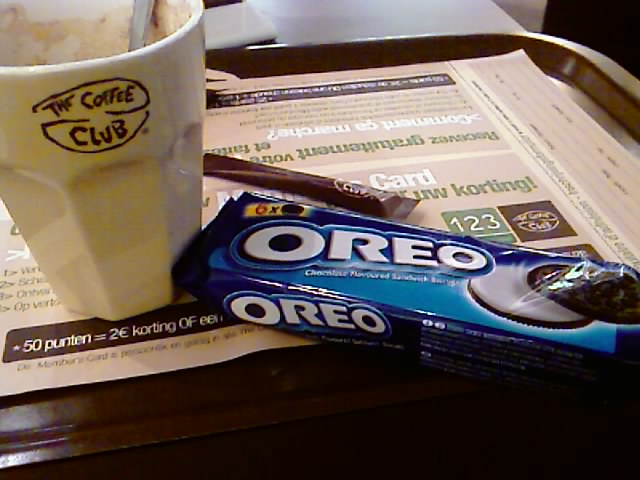
0C1FA19100000009IMAGE_009.jpgWauw, zie eens wat voor een pak koeken dat ge in de Fnac bij een cappuccino krijgt.
Ik liep weer eens achter want ik wist niet eens dat er een *Coffee Club* in de fnac was, laat staan een tweede verdieping.
Ik ging eigenlijk naar de Fnac om te zien of ik eindelijk een een hands-on met de HTC Shift kon doen, maar daar hebben ze hier nog nooit van gehoord. Er staat hier welgeteld 1 (een) Ultramobile PC en dat is dan nog een antieke Asus van 2 jaar oud.
Vreemd hoor, dat die dingen maar niet doorbreken . Mijn Q1 is al jaren het toestel waar ik het meest op werk, simpelweg omdat je zoiets altijd bij hebt (behalve dan als je het op de trein laat liggen ... Oef, die nachtmerrie is goed afgelopen.)Er staat hier wel een Macbook Air, die egenlijk wel tegenvalt. Klein scherm en een prutskeyboard.
(Posted by Mobile phone)Blogging, GadgetsReacties (0)