
Steffest Digitale Pulptuur

2019

3 berichten

Kiss-catalog

Presenting a new (small) project.

Kiss-Catalog!
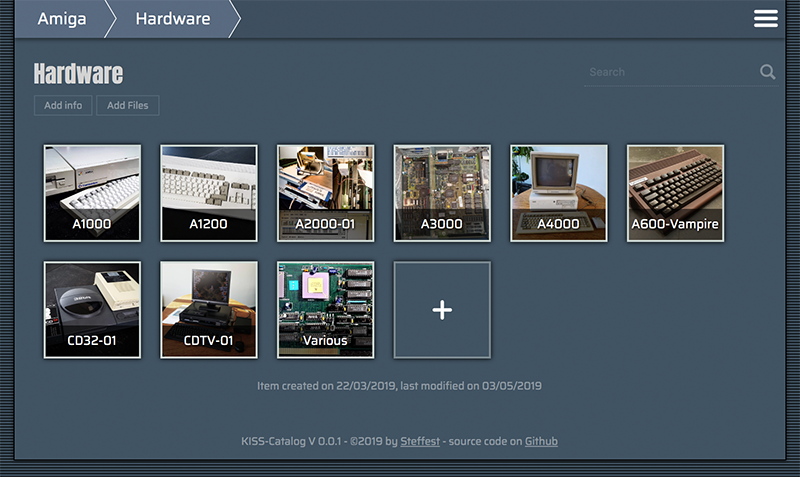
Kiss Catalog


It's an insanely simple Catalog System to keep track of your collections.

Some context

People who know me know I'm a bit of a collector.
Ok, some call it "hoarder" but I call it collector.
The difference between a collector and a hoarder is that the former knows what he has and keeps everything in good shape.
Still ... my retro computer collection is growing towards a point where I don't know exactly what I have anymore, or - more frequently - where I put it.
Questions like "I know I have this Amiga accelerator card, but ... where the heck is it?" need answers.

There's a ton of software already out there to help with that but I wanted something super-super-simple and with some very specific features.
As experience taught me: If it's too hard to maintain, it won't be.

Goals

  • Simple simple simple to maintain
  • Accessible from anywhere (which in my case always translates to "web based")
  • Everything should be searchable/browsable to quickly locate an item or to quickly show some overviews

When you start googling or asking around you get responses like. "Oh, an SQL database is what you need" or "There's an app for that, I use Collectorz or Numento"
No, no, no, nonono - been there done that. This is not my first attempt at cataloguing.
All other attempts stranded in

  • OR complex systems that took forever to maintain 
  • OR external platforms that ceased to exist...  

Did I mention it should be simple?
So: no database, no third party software, no fancy stuff.
Plain files and folders, plain JPG and .TXT files.

The concept:

You structure your collection in folders. Each folder can contain files and subfolders that further describe your item. Info is stored in plain text files. Images are stored in .jpg or .png. Any other file you add is just regarded as "file".
Then, a script is run that pulls all these files into data-structure.
This .json file is used to display a webinterface with browse and search features.
When you edit/add content from the webinterface, the local files are changed.
The "database" is always being generated from the local files. This means your data is your data: it lives in your folder as plain text files, completely outside Kiss-catalog.
If you stop using Kiss-catalog and delete it from your system, your hard cataloguing-work is not lost.

The main info file is called "info.txt"
The main image of an item is called "main.jpg"
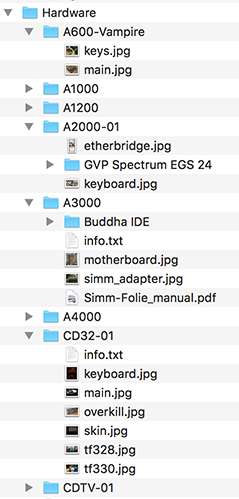


If you want to display your collection on the web, simply put all your static files on a webhost.
No database or serverside processing needed.

That's it!

Everything runs

  • BOTH locally and remote 
  • BOTH as a static website and a somewhat full-featured dynamic Content-Management System.

There's a small demo collection at http://www.stef.be/collector/amiga/  (read only)
Still starting to populate it, first I have to FIND all stuff :-) 

And of course: Open Source and everything.
It's made for personal use, but you're free to give it a go. Feature requests are welcome.
It runs one Node but if that doesn't ring any bells there are also pre-compiled binaries for Windows, Mac and Linux
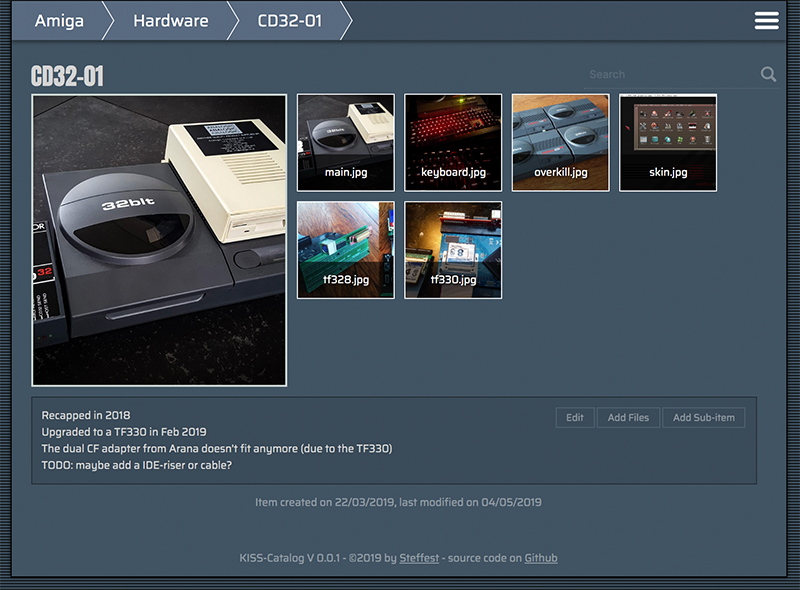
Kiss Catalog

Drawbacks

These "design" decisions have some drawbacks:


  • Flat file "databases" only go that far, if your collections is reaching like a 100.000 items, Kiss-catalog is not for you
  • Because everything is generated from your local files, this might get slow with large collections. Also there's no image processing (yet) so all images are displayed "as is" : if you fill everything with 4K images, loading will be slow.
  • If I ever want to add features like "private files or folders" or whatever - I will probably have to settle for some naming scheme.
  • Likewise for "calculated" fields like prices etc. some convention will be necessary. 


The Philosophy

I've been pondering the last few months (years?) over something I call "sustainable software"
It's probably not a new concept but that's what I call it in my head. 
Basically it means that a developer should write software that is as simple as possible for the job.
Not because simplicity is a goal in itself, but because simple software lasts longer.
It's easier to maintain, consumes less resources, runs faster, ...

Developers should write software to last.
It's all too easy to quickly throw something together using the funky libraries and frameworks that today are considered "modern". Before you know it you're lugging along a staggering dependency tree and rely on a multitude of online services to get your thing built/compiled/deployed.

Yes, you're the cool kid on the block, but how will it look in a few years? Will it still build/compile/deploy?
If it's a fairly simple web-app, do you really need that 2 MB javascript package, 7000 lines of CSS and 4MB initial page load? Maybe ...

In this project "sustainable software" means:

  • no exotic or platform dependent file formats. plain text RULEZ
  • no external (web)platforms: it's the only way to make sure your data is still there in a few years time.
  • no code dependencies. again: it's the only way to make sure your system still runs in a few years time.
  • platform independent. everything should run on - and be maintainable from - whatever device you use. 

 Anyway - that's food for maybe another blog post - don't get me started on frontend builds that pull in ONE MILLION packages and takes 20 minutes and 8gig to build ... 

For now: Happy Cataloguing!


Commodore Amiga, in English, ProgrammingReacties (0)

The bigger plan of my Amiga-Javascript projects


The past years I have been slowly tinkering on various Amiga Projects.
Mostly in JavaScript, mostly to unlock various parts of the huge Amiga ecosystem: parsing ancient filesystems and fileformats, reading and writing Amiga files with new tools, ...

Slowly all these various tidbits are coming together in the big plan: to break the Amiga out of it's emulated container and to seamlessly integrate in a modern OS.

That modern OS is platform independent. It runs on everything and it is accessible from everywhere.
For me, this translated to an OS that is web based. It runs in your browser and it lives in the cloud.

There have been many approaches to such an OS, some of them - like FriendUP - clearly have their roots in the Amiga system.
One of the most interesting ones is Amibian.js. It's also inspired by the Amiga and it runs in javaScript: Node.js on the backend, browser in front.

I've been talking with Jon - the creator of Amibian.js.
It's a HUGELY ambitious project, ranging from custom compilers in various programming languages to a recreation of an Amiga-like OS, complete with compatible system library calls and more.

When doing a modern Amiga inspired OS, one of the big questions is how you handle legacy software.
The Amiga has an old but super mature ecosystem of programs but sadly all that software doesn't run anymore on modern systems.
The solution is to emulate that old hardware so you can still run all that old software.
The most used Amiga Emulator is WinUAE, a glorious and ultra-advanced piece of code.
Rupert Hausberger did the daunting task of porting it to javascript.

The drawback of emulating an Amiga is that it is a contained black-box system that has no knowledge of the larger system it's running on. WinUAE handles this quite elegantly by allowing a shared filesystem, but in your browser there's no such thing.

This is where I stepped in: an emulated boxed Amiga running in your browser is cool, but wouldn't it be even cooler to break it open?
You could use Amiga software to seamless edit/play your local files,
or launch modern non-Amiga tools from within the Amiga,
or compile a program for Amiga with today's tools and launch it directly on an emulated 68k CPU
or ....

All this directly available on whatever system you use and wherever you are.

In the end, the underlying technicalities shouldn't matter.
It shouldn't matter what OS a program was written for, or where your files are exactly, or even who's physical machine you are using. Just launch your space and mold it to your liking.

Amibian.js already tries to break the barriers between the browser and your local system.
Browser or native? It shouldn't matter.

I will gladly help and try to break the barriers between the emulated environments and the native ones:
Emulated or native? It shouldn't matter.
 
The top video is a first demo of the progress. It shows various aspects of building such a system.
Most notably a shared filesytem so both systems (emulated and native) can access the same files.

Everything you see is running in the browser.
The (emulated) Amiga is on the right, the host system is on the left.
We're still doing babysteps: trying out stuff and laying the foundation for the bigger plan.

The concept is always the same: a seamless integration where it doesn't matter anymore where your files are or on what platform your program is running on.

Commodore Amiga, in English, Programming, Scripting, TinkeringReacties (0)

Bassoontracker - Release 0.3.0 is out!

Bassoontracker

During the past months I have been tinkering along on Bassoontracker - My browser based Retro Music Tool.
Today, it's ready for a next big release: Version 0.3.0 is out!

The most important feature is full FastTracker 2 compatibility. Yeah baby!

Fasttracker II was a music creation tool for DOS, released back in 1994 and it became THE standard for a long time for tracker based music.
1994 was also the year that Commodore went belly up, pulling the Amiga with them, so a lot of Amiga musicians made the jump to PC around that time, finding Fasttracker 2 as a perfect successor to Protracker.

Fasttracker is quite a bit more complex then a simple "sequencer". It added proper "Attack Decay Sustain Release" to instruments making them sound far more natural  and supported 16 bit samples, a huge step up in quality.
Up to 32 channels are supported, 128 instruments, 2 concurrent channel effects and much much more ...
That was fun to implement!

Other big changes are:

  • Dropbox integration: Load and save files directly from/to your Dropbox
  • Enhanced Sample editor: Slice and transform your samples directly inside BassoonTracker
  • Enhanced Pattern editing: use ranges and cut/copy/paste for quick editing
  • Export your song to .wav or .mp3
  • LOTS of fancy UI updates

And all that still in plain old javascript with ZERO dependencies.

BassoonTracker Sample Editor

During the years many thousands of music tracks have been made and you can access them all through the build-in Modarchive and Modules.pl browsers. (Which now have been expanded to include FastTracker .xm files too)

The playback engine has gone through extensive compatibility testing but if you find a module that doesn't sound the way it should: drop me line.

More info and full source code on Github: 
Or check out the live demo on https://www.stef.be/bassoontracker/

in English, MusicReacties (1)