Steffest Digitale Pulptuur

Tag: in English

91 berichten

How to be a full time Tech Blogger

a picture called howtobeafulltimetechblogger.jpg (click to enlarge)

Today I'm proudly introducing the first ever guest posting on this blog.
It's my good friend @zeursteffest!
His motto is "I'm whining about it so you don't have to"
I got to know him after @inferis pointed me in the right direction.
Normally I don't like negative people all that much but it became clear that he had some refreshing insights to share.
So without further due - @zeursteffest: the keyboard is yours.

Thank you @steffest for the opportunity.
So, I've noticed you don't blog all that often and I've decided to help you out a bit.
Your blog is crap - it's rubbish - It's going nowhere - so here are some tips.

First: where are the ads, man? How do you expect to get some ROI without advertisement? For Pete's sake, put some Google adwords between your posts, that's basic stuff!

Second: start hyping up your posts: start using words like boobs and sex and free beer and babes and nude cars and stuff, don't you know anything about SEO?

Third: I've read every single technology and gadget blog the last 2 weeks and made a detailed analysis of how things work around the scene. I've written a bling book about it, but I'm giving - that's right: GIVING you this wicked sick flowchart FOR FREE so even you get to be a full time Tech Blogger. (Once you put some ads on here, that is)
Don't thank me now, thank me when you ... err ... well, just don't and get your act together.

Apple-bashing, Gezeur, in EnglishReacties (0)

The best Spy phone in the world

Well, here's something you don't see often: the very "sexy" Windows Mobile being used for its coolness factor.
Ahem:
What's more: without even knowing it, I seem to have the most bad-ass Spy phone in the world.
Woohoo!
The HTC Touch pro and other HTC phone models are the weapon of choice of the super candoall robinhood good/bad guys of Leverage.

See there?
htc4

That's my phone, man, and you know what's he doing there?
He's hacking into the main server room of a multi billion dollar company, from where he relay-hacks into the cellphone of the bad guy (sitting in the server room), activates the camera of that phone and streams it live to his screen, so he can see what password is typed on the keyboard.

WOW! that's insane, some serious skillzzz there.
(one question though: if you can do all that, why would you need his password to get into his PC?) 

htc2
But there's more- of course there is, moments ago his beautiful accomplice Sophie Devereaux made smalltalk with the CEO of the company, while sneakily duplicating the RFID tag of his security badge and sending it to Alec's phone. OMG: That HTC Touch has a RFID reader AND writer. That�s so cool.


But that was not enough, nooooo, with an innocent "Can you hold this for me please", she scanned the CEO fingerprint, transferred it to Alec's phone who prints it out on a Dymo label printer to fool the biometric fingerprint scanner. WOOOOOOOW! Who said that touchscreens are fingerprint magnets? you're damn right they are!

htc5 htc6

As you guessed it: that's not half of it.
To find the spot where the safe is hidden, just swoop uit your phone and start the "metaldetector" app. (Yes, on WinMo there's an app for that, although I believe @emich once wrote an app for that too)

htcTouchpro2 htcTouchpro1

Man, They're so cool ... no a wait, I'm so cool, cause I have the same frakkin phone, yeah!
Something has got to rub off, no?

I already knew this but give a man a smartphone and there's no limit to what he can do :-)

htc3 
"Een man, een telefoon, geen grenzen" That's my motto.

So, show me yours, eh!

That show is going to be so much fun rewatching in 2030 ...

Gadgets, in English, MobileReacties (0)

Do you want Flash on your mobile?

adobe-flash-iphone.jpg

I really don't understand the aversion that some iPhone users have against the prospect of having Flash on their wonderphone.
Why is that?
Why wouldn't you want another development choice for your device?
Yes, there are a lot of crappy uses for Flash, lot's of crappy games, crappy ads, crappy sites ... but nobody is forcing you to watch them, do they?
Nobody is forcing you to even install it, do they?
Arguably there are even more crappy HTML sites, so should you also want to ban HTML from your phone?
Of course not.
So why do some think that opening their Jesusphone to the hordes of Flash developers would degrade it?
Because it would be less exclusive?
Because the ivory tower would get muddled by all those mediocre designers/developers?
hmmm ... it's not like all those iPhone apps are that shiny
And yet ... they do have a point: Last week I was at Brussels Girl Geek dinner #23 where Christoph Rooms was talking about Flash on mobile. "Flash is great for mobile video because you could create video files with embed commercials that would be impossible to skip! Hooray!"
Err .... that must be the worst possible "feature" to underline in such a geek audience :-) Bad points ...
Oh, but in fact, It still can get worse: Adobe is showing of their Flash player for the Nexus One Google phone: nice ...
First a crappy game is shown, that a topbanner flash ad, then a sidebanner flash ad, then an embedded video player.
Err ... WTF? If this is the future of flash then indeed: please get rid of it.
What was Adobe thinking producing a demo video like that?

Nevertheless: Flash for Mobile is coming, even for iPhone (somewhat)
Even after 2 years of little evolution in the Flash mobile area, I still see it as one of the best ways for cross platform development.
Apart from plain HTML/javascript, Flash still is the platform that is closest to the "Write once, run anywhere" paradigm.
Adobe's Open Screen project is very commercial, yes, but it DOES aim to unify a fragmented market, and that's hardly a bad thing.

So: of course you don't "need" flash on any phone but let's make a deal: give me Flash 10 for mobile already, and I'll build you a kick ass demo that shows how great a cross platform app for mobile can be ...

in English, Mobile, Web 2.0Reacties (1)

TEDx Brussels

logo_TEDxBrussels2.gif

Yesterday I attended TEDx Brussels.
TED stands for Technology, Entertainment en Design - The x stands for "independently organized"
It's a series of conferences for "free spirits" to spread ideas worth spreading and to inspire you with insights that are not necessarily inside your normal area of expertise.
The theme in Brussels was "Burn the Box" meaning it's not enough the think outside the box, you have to be willing to burn it if necessary.

Hmm ...
Mixed feelings about the conference.
Yes, there were some really good talks like "open everything" by Michel Bauwens about the need for open information, open standards and product hacking , the great talk about information visualisation by David McCandless and the super wacko talk of R.U. Sirius.
And yes, most of the speakers are undoubtedly experts in their field (although some of them clearly wondered why on earth they were invited to speak)
But there's something eery about a group of smart and established people shouting "Burn the box" or "we're so cool because we dare to think different" and most of them were soooooooo full of themselves.

example: During a coffee break I asked a theoretical physicist what he was working on and he replied "you wouldn't understand" ....
owkeeey bye!

If you have a good idea, just talk about it and leave out the attitude.
Attitudes like Nicholas Negroponte who talked (of course) about his OLPC project : no doubt he's a man with a vision and he achieved some amazing things but his talk was full of bloat and cheap shots at Microsoft. Don't devalue your competitor (or even your enemy), the only thing you achieve is devaluating your own message.

Attitudes like Conrad Wolfram who talked about how ridiculous it is that students still have to do math calculations on paper when there's something like a PC (with Wolfram Alpha) these days.
I completely disagreed with him. It's like saying to an artist he's stupid for still trying to achieve a impressionist style with oil-paint and a brush when we have photoshop filters for that now ...
Of course you should use a PC for mundane calculations but I am very glad I had to do so many math on paper without a computer in high school: it really showed me the beauty of math, how one can approach a problem from so many different angles and how one can translate a chaos like concept into comprehensible structured steps.
Wolfram Alpha is pretty cool, but it's little more then a multi-trick pony that you have to give the correct and narrow input to get the results you want.

Or attitudes like the way TEDx Brussels had set up their communication (you can't just register, you have to be invited) or the pumped up writing in their tweets like this one (yes, Djamal Laroussi can play the guitar, and yes there was some cheering - but going wild? It was more like Antony Bosschem said: it's like a dad who wants to act cool for his son)

To repeat myself: if you have something worthwhile to say: just say it to whoever wants to listen and leave out the bloat.
I find I get more insight and brain tickles spending some time following the various links and comments that float by on twitter then a full day at TEDx.
That's why i like the barcamp concept so much: it's like TED, without the attitude. Presentations there a more "burning the box" then the ones i heard yesterday.
So if you really want to get your mind be blown away, get your ass to Gent on december 19 for the next barcamp - you won't be disappointed.

in EnglishReacties (4)

Spotify Premium

spotifypremium.jpg

Streaming music is the way to go - it's as simple as that.
Replace your multigigabyte storage with a decent mobile always-on internet connection and suddenly the entire world fits inside your pocket.
I totally adore Spotify and it was driving me crazy I couldn't get it on my mobile because as Spotify isn't available in Belgium yet, you can't buy a premium account here to unlock the mobile application.
Of course the desktop app works fine on my Viliv s5 - which is also pretty mobile, but still ...
My own attempts to stream Spotify using my Spotify lib as remote control and VLC to stream my desktop audio to my mobile worked as proof of concept but the experience was less then ideal.
Sooo: today I finally managed to get myself a Spotify premium account and the key was Spotify's addition of Paypal as a method of payment.

Here are the steps to get your very own. 

  • You can only use a paypal account from the same country as you're buying a premium account so go to http://www.paypal.co.uk and create a new paypal account.
  • Fill in some bogus but valid UK address and bank details
  • You can't use your Paypal balance to pay for Spotify as this is a monthly subscription, so you'll have to add a credit card. If you already used your credit card for your main paypal account, you'll have to use a second one or remove the card from your main account (that's quite a hassle, no ... probably the biggest hurdle?)
  • You'll have to validate your card: paypal will charge it with 1.5 euro and you have to enter the transaction code which will appear on your credit card transcripts from your bank. The good (but weird) part is that Paypal will validate your card, even if you entered a fake name an UK address.
    After validation, you get a refund for the 1.5 euro.
  • Once your card is validated, log into your Spotify account - using a UK proxy if needed - and buy a premium account with your UK paypal.

That's it, you now have an add-free high-quality-streaming Spotify that you can use on your mobile too.
Their mobile app for Android (which you can download from m.spotify.com) is pretty sweet!
Their 14-days limit to use Spotify from "abroad" is now lifted too, so you can shelve your UK proxy tricks for the next UK only app.

Gosh, that must be the most trouble I ever went through to be able to BUY something ... jeez ...
If Spotify or Paypal ever decide I'm a fraud and cancel my account ... oh well, so be it - at least I had the fun and satisfaction to get what i wanted :-)


in English, Mobile, Web 2.0Reacties (4)

Archos5 Android tablet with keyboard,mouse and RDP

I'm showing (off) the Archos 5 Android tablet with a bluetooth keyboard and mouse, running remote desktop.

I really REALLY love this device.
It still is a bit unstable but let's hope some firmware update will fix that.

The only thing missing is - maybe - integrated 3G - or maybe not: tethering with your phone works fine and swapping sim-cards all the time is not something you want to keep on doing.

It doesn't have the Android Market but there are heaps of other places you can find software for it.
(unlike certain other devices you have a choice)
You can browse the web for .apk files of course, but there are also these dedicated Android open appstores running on your device

Besides those you have the web based stores like handango and Mobihand
On Cyrket you can browser the Android market through any webbrowser and the fabulous xda-developers also has a very interesting android section, mainly targeted towards the HTC models
(And if you happen to have a usenet account, you already know you can have all you can eat there too)

Next up for me: firing-up eclipse and start poking around with the Android SDK


Gadgets, in English, Mobile, VideoReacties (7)

A new spotlight on your Windows Phone

toshibaTGO1.jpg

Sooo! Today is the day that Microsoft presented it's new(ish) mobile OS: Windows mobile 6.5.
It's about time Microsoft is putting some effort into it's mobile OS: Windows Mobile is trashed like mad the past years and even Steve Ballmer seems to admit they dropped the ball big time.
And again: most people seems to think of today's release as whip cream on a turd (it's still a turd) - but that's too harsh ...
I happen to love Windows Mobile.
To put it simply - you can do whatever you want on it and the very mature development tools of Microsoft make it very easy to create your own software for it.
Don't like the how it looks? Install some software that makes it pretty!
If you don't find it finger friendly enough? Install some software that makes it finger friendly!
Even more important: it runs on whatever type of device you choose: want a keyboard? no keyboard but a touchscreen? both? flip-phone? slide-phone? candybar-phone? small to fit in any pocket or rather a huge screen for quality internet browsing? Take your pick
That's called freedom of choice, something other mobile operating systems severely lack ...

That also means that the successful windows mobile phones like the HTC Touch series are not successful because of Windows Mobile, but because companies like HTC are doing an incredible job of creating slick and highly functional hardware AND software user interfaces on top of it.
Have you seen the new TouchFlo 3D interface of the HTC Touch Pro 2 and the HTC HD2?
Naaaaaaaissss!! And the standard windows interface is nowhere to be seen if you choose it not to be.
The next person who claims you still need a stylus to operate a windows phone clearly doesn't know what he's talking about and has never tried this phone (but again, if you choose to use a stylus, you can :-) )

Windows mobile is also rebranded to "Windows phone" and a slew of new models were announced.
Is it just me or is the mobile phone business STILL the fastest growing sector in tech?
It's unbelievable how the specs of the newly announced models evolve: Fast processor, big touchscreens, multimegapixel camera's, some even with optical zoom, fast internet access...
I had some hands-on with the Toshiba TG01 (picture above) and man ... what an amazingly cool device!
The gap between smartphones and small netbooks is getting smaller as most smartphones now can do about anything a notebook can.
That's why in my opinion the "Windows Phone" rebrand doesn't make sense ... does this mean it will only run on phones?
One might argue that the gap between small PC's and mobile phones doesn't even exist anymore (e.g. the viliv s5 or an oqo running a full windows has about the same screen then the HTC HD2, which is running windows phone) so why not running a mobile OS on a non-phone mobile device? (or running windows XP on a phone?)

a picture called energyrom3.jpg (click to enlarge) And now for the best news: You don't have to wait or buy a new phone to try out all these cool new features: you can have them right now, for free, on your current windows mobile device.
That magic is made possible by the extra-ordinary people at XDA-developers

Let's say it with me "X.D.A D.E.V.E.L.O.P.E.R.S I.S. A.M.A.Z.I.N.G" :

It's a forum of mobile tech enthusiasts who really push the limits of your device by porting the new features of the future phones to current models, and who integrate the latest beta builds of OS and interface software into 1 gorgeous package.
Windows mobile 6.5 roms are floating around there for several months now, and it seems that new HTC Touchflo interfaces are backported on a daily basis.
My favourite one is the "Energy rom" - I use the one from this thread. (It's running winmo 6.5 with Manilla 2.1)
It's a bit hard to tell what feature is WinMo6.5 and what is added the Touchflo interface, but the device is running much much faster and smoother then before and it looks absolutely gorgeous!

Is it legal to install a custom windows rom on your phone you download for free?
Probably not, but it's my guess that Microsoft is pretty damn happy with the existence of xda-developers: it's thanks to them that the "powerusers" find what they're looking for on a phone, so in a sense they do as much to keep the windows mobile OS relevant then handset manufacturers like HTC.
One word of warning though: if you decide to install a custom build on your phone, make sure you read and READ AGAIN all guides and warnings - especially if you flash a phone for the first time.
If you're not careful you risk trashing your phone beyond repair, but if you follow the steps you'll end up with the best (or at least most feature rich) mobile experience available today.


in English, MobileReacties (0)

The digital TV battle

I had written a whole rant (dutch) about the big digital TV dilemma.
Man, that was boring, so you can be glad I banned it to the archive

Instead I crafted this highly objective chart of the big question: Telenet or Belgacom?


a clear victory for Telenet. Hooray! (can you tell I'm a little internet focused?)
Enter the Telenet guys!
But man ... what a huge disappointment, I don't know who created their digicorder user interface but it's bad ... really bad.
Let's compare it with our TV experience before: a windows media center


Wow! bad points for the digicorder ...
Solution: Connect the video out from the digicorder to the video in of the mediacenter, attach a IR-blaster between the two so you can control the digicorder from the mediacenter and voila!
voila? hmmm, as the digital signal is converted to analog and back to digital, there's some serious quality loss, so you can forget about the HD ... also the program guide is flaky because you can't have AND the EPG for the analog channels AND the EPG for the digicorder in the same interface ...
Here's the comparison


Is the middle "I want it all" solution even possible without losing your sanity? I don't know, but I do know this: I'll be damned if I let Telenet (or Belgacom for that matter) lock me in their proprietary controlled TV experience.
If any other geek has figured out a better TV solution, please DO tell :-)

in English, Media centerReacties (9)

Spotify API

spotify-logo300x300.jpg

Over these recent weeks I have been busy lining up my media collection and media "consumption" into 1 consistent experience. Because I'm getting lazier every day I wanted to control everything from a single point that's always accessible (the web) and stream the same media collection to every web-connected device I have.
I thought I had everything nailed down until a new kid on the block arrived last week (new for me anyway)
Spotify!
Love at first sight - finally a service like Musicmatch, which was sadly choked-to-death by Yahoo, but faster, better looking, more intuitive and most important: more fun.
Only one thing missing: NO WEB-INTERFACE !
I'm going to say it one more time: "to all developers: Please build a TCP/IP interface into every piece of software or hardware you build! - It doesn't have to be http or spit out html, just let it connect to some port to listen for commands.
The internet of things is already here, so don't miss it and let your appliance connect to it!"

That being said, Tickled by this tweet I decided to build a little Spotify wrapper class so that other applications - mainly my webserver - can interact with it - aahhh ... back to laziness, now i can also control Spotify with my mobile phone from the couch.

The class can be found here. it's all win32 API calls so it's easily portable to whatever language your like.
it's completely free and comes with no warranties.
it's tested with Spotify version 0.3.18 - as this is completely unofficial it might break with newer spotify versions

Usage:

Dim Spotify As New Spotify()

Spotify.PlayPause()
Spotify.PlayPrev()
Spotify.PlayNext()
Spotify.Mute()
Spotify.VolumeUp()
Spotify.VolumeDown()
Spotify.Nowplaying() (Gets the name of the current playing track)
Spotify.Search("Artist",False) (Searches for "Artist")
Spotify.Search("Artist",True) (Searches for "Artist" and starts playing the results)

The Search_and_play command is my favourite - works like a charm.
I really hope Spotify can survive. It's certainly worth €9.99/month to me.

in English, Media center, ProgrammingReacties (0)

Winamp database reader

winamplogo.jpg

I'm releasing a little tool/code snippet today for those DIY-people like me that like to tinker with their custom made ultimate personalised home media experience. (that's CUPHoME !)
One of the key elements is easy access to your music collection.
If you're serious about managing your music collection - and if you're using windows, you really have only 2 options: use Mediamonkey, or use Winamp.
iTunes on Windows really is a slow piece of garbage and Windows Media Player is a bit lacking in management features.
This "Battle of the media players" is over a year old but still very valid and spot on.
Mediamonkey uses SQlite as database so it's easy to interface with, but Winamp uses some propriety database format called NDE (Nullsoft Database Engine)
Although the format is somewhat documented, I was surprised i found very little code samples to connect to the winamp database from an external program. the documentation also seems a bit outdated as the internal binary structure seems to have evolved a bit.
Delphi to the rescue - writing a decoder for some binary format is actually a very satisfying pastime :-)
After a few hours I had a program that reads out the entire database and dumps it into a grid control, optionally exporting it to excel.
The source is here - should be easy to port to other languages.
Sample program is here (also includes source)

It's tested with the latest Winamp version as of writing: version 5.56.
It has a good chance of staying up to date as interfacing with Winamp seems to be a recurring theme over the years for my own projects.
Anyway - it's free to use in any way you want and comes with absolutely NO support :-)
Happy coding!

in English, ProgrammingReacties (1)

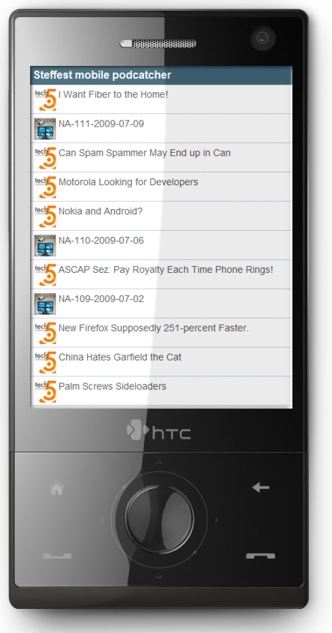
Mobile podcatcher

mobipodcatcher.jpg

As the tv-season is on hold during the summer months, I had to switch to another type of "media" to consume during longish train/bus rides, so I picked up some podcasts again I like to listen to.
These days mobile devices are also more and more "connected" to the web and downloading music and/or podcasts to your mobile device seems so tiresomely old ... so: streaming audio for the win !
There are several really good streaming audio clients on the various mobile platforms, but heck, I found it was really frustrating to get the updates from your favourite podcast and get your device to play the darn thing.
Most annoying, especially as it was not a technical issue but an "ease of use" and "interface" issue.
Conduits Pocketplayer does a semi-decent job, but that thing is bloated and painfully slow to load as it tries to rescan your local music library AND your feeds at every move you make. (besides that, it's not free)

As always, the "If you want it done better, do it yourself!" mantra made me tinker to create a very simple and fast way to reach my favourite podcasts. no need to reinvent the weel and create a player; a small web application would do to fetch the latest mp3 url's and feed it to a player.

tadaaa!:  http://m.stef.be/pod (works in every browser but it's optimised for your mobile device)

Keeping track of various RSS feeds yourself in any application is a bit a pain in the behind: you have to scan, validate and cache each feed at regular intervals which can quickly cause some major strain on your server.
This time i took the smarter route and created a connection to a system that does RSS aggregation better then anyone else in the world: Google Reader.

in Google Reader I label the podcasts i want with a tag "mobilepodcast" , then my podcatcher script simply fetches the 20 latest items of all feeds with that label.
I'll post the code for the Google Reader connection later, it's really an easy way to get a feed and you still get to process them the way you want.

Depending on your mobile device and the software your prefer, the application presents the audio files as a PLS playlist, a ASX playlist or a direct link to the mp3 file.
You can modify this by clicking the "settings" button to choose your preference.
On my mobile, I've setup Coreplayer to open .pls files automatically. It's hands down the best media player for windows mobile.

Future improvements might be to connect this with my mp3 library at home, allowing for streaming audio from the home pc, or with this collection, but we'll see about that ...
In the mean time: http://m.stef.be/pod it is.


in English, Mobile, Programming, Scripting, Tinkering, Web 2.0Reacties (0)