Bekijk terug alle berichten.
Kiss-catalog
Presenting a new (small) project.
Kiss-Catalog!
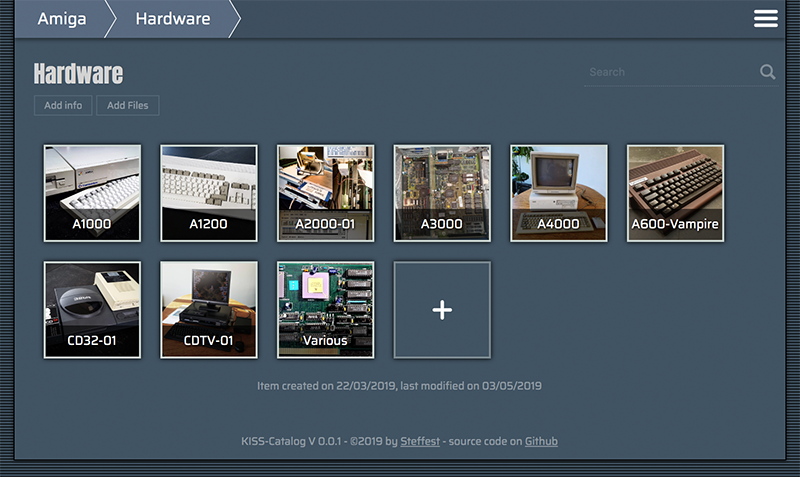
It's an insanely simple Catalog System to keep track of your collections.
Some context
People who know me know I'm a bit of a collector.
Ok, some call it "hoarder" but I call it collector.
The difference between a collector and a hoarder is that the former knows what he has and keeps everything in good shape.
Still ... my retro computer collection is growing towards a point where I don't know exactly what I have anymore, or - more frequently - where I put it.
Questions like "I know I have this Amiga accelerator card, but ... where the heck is it?" need answers.
There's a ton of software already out there to help with that but I wanted something super-super-simple and with some very specific features.
As experience taught me: If it's too hard to maintain, it won't be.
Goals
- Simple simple simple to maintain
- Accessible from anywhere (which in my case always translates to "web based")
- Everything should be searchable/browsable to quickly locate an item or to quickly show some overviews
When you start googling or asking around you get responses like. "Oh, an SQL database is what you need" or "There's an app for that, I use Collectorz or Numento"
No, no, no, nonono - been there done that. This is not my first attempt at cataloguing.
All other attempts stranded in
- OR complex systems that took forever to maintain
- OR external platforms that ceased to exist...
Did I mention it should be simple?
So: no database, no third party software, no fancy stuff.
Plain files and folders, plain JPG and .TXT files.
The concept:
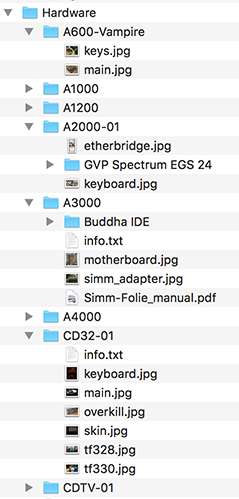
You structure your collection in folders. Each folder can contain files and subfolders that further describe your item. Info is stored in plain text files. Images are stored in .jpg or .png. Any other file you add is just regarded as "file".
Then, a script is run that pulls all these files into data-structure.
This .json file is used to display a webinterface with browse and search features.
When you edit/add content from the webinterface, the local files are changed.
The "database" is always being generated from the local files. This means your data is your data: it lives in your folder as plain text files, completely outside Kiss-catalog.
If you stop using Kiss-catalog and delete it from your system, your hard cataloguing-work is not lost.
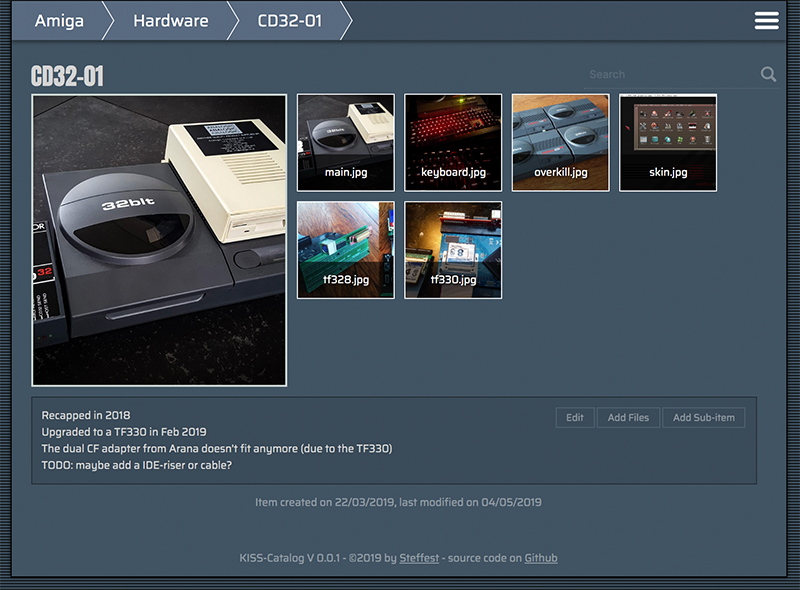
The main info file is called "info.txt"
The main image of an item is called "main.jpg"
If you want to display your collection on the web, simply put all your static files on a webhost.
No database or serverside processing needed.
That's it!
Everything runs
- BOTH locally and remote
- BOTH as a static website and a somewhat full-featured dynamic Content-Management System.
There's a small demo collection at http://www.stef.be/collector/amiga/ (read only)
Still starting to populate it, first I have to FIND all stuff :-)
And of course: Open Source and everything.
It's made for personal use, but you're free to give it a go. Feature requests are welcome.
It runs one Node but if that doesn't ring any bells there are also pre-compiled binaries for Windows, Mac and Linux
Drawbacks
These "design" decisions have some drawbacks:
- Flat file "databases" only go that far, if your collections is reaching like a 100.000 items, Kiss-catalog is not for you
- Because everything is generated from your local files, this might get slow with large collections. Also there's no image processing (yet) so all images are displayed "as is" : if you fill everything with 4K images, loading will be slow.
- If I ever want to add features like "private files or folders" or whatever - I will probably have to settle for some naming scheme.
- Likewise for "calculated" fields like prices etc. some convention will be necessary.
The Philosophy
I've been pondering the last few months (years?) over something I call "sustainable software"
It's probably not a new concept but that's what I call it in my head.
Basically it means that a developer should write software that is as simple as possible for the job.
Not because simplicity is a goal in itself, but because simple software lasts longer.
It's easier to maintain, consumes less resources, runs faster, ...
Developers should write software to last.
It's all too easy to quickly throw something together using the funky libraries and frameworks that today are considered "modern". Before you know it you're lugging along a staggering dependency tree and rely on a multitude of online services to get your thing built/compiled/deployed.
Yes, you're the cool kid on the block, but how will it look in a few years? Will it still build/compile/deploy?
If it's a fairly simple web-app, do you really need that 2 MB javascript package, 7000 lines of CSS and 4MB initial page load? Maybe ...
In this project "sustainable software" means:
- no exotic or platform dependent file formats. plain text RULEZ
- no external (web)platforms: it's the only way to make sure your data is still there in a few years time.
- no code dependencies. again: it's the only way to make sure your system still runs in a few years time.
- platform independent. everything should run on - and be maintainable from - whatever device you use.
Anyway - that's food for maybe another blog post - don't get me started on frontend builds that pull in ONE MILLION packages and takes 20 minutes and 8gig to build ...
For now: Happy Cataloguing!
Tags: Commodore Amiga, in English, ProgrammingGeef je reactie (0)
The bigger plan of my Amiga-Javascript projects
The past years I have been slowly tinkering on various Amiga Projects.
Mostly in JavaScript, mostly to unlock various parts of the huge Amiga ecosystem: parsing ancient filesystems and fileformats, reading and writing Amiga files with new tools, ...
Slowly all these various tidbits are coming together in the big plan: to break the Amiga out of it's emulated container and to seamlessly integrate in a modern OS.
That modern OS is platform independent. It runs on everything and it is accessible from everywhere.
For me, this translated to an OS that is web based. It runs in your browser and it lives in the cloud.
There have been many approaches to such an OS, some of them - like FriendUP - clearly have their roots in the Amiga system.
One of the most interesting ones is Amibian.js. It's also inspired by the Amiga and it runs in javaScript: Node.js on the backend, browser in front.
I've been talking with Jon - the creator of Amibian.js.
It's a HUGELY ambitious project, ranging from custom compilers in various programming languages to a recreation of an Amiga-like OS, complete with compatible system library calls and more.
When doing a modern Amiga inspired OS, one of the big questions is how you handle legacy software.
The Amiga has an old but super mature ecosystem of programs but sadly all that software doesn't run anymore on modern systems.
The solution is to emulate that old hardware so you can still run all that old software.
The most used Amiga Emulator is WinUAE, a glorious and ultra-advanced piece of code.
Rupert Hausberger did the daunting task of porting it to javascript.
The drawback of emulating an Amiga is that it is a contained black-box system that has no knowledge of the larger system it's running on. WinUAE handles this quite elegantly by allowing a shared filesystem, but in your browser there's no such thing.
This is where I stepped in: an emulated boxed Amiga running in your browser is cool, but wouldn't it be even cooler to break it open?
You could use Amiga software to seamless edit/play your local files,
or launch modern non-Amiga tools from within the Amiga,
or compile a program for Amiga with today's tools and launch it directly on an emulated 68k CPU
or ....
All this directly available on whatever system you use and wherever you are.
In the end, the underlying technicalities shouldn't matter.
It shouldn't matter what OS a program was written for, or where your files are exactly, or even who's physical machine you are using. Just launch your space and mold it to your liking.
Amibian.js already tries to break the barriers between the browser and your local system.
Browser or native? It shouldn't matter.
I will gladly help and try to break the barriers between the emulated environments and the native ones:
Emulated or native? It shouldn't matter.
The top video is a first demo of the progress. It shows various aspects of building such a system.
Most notably a shared filesytem so both systems (emulated and native) can access the same files.
Everything you see is running in the browser.
The (emulated) Amiga is on the right, the host system is on the left.
We're still doing babysteps: trying out stuff and laying the foundation for the bigger plan.
The concept is always the same: a seamless integration where it doesn't matter anymore where your files are or on what platform your program is running on.
Tags: Commodore Amiga, in English, Programming, Scripting, TinkeringGeef je reactie (0)Bassoon Tracker
Presenting a new project:
Bassoon Tracker!
It's a Browser based old-school Amiga Music Tracker in plain old javascript.
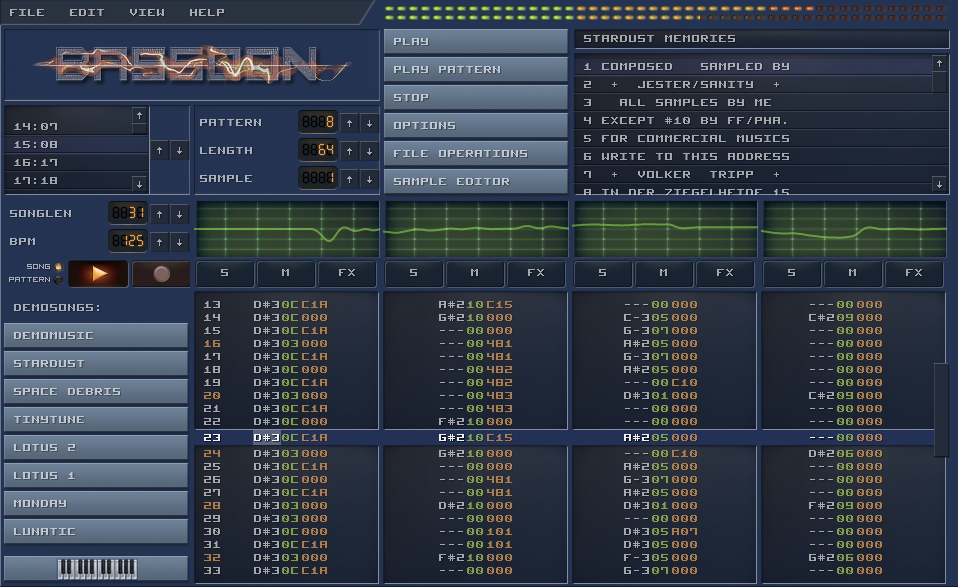
If you have ever heard of Protracker or Fasttracker, then you know the drill,
if not, then you are probably too young :-)
Check it out at http://www.stef.be/bassoontracker/
Tracker music originated way back in 1987 on the Amiga computer.
This was an era where PC's only made bleep sounds.
Even as the Atari could produce some funky chip sounds, then there was this all-singing-all-dancing Amiga machine that could produce 4 channel wave-audio.
Ok, it was still 8-bit sound, but suddenly everybody could access a digital music creation tool for an affordable price where previously you would have to spend a fortune on hardware samplers and midi interfaces to get the same possibilities.
My first sampler I soldered myself: You could plug it into the parallel port of the Amiga to "record" analog audio signals into 8-bit samples. It produced very low quality samples, but ohh... the wonder of it all!
It also was en era where user interface design was non existent so yes: the interface is a bit ... "special" :-)
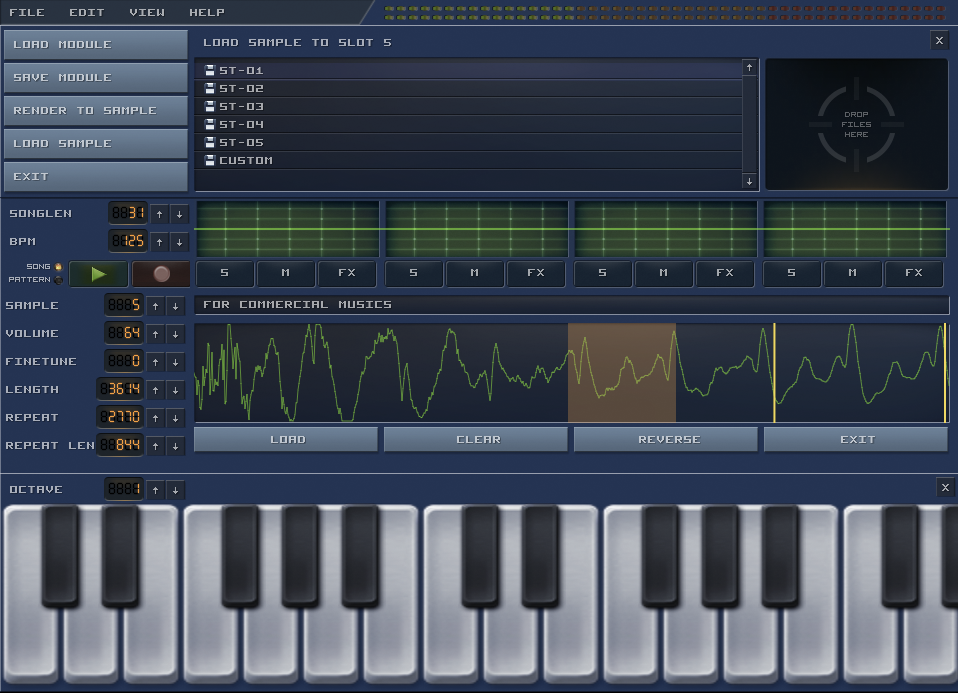
Tracker programs where made by developers for developers: You don't enter notes on a musical bar, you enter notes as numbers in a grid with your computer keyboard and you apply effects by entering even more numbers.
All in hexadecimal of course, as plain decimal number are for pussies.
I especially like the format because you sort of get the sheet-music AND the instruments together with the song.
If you hear a cool piece and go like "Wow, how did they do that?" you can jump right in and examine what samples are used and what effects are applied.
It's like an open-source music format where you can do a "view source" to see exactly how it's done and fiddle with it, much as you can do with any website or web application.
Just like much of my early javascript and css knowledge was build by inspecting the source of other applications, much of my early musical knowledge was build inspecting mod files on the Amiga.
The golden age of the Amiga is long gone, but the tracker format lives on. There have been countless spin-offs and remakes.
Even in modern audio software like Renoise, Radium and Sunvox the tracker spirit is present.
And of course there's openMPT: It doesn't have a cool and snazzy interface but it's the most compatible and complete true tracker around.
Remember: these are not just mp3 files you hear, the music is reproduced using samples that are played and manipulated in sequence in real-time.
This is why mod files in general are quite small, making them perfect for (early) games and other projects where file size is important.
Even the super popular Unity game platform still has support for tracker formats
Playing mod files in a browser is nothing new, but still I wanted to create my own tracker for the following reasons:
- I wanted to research Web-Audio, especially real time audio manipulation.
- I wanted a real tracker where you can open, edit and save mod files, not just a player.
- It should perform well on mobile browsers.
Most mod players don't work that well on mobile browsers.
They tend to implement a very low level way of handling audio, doing the resampling and mixing all in the javascript layer, maybe because the code is ported or recompiled from other platforms.
I took a high-level Web-Audio approach which makes it perform really well on mobile browsers. Even if the UI slows down, the music should never stutter. - I wanted to build a SCALABLE cool retro user interface.
Most old-school trackers have a fixed size user interface.
I wanted a pixel-retro interface that scales with the screen.
You could call it "responsive design" but then for HTML canvas :-)
That's a pretty cool feature even if I say so myself! - I wanted to have a decent music playback engine to be able to build upon: a drum-sequencer? a midi-player? real-time online collaboration? all rather straightforward once the main playback engine is in place.
Anyway - here are some examples!
- Startdust Memories - By Jester
- Guitar Slinger - By Jogeir Liljedahl
- Space Debris - By Captain (Markus Kaarlonen)
- Title track of the game "Lotus Turbo Challenge 2"
- Professional Tracker - By H0ffman and DayTripper (Watch the pattern animation on this one)
Even more?
The ModArchive hosts thousands of tracker songs and they have an API so you can directly access them from within Bassoon Tracker.
The source files are available on GitHub.
Have fun, and if you think of any cool feature you're missing: let me know!
Physical buttons for your Sonos
I totally love my Sonos system.
The Sonos players are expensive but they are worth every penny and i haven't regretted any of my Sonos purchases for a minute.
There's one thing missing though ... hardware buttons!
Even as a smartphone or tablet to control your appliances is perfect (remember 2009?), sometimes you just don't have your smartphone ready at hand and you find yourself hunting for your smartphone to control your Sonos.
Yes, each Sonos has some hardware buttons, but they are only used to play/pause the current song, or to adjust the volume of that particular player.
Enter D.I.Y.
I'm a big fan of old tube-based radio's. If they are not too far gone they get repaired, otherwise they just look cool.
One particular little radio-bugger was beyond salvation and received another purpose: controlling the Sonos with some presets, volume and play/pause with its old-school tactile click-clack buttons.
The final contraption looks like this: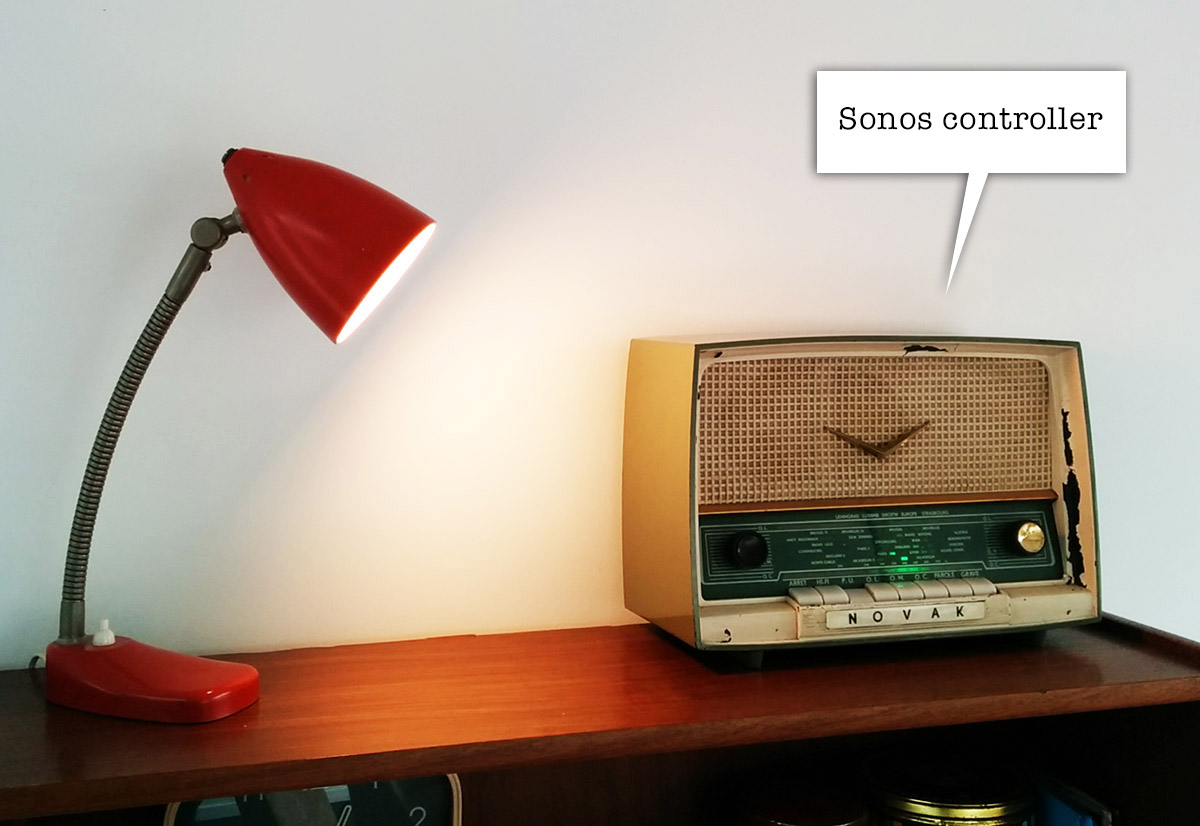
very incognito. looks like a radio, no?
On the inside the buttons are wired to a little Arduino.
When you press a button or turn the volume knob, one of the digital or analog inputs of the Arduino is activated, allowing you to define a resulting action in software.
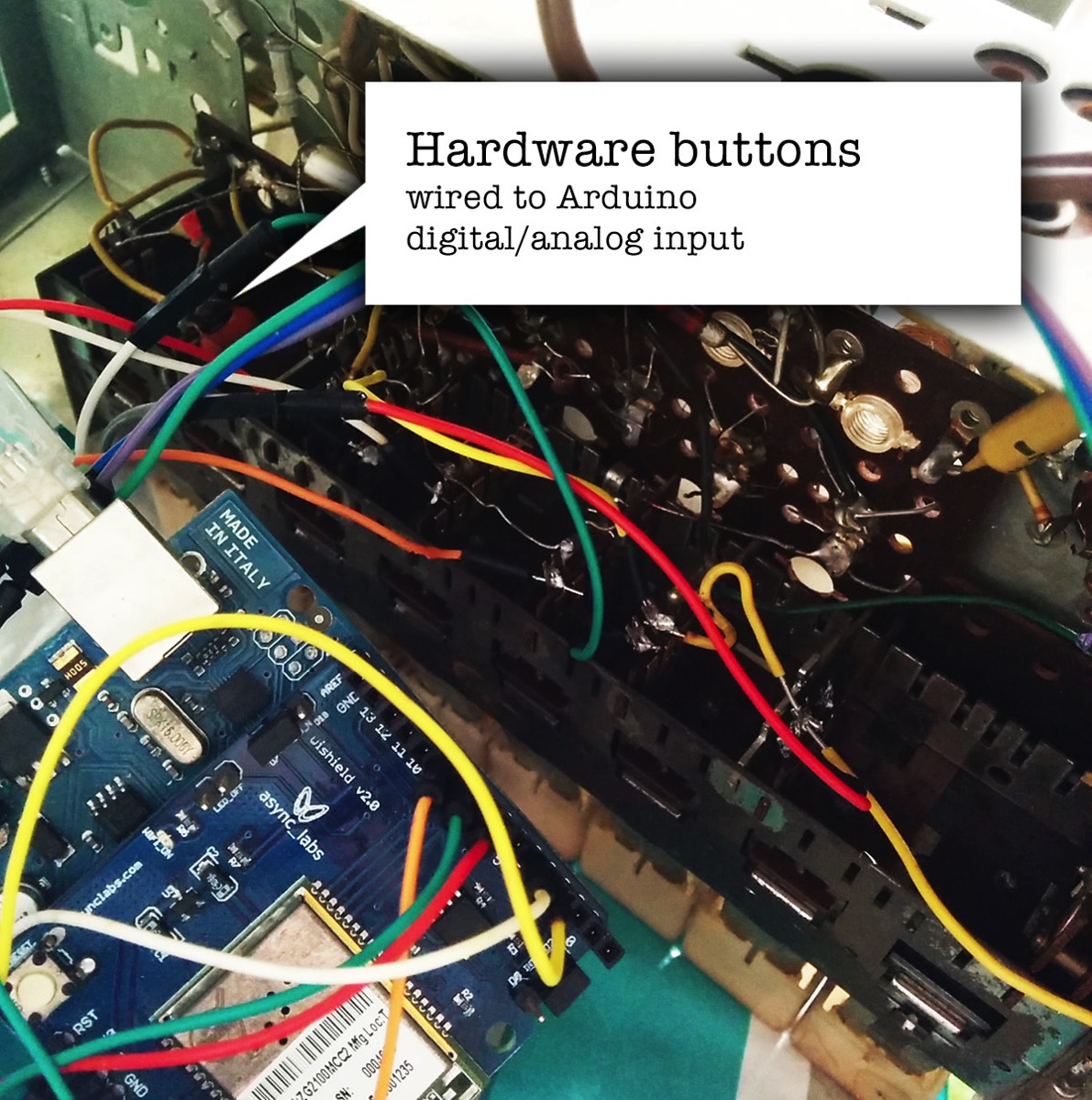
There's a little WiShield attached to the Arduino allowing it to communicate over wifi with other devices.
Although it's possible to talk to the Sonos devices directly using the UPnP protocol, it's easier to use a some sort of middleware like the excellent Sonos Http Client by Jimmy Shimizu .
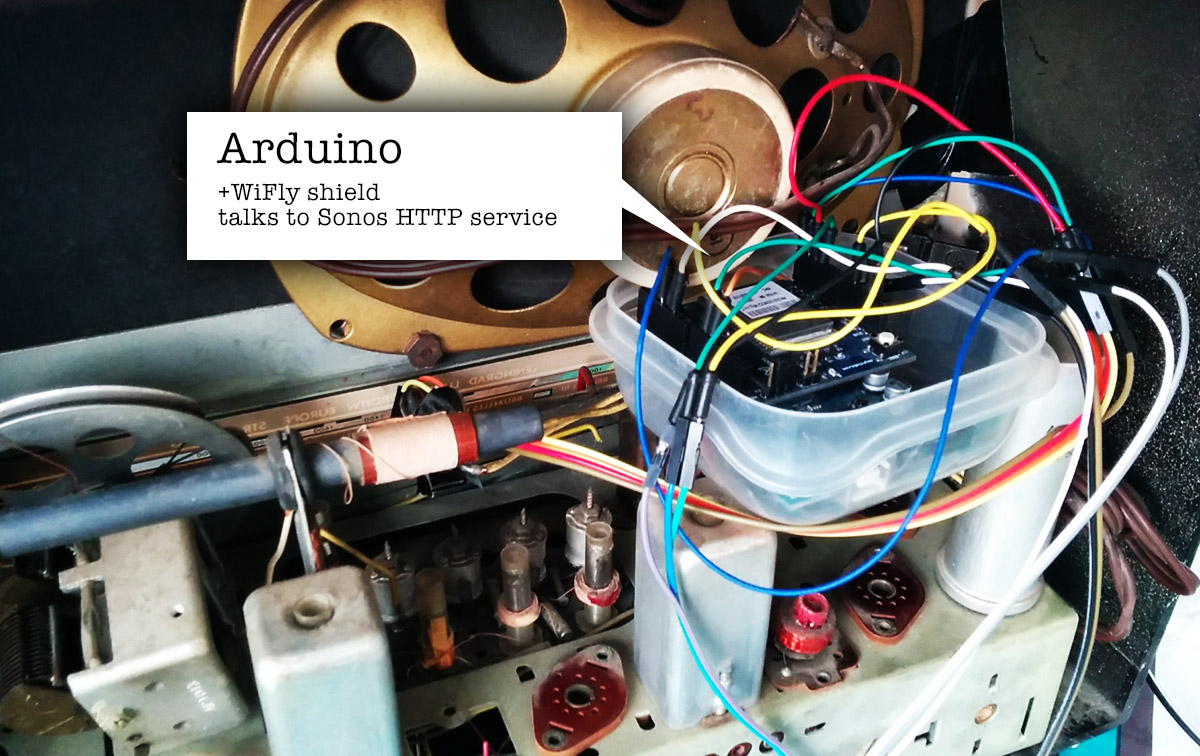
The WiShield is rather old in terms of IT-gadget-age and its libraries are not compatible with the current generation of Arduino IDE.
I had to patch them a little to make them work on Arduino 1.x and up. You can find my fork here.
The little Arduino sketch that controls everything is also on my GitHub.
A little status led completes the setup, giving some feedback on your actions.
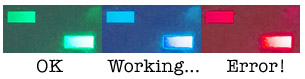
With the radio buttons i can now activate the 5 presets we use the most, change the volume of the grouped sonos speakers and pause/play everything.
The presets are currently 3 radio stations (Studio Brussel, Radio 1, Radio Nostalgie), the Spotify favourite list (starred tracks) and a random Spotify playlist.
Due to some wonderful coincident the labels of the buttons also EXACTLY match the preset they trigger:
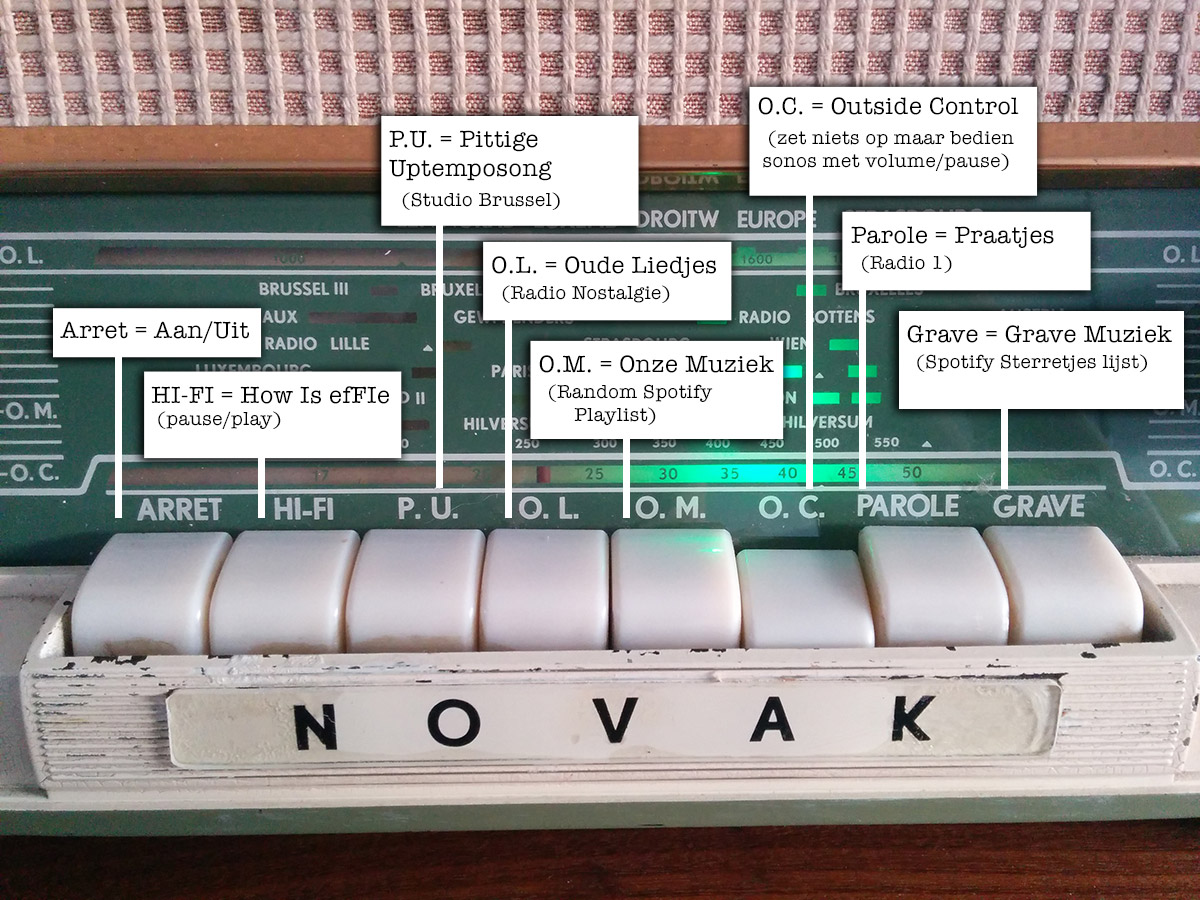
How convenient!
The concept is a bit hard to explain to people who don't have a wireless speaker system.
Most of the time they just stare blankly and go
"Uhm ... so you've build a radio that you can use to ehm ... turn on the radio? ... Ok ... cool ..."
Exactly!
Just like software controllers as Ableton Live end up up creating matching hardware controllers with LOTS of buttons, let's hope this is the start of a trend.
There's nothing like the feeling of pressing a big chunky button down and make it go *CLACK* , far more satisfying than using the non-tactile buttons of a touchscreen controller ... .
Hmm, I still have this thing somewhere in my garage ... what still needs controlling?
Tags: Arduino, in English, Programming, TinkeringGeef je reactie (3)
Stievie kijken op je PC en op XBMC/Kodi
Stievie is best lollig.
Het is natuurlijk ook veel te duur en bevat veel te veel gaten in de programmagids, maar als concept is het prima.
Jammer alleen dat je perse een tablet of telefoon moet gebruiken en dat je het niet met XBMC/Kodi kunt gebruiken.
Dat zal best 1 of andere rare prehistorisch reden hebben, maar zuiver technisch zal die reden niet zijn.
Ik hou niet zo van apps, zo van die dichtgesmeerde gepolijste bolletjes waar je enkel datgene mee kunt wat de appmaker wil dat je kan.
Waarom kan niet gewoon alles wat meer open en flexibel zijn zodat je het beter kunt afstemmen op je eigen wensen?
Natuurlijk kan dat wel!
Enter de Stie-viewer: een webapplicatie die je lokaal draait en waarmee je alle programma's die op Stievie staan gewoon in je browser kunt bekijken.
Als extraatje zit er een kleine XBMC/Kodi component in waarmee je een programma ook op XBMC/Kodi kunt afspelen.
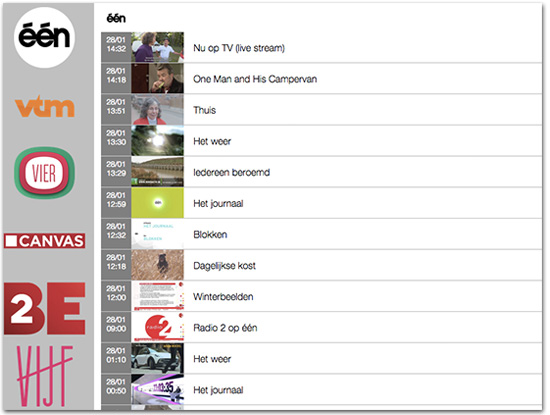
Je vindt het op https://github.com/steffest/Stieviewer
Het is dus NIET iets waarmee je zomaar de Stievie beveiliging kunt omzeilen:
- Je hebt nog steeds een geldige Stievie account nodig
- Je kan nog steeds niet op meer dan 1 toestel tegelijk kijken
- Je kan geen programma's bekijken die niet op Stievie beschikbaar zijn (die uitgegrijsd zijn of meer dan 7 dagen oud zijn)
Kortom: Bekijk het als een onschuldig scriptje dat Stievie iets aantrekkelijker maakt, niet als iets dat bedoeld is om Stievie te ondermijnen.
(Met andere woorden: don't sue me, i'm not attacking your product, just presenting some added value :-) )
De installatie is wat geeky: je hebt node.js nodig. Als je dat nog niet geinstalleerd hebt, vind je dat op http://nodejs.org/
Download de applicatie via https://github.com/steffest/Stieviewer - ga via de command line naar de plaats waar je het uit hebt gepakt en type
npm install
daarna kun je het starten via
node server.js
en is de applicatie beschikbaar via http://localhost:8000 in je browser.
De eerste keer dat je de Stieviewer opent dien je een geldige Stievie login in te vullen.
Je login wordt niet opgeslagen.
Ze wordt enkel gebruikt om de Stievie authenticatie server te conctacteren.
Daarna krijg je een access token die in je local storage wordt bewaard.
Je kan dan alle zenders doorbladeren en het programma in je browser bekijken. Vermits de meeste browser het video formaat van Stievie niet gebruiken, wordt er op de meeste browsers een flash-fallback gebruikt om de video af te spelen.
Je kan natuurlijk ook de url van de video stream kopiëren en bv. afspelen in VLC of QuickTime.
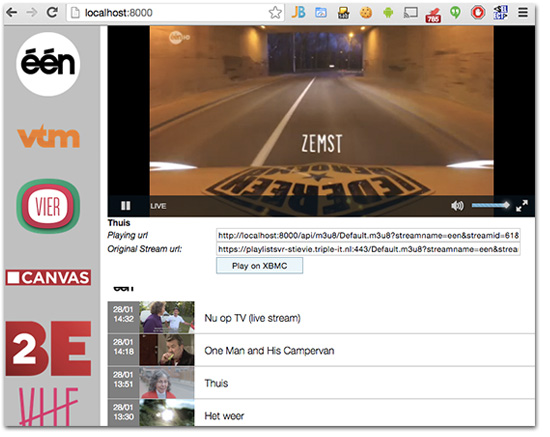
Wil je het programma via XBMC/Kodi bekijken dan klik je op "Play on XBMC".
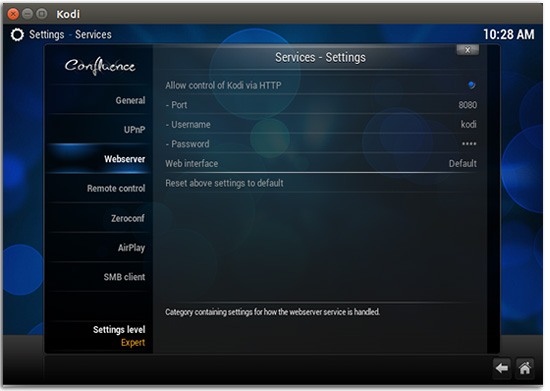
Kijk dan wel eerst even na dat je de http interface van XBMC hebt aanstaan.
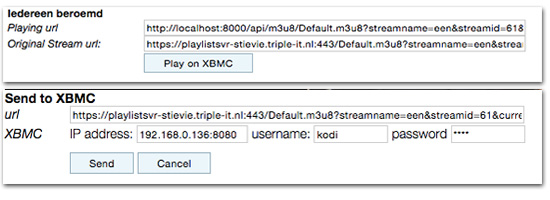
Je vult het ip adres en poort van XBMC in, samen met je login en paswoord en klikt op "Send".
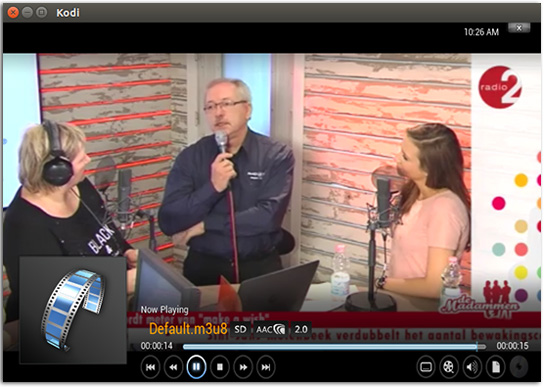
Daarna heb je je PC niet meer nodig: XBMC speelt rechtstreeks de video af vanuit Stievie.
Hoe werkt het?
Je start via Node een lokale webserver op.
Deze doet zich voor als echte "Stievie App" en communiceert met de Stievie server om alle gegevens op te halen.
Daarna verpakt de applicatie deze gegevens een beetje anders zodat je er iets mee kunt doen in een webbrowser.
Om de video af te spelen wordt (meestal) Flash gebruikt.
Om de Same-Origin restricties van een webapplicatie te omzeilen wordt alles via de lokale webserver gesluisd zodat Flash de video kan afspelen.
XBMC/Kodi kan (sinds kort) ook Http Live Streaming videos afspelen, maar heeft blijkbaar nog wat moeite met Adaptive Streaming.
Daarom wordt er op het moment dat je iets naar XBMC stuurt eerst de HLS index playlist opgevraagd en wordt de eerste "echte" playlist die daarin staat naar XBMC gestuurd ipv. de adaptive playlist.
Meer info en de volledige broncode vindt je op https://github.com/steffest/Stieviewer
Het is nog wat ruw en niet echt bedoeld als gepolijst product voor de eindgebruiker, maar toch al bruikbaar.
De Stieviewer is op geen enkele manier gerelateerd met Stievie, Medialaan en/of Triple-IT.
Enjoy and be nice!
Airwave Pong Style!
Wave you hands in the air and pong it like you just don't care!
I like old stuff: it has a story, it is used. it has flaws.
And exactly those imperfections are interesting. Waba-Sabi you know?
That's why I ditched all my CD's and moved back to Vinyl,
and that's also why In my opinion most "pre-computer music" sounds better.
When you take a basic step sequencer or midi program, it's a robot: all notes are aligned on a fixed grid and it usually takes some effort to get a "human feel" to your music.
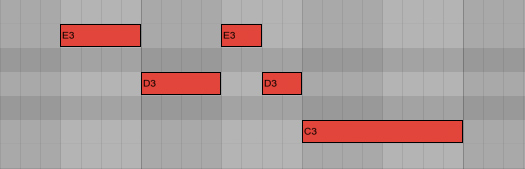
Now what if you could ease it up a bit in a fun way?
Let's take the graphical representation of a "beat" in most common step sequencers.
and let's take this thought one step further: the graphical representation defines the music, right?
So what if we alter the graphics, would the music change too?
For example, if we want to add a fade, we can just as well use photoshop to add some blur, right?
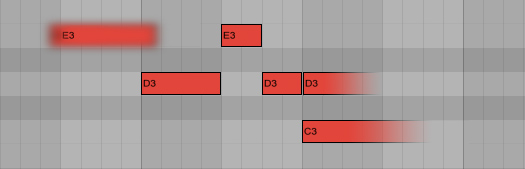
And if we want to loosen up that fixed grid, why not use a graphical filter to make it more "wobbly"
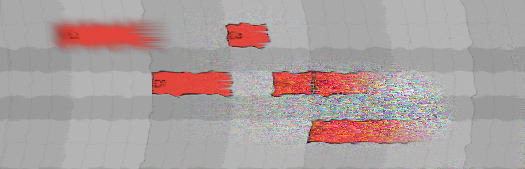
This way we can use graphical tools to mold your music into a more organic shape.
And more!
What if we could "read" any image in a musical way?
An image consists of lot's of coloured dots, each dot has some info we can use. on a computer screen, this is for example the amount of red, green and blue and the transparency.
We can sample that info from an image and use it for something musical.
An example: move you mouse over this image of a jungle, to explore it in an audio-way. (Well ... after you click on it to open the demo, right?)
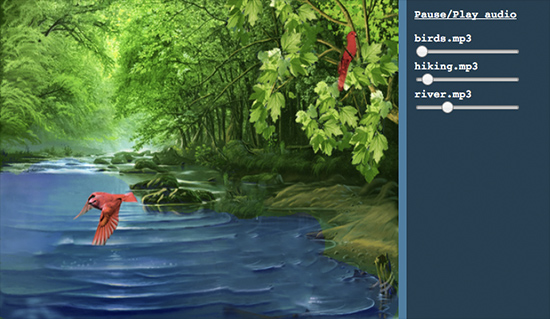
To pour that into something musical, we can use "the bouncing ball" effect: a ball bouncing around in a rectangular box has 2 rhythms that are both fixed but as the sides of the box are not equal, the rhythms are constantly shifting.
It has the predicable structure of a beat box, but also the unpredictability of 2 patterns intermingling: Exactly the interesting effect we are looking for.
Try it out for yourselves!
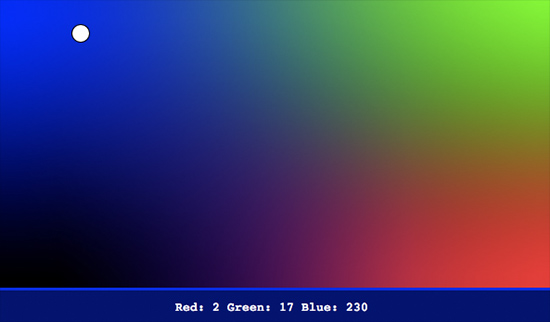
(Seriously: leave it running on chrome or safari for a few hours: it's very relaxing!)
Of course we don't have to use a static image, we can use a video or ... a camera!
That is when things really get interesting: when you connect a camera as your graphical/musical input source, you can interact with your musical model live, in front of your camera.
Add a little motion-tracking and color-tracking, and you get a pretty accurate way of triggering musical events using your webcam.
To go all the way back to music software, we can even add some MIDI to trigger midi events using your webcam, and to record everything you do in your midi sequencer to take it further along towards a full musical production.
Wham! Before you know it, you got yourself a playful musical instrument.
Of course, it's a bit hard to control. It's probably wise to limit yourself with some quantization or some predefined chord schematics to get the sound you want.
Fiddling around with all my prototype toys, I created this demo song - I call it "Airwave pong" (You now: Wave you hands in the air in front of your webcam - combined with pong)
To be honest, I had to do a lot of post-processing on the midi data ... my motion tracking routines are somewhat crude and fly all over the place.
If you want to try it out for yourself, come find me a Barcamp Antwerp 7 this saturday, where I will be doing a live demo and will release all the tools I used.
Yes indeed: barcamp STILL is one of the most inspiring events EVER.
The concept is simple: short and open talks about anything you're passionate about.
The presentations won't be perfect, but they will be real and honest, which makes them far more valuable then about 90% of al other talks on "professional" events.
So if you happen to be in the vicinity of Antwerp, do yourself a favour and drop by #BCA7
I can't wait !

Foto door Simon Schoeters
Tags: Graphics, in English, Music, Programming, Tinkering, VideoGeef je reactie (1)My Little DrummerBot
Yay! finally took the time to finish a little Arduino project.
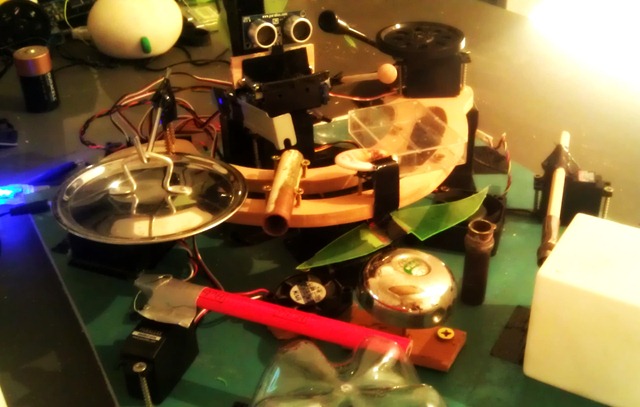
It's a another bot, more specific: a web controlled drummerbot!
Yes yes, the same old trick: web interfaces to physical objects: Me LUVS them.
Give me an Arduino and a browser and I'll build you your rainbow
Hey, I feel a song comming up!
Tap the drum pattern on your phone and this little bot will rock it!
You control it like most drum computers: you draw the beats on a pattern of sixteen dots, perfectly suited for generic 4/4 rhythms.
There a 8 lines, each controlling 1 servo motor.
Most of the servo's have a percussion item both on the left and the right, that's why the pattern buttons have 3 states: off, left, right.
That makes 14 distinct percussion sounds for the drummerbot.
The pattern in the webbrowser is packed into a string, which get send to the Arduino via HTTP.
You can use a wifi module and a http server on the Arduino, or you can use another device attached to the Arduino through a comm port.
The Arduino receives the string, unpacks it back to a pattern and simple loops over the steps controlling each servo.
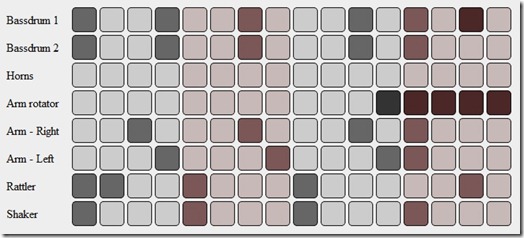
the "DrummerBot Step Seqeuncer V 0.01 very-much-alpha" page is here
You can also download the Arduino code here.
I must admit: the drums sound a bit dry without amplification though.
I recorded everything into Ableton Live and did the final mix there. (Shocking, right? The videoclip is actually NOT a live performance :-) )
I'm specifically fond of the "Horns"
They are 2 little fans with a servo pushing a piece of plastic against the blades.
A hell of a noise but when you add heaps of fuzz, chorus and overdrive effects they are pretty convincing.
I call them F*CK-YEAH-HORNS
If you want to jam along yourself: hop over this saturday to Barcamp Antwerpen, where I'll be giving a presentation with/about the bot.
Let's play!
Javascript library: 9-dot Pattern Lock
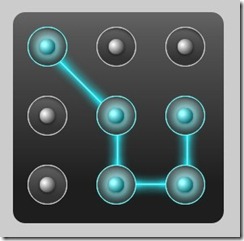
You have probably seen this on a touchscreen smartphone: to unlock it, instead of typing a password you are presented with 9 dots and you have to draw a pattern.
It works great: drawing a shape on a small touch screen is far easier than typing on those bl**dy small keyboards AND far easier to remember too.
Once you've got used to it, typing passwords in general gets pretty annoying: you want to swipe your way through every login screen you see.
For my own mobile web apps, I wanted to replace that standard password box with a familiar pattern lock, but was surprised I couldn't find one that was targeted towards web apps.
Maybe it does exist but i missed it?
Oh well, Do It Yourself! : my never ending mantra that I keep repeating over and over and over and over again :-)
Enter the 9-dot pattern lock javascript library.
It's pretty much drag-n-drop: just include the JS file and give your password box the class "patternlock" : It will be replaced with a nice touchy patternlock.
I wanted it to be free of any dependencies on frameworks like jQuery or Moo so it's completely standalone.
A live demo is at http://www.stef.be/dev/javascript/patternlock/
It's targeted towards large touchscreen devices such as Android phones/tablets, iPhone and IPad, but it works fine on any major desktop and mobile browser.
The idea is that each dot is a number from 1 to 9, when you draw a pattern, you're actually entering numbers into the password box.
It's free and open source, grab it here if you find it useful.
Parameters
- it has 2 parameters
- patternlock.autoInit
If set to true all input elements with the className "patternlock" will be replaced
If set to false you have to manually initiate it by patternlock.generate(IDofElement) - patternlock.autoSubmit
If set to true your form will be submitted when you stop drawing the pattern
If set to false the user will have to submit it manually
- patternlock.autoInit
Possible enhancements for the future:
- maybe rewrite it as a jQuery plugin ?
- it would be much cooler to use the HTML5 canvas element to draw the dots and lines in runtime instead of using images. But since that's not supported on all browsers, I used images to keep it compatible.
Known issues
- the default Android browser has a really slow "ontouchmove" trigger: if you draw very fast on your android phone, you will miss some dots. (I hate to admit it but the iOS browser clearly is the most potent mobile browser for touch stuff at the moment)
- If you draw outside of the box you can connect non-adjacent points. allthough that's perfecty fine, no lines will be drawn between those points.
- Using multiple patternlocks on the same page probably won't work.
If you bump into other issues or have any improvements: let me know!
Tags: in English, Mobile, Programming, ScriptingGeef je reactie (9)Snuffelen aan je ipad apps
Deze week was ik te gast bij de Tech45 podcast - als je wil herbeluisteren kan dat hier .
Het was naar aanleiding van deze blogpost en Jan's reactie erop.
Mijn achterliggende stelling was dat (ik hoop dat) al die iPad en iPhone en Android en wat-nog-al-niet-apps een tijdelijke hype is.
Begrijp me niet verkeerd, mobile gaat super hard ontploffen, maar qua applicaties zal het gaan zoals op de grote PC's: eerst was alles een lokaal programma, en toen evolueerde het zodat je bijna alles in je browser kan doen.
Natuurlijk zullen er steeds toepassingen blijven die op je PC lokaal moeten staan, zoals tekenprogramma's of games bijvoorbeeld, maar de tendens is wel duidelijk: software is steeds meer online. Hup naar de cloud!
Voor al die mobiele toestellen zoals de iPad en je telefoon zal dat hetzelfde zijn: de "App" zal na verloop van tijd naar "browser" evolueren.
Nu is het nog even super hip om een iPad app te lanceren, maar dat slijt er wel af.
De grote Apple baas blaast dat de App HET opperste goed is voor de gebruiker, maar dat zegt hij natuurlijk vooral omdat hijzelf met zijn hebberige vingers tussen de Appverkoop zit en bij de browser niet.
Vooral "media consumeren", dat is iets waar de browser goed in is: lezen, filmpjes kijken, foto's bekijken ...
Kun je het je inbeelden dat "De Standaard" een Mac applicatie zou lanceren speciaal voor de krant te lezen? natuurlijk niet, daar heb je een website voor.
Kun je het je inbeelden dat Telenet een Windows applicatie zou lanceren speciaal om TV te kijken? natuurlijk niet, ook streaming video loopt veelal via de browser.
Waarom ze dat voor iPad wel doen is me een raadsel (niet echt natuurlijk, vanuit technisch oogpunt)
Die apps zijn niet meer dan veredelde browsers die ingesteld zijn om maar 1 "website" te tonen.
Geen woorden maar daden!
Laat ons bijvoorbeeld de Telenet Yelo applicatie eens bekijken. 
Maar eh .. hoe doe je dat eigenlijk?
De iPad is via je wifi netwerk verbonden met het internet.
Alle gegevens passeren naar je wifi router en gaan van daar verder.
Als je precies wil weten wat een applicatie allemaal online gaat zoeken (en terugkrijgt), zou je eigenlijk in je router moeten gaan afluisteren.
Gelukkig bestaat er ook een truukje om die "router" iets gemakkelijker te maken.
Elke PC die zowel een ethernet als wifi heeft, kan ook als wifi router dienst doen.
Erg gemakelijk en een gratis programma zoals Virual Router maakt het in 1 klik waar. 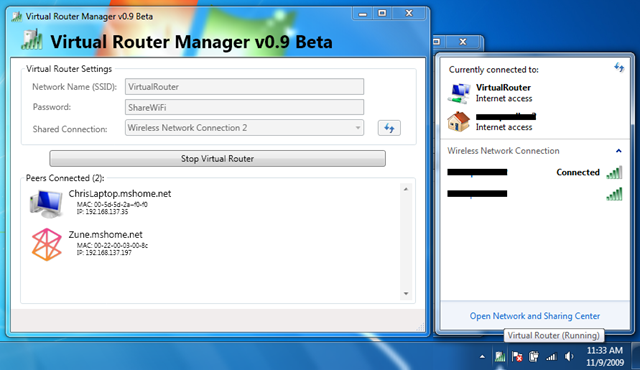
Even op de startknop klikken en er is een nieuwe draadloos netwerk in de lucht waar je bijvoorbeeld met je iPad op kan connecteren.
Je PC doet nu dienst als router en geeft alle gegevens dia van je draadloze toestellen komen door.
Fijn, maar hoe doe ik daar nu iets mee.
Daar komt de FANTASTISCHE ONGELOOFLIJKE FENOMENALE tool Wireshark om de hoek kijken.
Wireshark is het lievelingetje van elke computer netwerk mens - het zwitsers zakmes van de netwerken.
Wireshark nestelt zich in je netwerk en bekijkt alles wat er passeert. Met een druk op de "record" knop, begint hij alle gegevens bij te houden zodat je later rustig kunt bekijken wat er gebeurd is op je netwerk.
Elke website die je opent, elke verbinding met het internet die elk programma maakt - ALLES - wordt zo gelogd.
Wireshark biedt bovendien nog veel middelen om later ook nog wijs te worden uit die enorme hoop gegevens.
Mooi! Laat ons dan eens kijken wat die Telenet Yelo app zo allemaal online gaat zoeken. 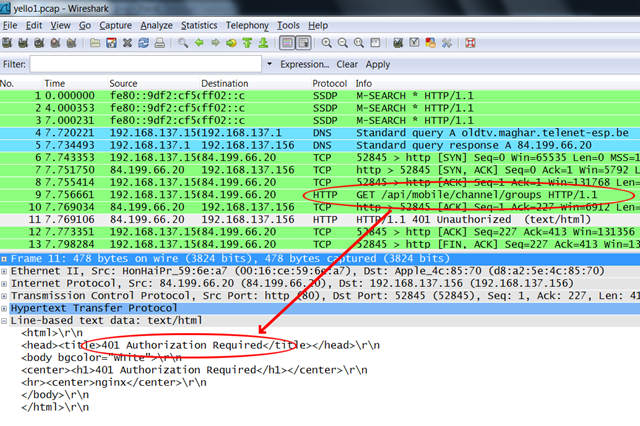
Je ziet hier dat de App eerst http://oldtv.maghar.telenet-esp.be/ gaat opzoeken en daar naar http://oldtv.maghar.telenet-esp.be/api/mobile/channel/groups gaat kijken.
Ha! een API ... dat is altijd leuk.
Helaas krijg je een loginscherm voorgeschoteld als je op bovenstaande link klikt.
Maar die applicatie geraakt er wel op, dus nog even verder kijken.
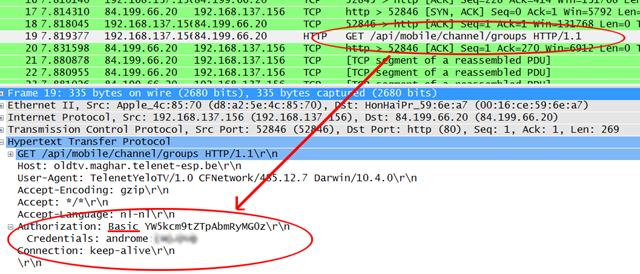
Wireshark laat ook de inhoud van elk verzoek zien, en hier zien we dat de login gevens als "Basic Authorization" worden verstuurd.
Dit wil zeggen dat login en paswoord als leesbare tekst worden verstuurd en inderdaad: we kunnen dat hier lezen.
voor de : staat de login, erachter het paswoord.
de login is "androme" en het paswoord ... heb ik even vaag gemaakt, dat zul je zelf even moeten opzoeken.
Dat werkt.
We kunnen nu via de browser zelf opvragen wat de Yelo app achter de schermen doet.
En wij krijgen zaken te zien als
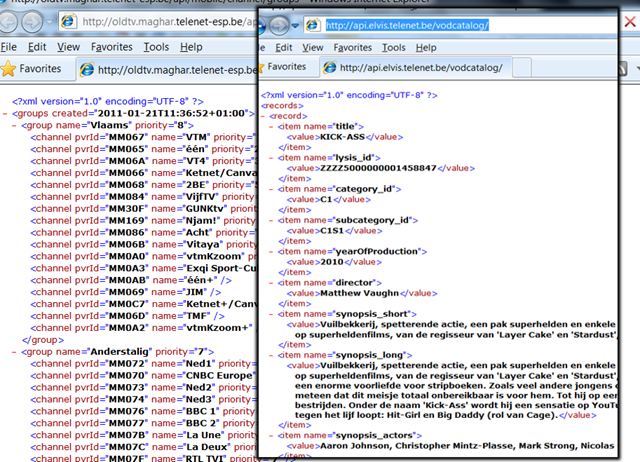
Schone propere XML waarvan een developer blij wordt. Daar kunnen we mee aan de slag.
Wat verder snuffelend leren we dat hun API blijkbaar "ELVIS" heet, de meeste aanvragen gaan naar
http://api.elvis.telenet.be/livechannels/ en zo van die dingen.
Dit zijn allemaal "publieke" gegevens die voor iedereen hetzelfde zijn: de TV-gids, de info van elke programma, welke kanalen in welke categorie zitten ...
de Telenet Yelo app kan echter ook je eigen opnames instellen, en daarvoor heeft het je login nodig, die de applicatie ook naar de telenet servers zal moeten sturen.
Oeps! Wat zien we daar! 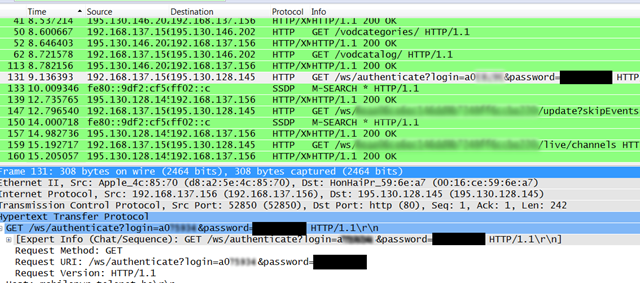
De applicatie gaat aankloppen bij http://mobilepvr.telenet.be/ws/authenticate
en verstuurd mijn login en wachtwoord niet eens als "basic authentication" maar gewoon hopla in de URL ...
Dat is wel niet zo netjes hé Telenet.
Draadloze netwerken stoppen niet bij de buitenmuur van je huis. Dan maar hopen dat je buurman geen al te grote GEEK is en aan het meeluisteren is ...
Ik poste dit ook op twitter en ik moet zeggen dat Telenet goed luistert en supersnel was met hun reactie.
Dit gaat in de volgende versie opgelost zijn. Blijkbaar was Telenet wat gehaast om deze app uit te brengen hebben ze hier en daar wat hoekjes afgesneden.
Update: Plots staat er vandaag een artikel over in de standaard:
Ze vermelden "Een Twitter-gebruiker signaleerde onze redactie dat de login-gegevens in de Yelo-app niet beveiligd zijn"
Ik hoop eigenlijk niet dat ik die twittergebruiker was :-)
de Standaard maakt er hier een opgeklopt verhaal van.
Je wil eigenlijk niet weten hoeveel applicaties en websites de logingegevens op soortgelijke manier onversleuteld versturen en ach ... zooooooo'n groot probleem is dat nu ook weer niet, het is gewoon een beetje slordig van Telenet, meer niet, en ze zullen dat wel rechtzetten ... geen reden tot paniek ... nothing to see, move along.
en along moven doen we door te komen waar we willen zijn:

We komen bij de URL's waar de livestreams van hun TV kanalen opstaan.
Het zijn .m3u8 bestanden, wat eigenlijk een soort playlists zijn van allemaal hele korte video bestandjes die door de player naadeloos aan elkaar worden geplakt.
"HTTP live streaming" noemen ze dat bij Apple - en jawel - eigenlijk is dat best een goede uitvinding.
Als je deze URL neemt en je plakt die in een browser (op iPhone of iPad) , opent de standaard mediaplayer zich en speelt de video af.
Voor de films die je kunt huren is dat hetzelfde.
Alles wat je in de Yelo applicatie ziet, past prima binnen een browser.
Maar ja, "TV kijken op je iPad" klinkt nu eenmaal veel cooler dan "TV kijken in je browser" en is het ingegeven door hippe marketing om nu te kiezen voor de App.
Het lijkt me echter niet meer dan logisch dat Telenet op den duur deze functionaliteit mee in hun online www.tv.be en m.tv.be aanbod stopt zodat het ineens overal en op elk toestel werkt.
Voor Android en andere toestellen gaan ze enkel een ander formaat videostream aan moeten bieden, maar dat is geen struikelblok.
En als Telenet dat niet doet ... tja, dan zullen we het zelf moeten maken, natuurlijk :-)
Mocht je morgen naar Barcamp VRT Brussel komen, dan zal ik je graag mijn eerste opzet daarvan laten zien.
Tags: in 't Nederlands, Programming, ScriptingGeef je reactie (6)
Open Source Telenet Digicorder API
A few months ago, Telenet finally made the jump and opened up their digicorder devices to be controlled through their TV web portal TV.be.
Nice!!!
Finally you could schedule your TV recordings from anywhere using a web browser instead of a infrared remote and the dorky digicorder interface.
Controlling media devices through web interfaces happens to be one of my sweet spots so the first thing I did was firing up Firebug to see what kind of communication was going on between their various web applications.
They've done a really good job, as they created an internal API to talk to the digicorder.
Figuring out how the API works has the same attraction as seeing a crossword puzzle in a newspaper: it tickles your mind but at the same time it's not too hard and with some time and logic the puzzle is quickly solved.
So, let's get to work to create a more open API to control your TV recordings from any software package you want instead of only through the tv.be website.
First step: login
Telenet uses a single-sign-on system, providing a token that authorises you as "logged in" and that you can take with you to other sites.
It sends you on a redirect path towards multiple domains - telling each domain you have logged in.
The script just recreates that path and makes sure to collect and pass all cookies to the next step. (That's really easy in .net - just use the same cookiecontainer for each request)
After that you can use the Telenet remotePVR API from the script as an authenticated user.
One problem though: to schedule a new recording you need the eventID of the program you want to record.
That's where tv.be and some good old screenscraping comes in: a Channel listing for each day is requested on the tv.be website and the EventID codes get extracted and saved to a local cache (so we don't have to hammer the tv.be site more then we need to)
Technically that might be against Telenet's Terms of Use policy, but hey - we're all in favour of free and open data, aren't we?
That's it.
I created a more simple API as .net wrapper class with the following syntax
Dim tvbe as new tvbe
tvbe.login()
tvbe.logout()
tvbe.recordings()
tvbe.reminders()
tvbe.zenders()
In a webapp that translates to URLs as
/login
/logout
/boxes 'gets info on your digiboxes and digicorders
/recordings 'gets a list of your scheduled and completed recordings
/recordings/schedule/ID ' schedules a new recording, ID is an eventID provided by tv.be
/recordings/delete/ID ' deletes a recording, ID is an eventID provided by tvbe/recordings
/reminders/ 'gets a list of your scheduled reminders
/reminders/schedule/ID ' sets a new reminder, ID is an eventID provided by tv.be
/reminders/delete/ID ' deletes a reminder, ID is an eventID provided by tvbe/reminders
/zenders ' (short)list of available channels
/zenders/channelname ' program guide of the channel with name "channelname"
/zenders/channelname?date=dd-mm-yyyy ' program guide of the channel with name "channelname" of a given day
The sourcecode can be found here.
After a (very friendly) request from Telenet I'm taking the sourcecode and the demo application offline.
However I do hope I can contribute following their open invitation to help unlock their digital services towards a more open communication (API?) in general and mobile devices in particular.
To be continued ...
As a demo I created a little frontend for the API for use on mobile devices.
http://tv.stef.be it is.
You can use the TV guide without login in, but if you want to manage your recorders you have to create an account at tv.be (and be a Telenet Digital TV customer of course)
It's a bit of a trust-issue to enter your telenet credentials in a "rogue" app like this, but i can assure you it's safe: your credentials are not stored anywhere and are only used to pass through the Telenet login sequence.
If you're still hesitating to enter your login, you can grab the source and try it on your own machine.
Here are some screenshots. 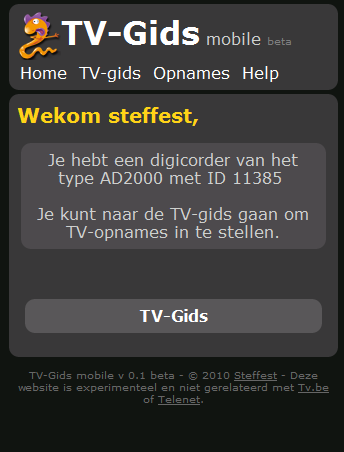
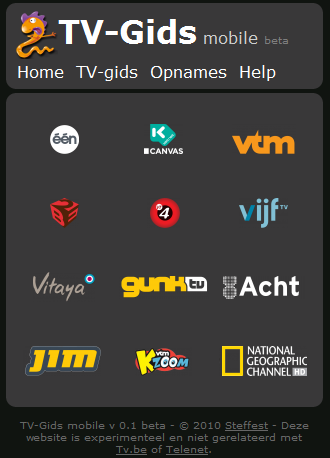
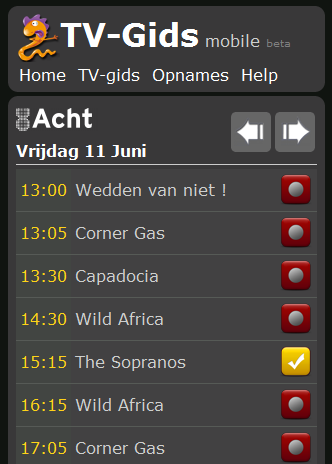
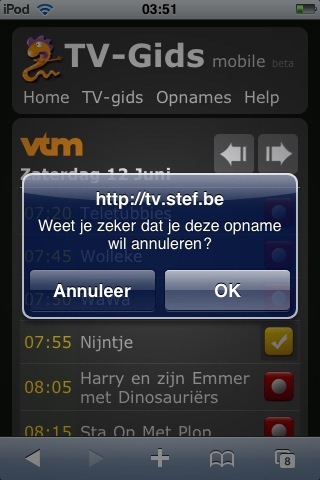
The API still has some holes, mostly because not all tv.be content is easily available.
Most important i would love a simple system to convert EventID's to program names and vica versa, maybe if i ask the tv.be people nicely? :-)
Also it's not really suited if you have more then one digicorder.
A search function would be nice ... maybe I'll implement that.
Of course it works fine as long as Telenet doesn't change their internal API, which is always a risk, but well, then the cat and mouse game can continue.
I was planning to build an Android app for it but actually http://tv.stef.be works very well on mobile devices and since you still would need a data connection to talk to your digicorder, why would you create a native app when a webapp will do?
Happy recording!
Usenet-o-matic for your mobile
"Usenet indexer Newzbin has lost its MPA court case."
Maybe that doesn't ring a bell but anyone who's been digging into to "downloading stuff from the net" will soon find out that Usenet is the place where it's at: your one stop shop for all the movies, TV shows, music and apps you can chew.
The only problem: it's too much and as is the case with the torrent trackers - Usenet is also flooded with crap: virus infested apps, password protected files, DRM loaded pay-movies,...
Not very easy to find the good stuff.
That's where Newzbin came in: their system of user-generated and verified reports made it a no-brainer to find clean and high quality releases - nicely packaged in so called nzb files,which are a list of all the binary chunks you need to download from a Usenet server in order to rebuild the files you want.
AND they have a very nice API for developers like me so they can script and automate their download flow.
Not anymore: starting from March 31, no new reports are being added. The service is not broken, but without updates it's pretty darn useless.
So there i was: sitting in my bathtub, sipping my red wine and hitting the play button, only to find the latest episode of Lost wasn't there.
No fun!
Especially since I was not in the position to jump up, run to the keyboard and quickly find another source.
As these things go, it's a classic case of "the King is dead, long live the King".
NZB sites are not hard to find and I quickly updated my scripts to use NZBMAtrix as an alternate source.
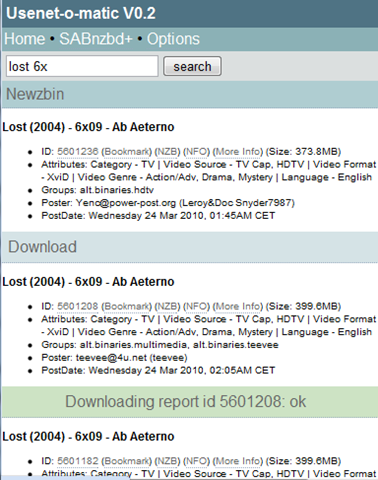
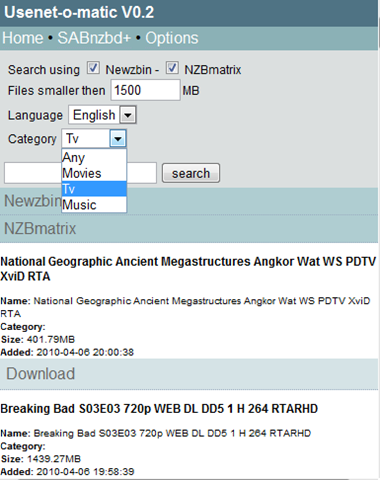
One of those scripts is a mobile optimised search tool to quickly find a TV-show (or whatever it is you're looking for) and tell your homePC to download it.
The idea is that you use your mobile phone to initiate a download, your homePC downloads the file using a fast internet connection and streams it back to your mobile phone. Very easy and very fast: e.g. downloading a TV episode takes a minute or 2 after which you can use Relocally - or something like Air Video - to stream it to your device.
The script is called Usenet-o-matic. It will be part of Relocally, but if you want you can use it yourself.
It's available at http://usenetomatic.codeplex.com.
In this first release it supports Newzbin and NZBmatrix as index sources and SABnzbd as download server.
This means that in order to get it working, you need a Newzbin premium account or a NZBmatrix VIP account and a SABnzbd installation. (and a decent Usenet provider obviously - like Giganews)
I admit: those are a lot of things to set up (and are not free) so probably the target group of a script like this is pretty narrow, but once you get everything inline, download Walhalla is yours :-)
Sorry, no live demo but here are some screenshots: (Yeah yeah, I know: it looks like crap, I left the design part for you to add :-) )


Woordklok
Het idee is grandioos gepikt van deze klok, maar toen ik hem zag was het liefde op het eerste zicht.
Dat wordt een mooi Arduino projectje om er zelf een in het Nederlands te maken in supergroot formaat.
Deze instructable zit er veel te complex uit - dat moet toch simpeler kunnen, uiteindelijk moet je maar 22 lichtgroepen kunnen aansturen.
Om de logica al wat uit te schrijven maakte ik snel deze flash-versie ('t is dus geen afbeelding - hij werkt echt)
Mocht er iemand geïnteresseerd zijn: hier is het .fla bronbestand.
Mooi! Nu alleen de uitvoering nog :-)