Bekijk terug alle berichten.
Google maps/latitude/twitter/blog mashup
Vorig weekend ging ik nog eens een wandelingetje maken, als voorbereiding op deze tocht, weet u wel.
40 km stond er op de planning. Het was tevens de eerste grote test voor mijn real time google maps/latitude/twitter/blog mashup (een hele mond vol, maar het gaat dus over de kaart die u hieronder zit)
- voor de RSS lezers die de iframe-kaart niet zullen zien: het is deze.
Ik ben al een tijdje bezig mijn mijn locatie te loggen. Ik gebruik daarvoor voornamelijk Google Latitude: mijn telefoon weet waar ik ben en geeft dit door aan Latitude. Door om de zoveel tijd deze locatie op te vragen en op te slaan in een database krijg je zo een geo-log waar je overal bent geweest. Het handige is dan dat je van alles waarvan je weet WANNEER je dit deed, je ook ineens weet WAAR dat gebeurde.
Als je bijvoorbeeld een tweet stuurt, of een foto maakt en upload, dan kun je ineens op een kaart tonen waar je was.
Dit doe je dan van tijdstip A (je vertrek) tot tijdstip B (je aankomst) en voila! je hebt een routekaart van je tocht met geografisch aangeduid waar (en wanneer) je bv een foto postte of iets op twitter zei. (je kunt op de icoontjes klikken om de tweet/foto te zien)
Het mooie is dat dit dus realtime gebeurd (of kan gebeuren).
Als backup heb ik ook een GPS-logger bij, om achteraf de locaties wat bij te schaven en dat is eigenlijk wel nodig ook.
Google latitude is eigenlijk niet bedoeld om je route te tracken, maar om je huidige locatie te tonen.
Het maakt af en toe rare locatie-sprongen want zelfs als de gps van je telefoon continu aan staat, stuurt latitude soms toch de geïnterpoleerde gsm-mast locatie door en die is veel minder accuraat.
Op je route lijkt het dan soms alsof je heen en weer springt.
Ook ergerlijk is dat er geen mogelijk is om exact te bepalen wanneer Latitude de nieuwe locatie doorstuurt en ik heb al gemerkt dat dit best lang kan duren.
Langs de andere kant is het wel een erg mooie applicatie die bovendien ook erg vriendelijk is voor de batterij van je telefoon - niet te onderschatten tijdens lange tochten.
De "real-time" kaart is dus niet zo accuraat, pas bij terugkomst wordt de route 100% juist na het importeren van de GPS-logger gegevens.
Tijdens de tocht bleek alweer dat "social media" als twitter effectief wel "social" is: ik was in mijn enthousiasme vertrokken zonder geld of drinken - dom natuurlijk, en dat had ik meteen maar op twitter gezet.
Gelukkige was er een vriendelijke twitteraar die zeer juist deduceerde dat ik wel eens in zijn buurt kwam te passeren en bood aan dat ik bij hem wel mocht komen lunchen - WAUW! - nogmaals een dikke merci! (jajajaja twitter is ECHT cool)
Je ziet op de kaart dat ik op een gegeven moment rechtsomkeerts maak om nog even langst Broechem te passeren - waardoor de tocht uiteindelijk 45 km lang werd.
Ik moet zeggen dat ik blij was dat ik de finish bereikte - het viel eigenlijk wat tegen en ik voelde me echt een oude zak.
Dat beloofd ...
Dit weekend staat er weer een 45-km tocht op de planning - dit keer in groep, wat meestel iets minder snel vooruitgaat.
Uiteraard wordt deze ook getrackt!
Pimp your Picture Frame - part 1

Last week I bought one of those digital I-mate Momento Pictures frames from iBood.
As with most of the stuff you find on iBood, this item is part of some left-over stock because i-mate has decided to discontinue their picture frames service, but for a price of 50 euros, what can go wrong, especially as the frame sports a cool feature like Wifi!
Yep, it claims to load your images right of your local network or from the web.
As some reviews al ready prove to be very negative, I didn't expect much but in the end it's quite alright except for one mayor flaw: the thing doesn't load standard RSS feeds but instead relies on their propriety Momentum Live service to feed the device online content.
I could have lived with that except .... that service is discontinued :-)
Bummer, there goes my intention of having a cheap Picture frame for my mum to automatically show the latest updates pics of the kids ...
There are some ways to get the thing to connect to the web, but it involves tinkering with DNS-servers and mimicking the Momento live service with your own scripts but that's way too much trouble to be useful.
Still, I was intrigued and when that happens I know myself good enough to just pursue the possibilities or else it will be haunting my head for some weeks. Better to just get rid of it :-)
I decided I wanted a picture frame that not only loads pictures from an arbitrary RSS feed but also could show other "sidebar gadget" like content like twitter updates, resource monitors, textual RSS items ...
The momento frame does support Windows Sideshow, which means you can push little info snippets from your (windows) PC to the device to be displayed. This is very easy to setup and is also very easy to develop for, but it's also very limited as you have no control of the layout, the rate of updates or the amount of text that gets displayed.
In fact, the only thing the device does well is displaying jpg images - it IS a picture frame after all !
Luckily, loading pictures over wifi from your network works really well and is very easy to setup.
It works with the "shared media" function of Windows Media player - actually a pretty cool feature.
I hit another snag when Windows Media Player turned out to be notoriously flaky to update its media library when new pictures are being added so new items sometimes took several hours to show up ; so much for fast twitter updates :-)
After some experiments I found the solution: the Momento frame does store some pictures in its cache, but when a network connection is present it always fetches a fresh copy from your pc. Thank god for that as it means that when you update or replace an image keeping the same filename, the new picture get instantly loaded on the frame (the next time the playlist reaches that image)
Great! Now if I had a program that would update the same set of pictures with new stuff coming from my picture library AND the web, I was all set.
I didn't want to spend too much time with rendering textual items to images, after all, that's what HTML is for no?
If a screenshot of a webpage could be feed to the device, that would allow everything we need.
Witness the birth of a new project: the "PictureFrame-o-matic" !
After some fiddling in Visual Studio I now have a program that
- Can read standard RSS feeds
- Takes any image enclosure it finds in the RSS, resamples it to 800x600 and stores it a folder, numbered with the name of the feed.
- Can retrieve a screenshot of a webpage and stores it as a jpg
- Can combine 2 images (a webpage and a picture) with some overlay options to render some (web)content on top of the image.
the images are not added to the folder, but the existing images simply get replaced with new ones
the Momento device points to that folder and essentially displays the same playlist over and over again, only with updated pictures.
It works really well !
The layout is completely open as it is just HTML and/or flash content being saved as an image, the content is completely customisable as you can take any webpage or RSS feed as your source (e.g. news items or Poetry lines, ...) and the rate of updates is instantly.
I'll leave it be for now, but it's certainly a project I want to continue some day.
There still are some drawbacks:
- Webpages that require a login don't work (twitter e.g. so I had to create a custom page that shows my tweets from the twitter API)
- Updates only work when your PC is on and the PictureFrame-o-matic program is running.
The momento does have a good fallback system: if the PC is off or otherwise not reachable, it displays the last 50 pictures from it's cache. - it's a bit resource hungry for the hosting PC
- It would be cool to integrate the existing windows sidebar gadgets but I have no idea (yet) how to accomplish that. (apart from taking a screenshot of the desktop and cropping it around the gadget, but that's lame)
Thing to do in the next future
- create some dedicated webpages to be displayed on the device
- create a website to configure each picture frame, setting what content should be displayed (which would allow you to configure the picture frame using your phone) sounds a lot like the interface i did for Tweetshirt.
- post some screenshots
- clean up the source code and post it here.
- Maybe demo it on some barcamp or something (after all - the same engine could be used to feed the tweetshirt)
It's still not a good solution for my mum (as a PC has to be running all the time) but it's a nice gadget and I think this setup really gives a lame half-ass picture frame as the i-mate Momento a huge makeover.
On a technical side, Maybe this is the tipping point that I start liking .net and Visual Studio more then Delphi ... (never though I would say that)
It's just that pulling webcontent into your program, working with xml and juggling images around is soooooo much easier in .net then it is in Delphi. (sure, you can write .net in Delphi too, but let's not go there :-) )
Oh well ...
There, that's out of my system.
On to the next project.
How to cheat on online pols - part 2

IJdelheid en Ego, 't is toch altijd weer prijs.
Er moet maar weer een populariteits wedstrijd opduiken of het is weer hot topic on Twitter.
Deze keer loopt er een Mr. en Ms twitter verkiezing.
Iedereen kan zijn stem uitbrengen en de resultaten zijn real-time te volgen.
Zo'n dingen laat ik meestal links liggen maar toen wat berichten opdoken dat er schijnbaar gefoefeld werd ging ik toch eens kijken.
Ja lap, he, net zoals de vorige keer werkt dat bij als een rode lap op een dolle stier. Online foefelen duidt op een software bug, en software bugs moeten gefixt worden - daarom doe ik mij job ook zo graag :-)
Zo'n twitterpoll is leuk, maar als er niet met gelijke wapens gestreden wordt, is er voor niemand iets aan.
Open online polls en verkiezingen zijn wreed moeilijk waterdicht te beveilingen, eigenlijk kun je net zo goed geen moeite doen om het te proberen, en Tweeterwall heeft er dan ook niet veel aandacht aan besteed.
Stap 1 is altijd eens kijken hoe iets werkt want als je weet hoe iets werkt, weet je waar de bug zit.
Een goede tool daarvoor is de Firefox plugin Firebug. Het laat o.a. exact zien welke url's worden aangeroepen.
Zo zien we dat als je op een plusje klikt er een url als http://tweeterwall.mallplace.com/tw/vote/123456789/99 opgeroepen wordt en inderdaad, als je deze url in een browser oproept wordt je stem netjes meegeteld.
En er staan cijfertjes in de url, dat is altijd leuk om iets mee te proberen.
Een snelle blik in de broncode maakt snel duidelijk dat het eerste nummer de gebruikers ID is, maar wat zou die 99 zijn?
Even proberen dat te veranderen naar bv 999 en ... OEPS! Plots staat de teller van die gebruikersID terug op 1 - jawadde, per ongeluk ontdekken we zo een wel erg drastische manier om "de concurentie" een hak te zetten ...
Een twittersearch toont dat een aantal twitter gebruikers plots al hun stemmen kwijt leken te zijn, wat bv o.a. bij @netlash, @bnox en @flexyflow het geval was.
Je kunt er zo goed als zeker van zijn dat dit allemaal te wijten is aan iemand die de url parameters aan het uitproberen is en - wellicht onbedoeld - de teller zo resette. Op zich al een duidelijk bewijs van gefoefel.
Ok, die 99 laten we staan dus.
Als we nu als een gek die URL gaan oproepen door bv op refresh te gaan meppen werkt het niet, want je IP adres wordt 20 minuten lang onthouden zodat je maar om de 20 minuten vanop dezelfde computer een stem kunt uitbrengen.
Je kunt natuurlijk je Firefox instellen om elke 20 minuten deze pagina te verversen, maar dat schiet niet op.
De truuk is om deze url vanop zoveel mogelijk IP-adressen (locaties) op te roepen, maar hoe doe je dat?
Je kunt het aan de oma van Pascal Vyncke vragen, die is daar schijnbaar erg goed in, maar je kunt het ook zelf, door mensen onbewust en onzichtbaar via hun browser die url te laten openen.
Dit kan door bv in een webpagina een iframe te zetten of zo, maar wellicht de simpelste manier is om de url als afbeelding op te roepen.
Zet bv <img src="http://tweeterwall.mallplace.com/tw/vote/123456789/99" alt="" /> op een webpagina en iedereen die de webpagina opent zal de stem-link openen vanuit hun computer als ze die webpagina openen, en dit zonder dat ze het weten.
Uiteraard krijgen zo ook een kapotte afbeelding te zien, maar dit kun je verbergen door bv
<img style="display: none" src="http://tweeterwall.mallplace.com/tw/vote/123456789/99" alt="" /> te gebruiken.
En zo zijn er nog tal van andere manieren om het systeem voor de gek te houden.
Flauw, maar als je de stem-resultaten wat in het oog houdt lopen er zo wel een paar foefjes ...
Ikzelf kon het ook niet laten hoor: toen @amedee een vat beloofde als hij de Mr verkiezing zou winnen, vond ik dat nog wel een mooie uitslag: zo zou iedereen er tenminste wat aan hebben, en ikzelf ben dan ook wel weer zo ego-gevoelig om even uit te testen dat je "het systeem verslagen hebt" of zoiets (Jaja, Steffest de rebel - kuche kuche)
Afin, zo gezegd zo gedaan, en even later stond @amedee dan ook met een ruime voorsprong op de eerste plaats te prijken.
Goed zo, behalve dan dat iemand het blijkbaar nodig vond om zijn resultaat te torpederen, en zijn teller met boven beschreven truukje te resetten.
Bon, Ik heb nog eenmaal het scriptje laten lopen en momenteel staat @amedee weer op 1 (geheel verdient uiteraard) en ik ga me er voor de rest ook niet mee bezig houden.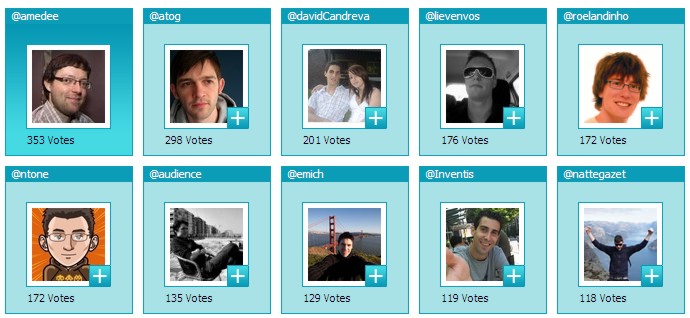
Voor alle duidelijkheid: ik heb enkel 2 maal @amedee zijn stemmen een duwtje naar boven gegeven, met alle andere rare fenomenen op die tweeterwall heb ik compleet niets te maken, hoor en vermits @amedee sprak over de kloof tussen de "haves en de haves-not in de informatiewereld" dacht ik - hup - laten we eens wat informatie vrijgeven.
(Want het is wel duidelijk dat ik zeker niet de enige of eerste ben die "op onderzoek" uitgaat)
Bottom line is: gebruik best geen online polls voor verkiezingen, of als je het dan toch doet - verzin dan een simpel systeem om het eerlijk te laten verlopen - open stemmen via twitter of zo.
Gegarandeerd dat er anders toch vals wordt gespeeld en dan is er voor niemand nog iets aan.
Hoe dan ook, mocht @amedee zijn vat geven, ik zal zeker wat meesponsoren :-)
Tags: in 't Nederlands, Twitter, Web 2.0Geef je reactie (2)
Launching Twikilist

I'm launching a new little service today: Twikilist
Yes, of course it is twitter enabled, what did you expect ? :-)
Twikilist was created as a simple, open and public registration list for your events.
Why?
i love the open and public nature of community-editable systems like wiki's or blogcomments, but i noticed some drawbacks, especially when a lot of people are trying to get their name on the list at the same time.
Enter Twikilist: create a list, select the features you want, spread the word and don't worry about the rest.
Registration lists are easy to embed in your wiki, website or blogpost, or you can use the Twikilist website itself.
Did I mention I love Twitter? And so does Twikilist
By simply checking a box you allow people to register - or unregister - for your event by sending a tweet, giving extra visibility to your event.
For example, if your event is called "TwikiLaunch", sending a tweet @twikilist #TwikiLaunch I'll be there will get on the list (and @twikilist #TwikiLaunch cancel will remove you)
Twikilist was made because Topanga was looking for a nice and simple tool to take the hassle out of public registration lists (And she bribed me with the most delicious dinner I have tasted in the last few years, so how could I refuse?)
It was wipped up in a few evenings so if you find any bugs, let me know.
A big thanks to cubus for doing the CSS design
It's first use is for the Blogborrel, 30th of May in Antwerp - Feel free to join !
Googlewhack sabelplassen
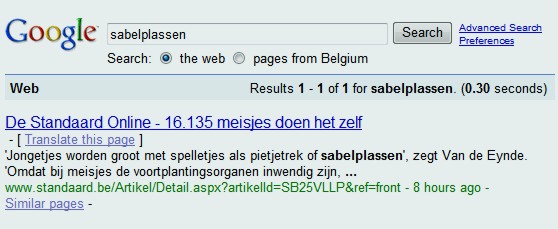
Ik had er nog nooit van gehoord: Googlewack - en zelfs Googlewhackblatt
Het is dus een (zinnig) woord dat slechts 1 zoekresultaat op google oplevert.
En jawel, vandaag werd door @eyeballkid en @wim_morc ontdek dat sabelplassen er 1 is.
Iedereen weet meteen wat sabelplassen is en toch komt het op het hele publieke internet maar 1 keer voor,
meer bepaald in een artikel van de Standaard over wemasturbate (@wemasturbate op twitter)
Een googlewack is natuurlijk heel delicaat, want zodra er iemand schrijft dat sabelplassen een uniek woord is, wordt dat opgepikt door google en is het er geen meer. Het is een beetje zoals het vinden van een klavertje 4 in een dichtbegroeid klaverveld: als je het plukt is het weg, en als je het niet plukt vind je het waarschijnlijk later nooit meer terug.
Het zijn kleine dinkies als deze die me doen glimlachen, en alleen daardoor al veel waard zijn.
Update: Oh nee - ik heb het verprutst - nu zijn er al 4 resulaten op http://www.google.be/search?q=sabelplassen
Damn, Google is snel ... dat heeft net 5 uur geduurd.
Twitter Follower Wonderwall
The übercool @bnox hopped over 1000 twitter-followers yesterday and posted her wonderwall of twitter-followers on her blog.
It was generated by a script by Walter Higgins. Cool! Only one thing: I noticed it had only 700 peeps on it. (Actually, I miscounted so thanks @StefaanLesage for the recount )
It's stupid things like this that bug me (litteraly)
I'm conditioned by my job of course: when I see a software bug I automatically switch to "Can we fix it? YES WE CAN!" mode.
I created a little script that gets your followers and displays them in a grid. It turned out to be piece of cake thanks to Twitter's excellent API.
Here's the script if you want to make your own Wonderwall or adapt it.
<%
twitterAccount = "steffest"
twitterPass    = "******"
twitterUser    = "Bnox"
page=1
colcount=1

response.write("<h1>"&twitterUser&"</h1>")
response.write("<table><tr>")
twitter_getfollowers()
response.write("</tr></table>")

function twitter_getfollowers()
	twitterurl = "http://twitter.com/statuses/followers/"&twitterUser&".xml?page=" & page
	set objXMLHTTP = Server.CreateObject("MSXML2.SERVERXMLHTTP")
	objXMLHTTP.Open "GET", twitterurl, false,twitterAccount,twitterPass

	objXMLHTTP.Send
	Set objXML = Server.CreateObject("MSXML2.DOMDocument")
	bAns = objXML.loadXML(objXMLHTTP.responseText)

	if bAns then
		set objItemNodes = objXML.DocumentElement.SelectNodes("user")
		if objItemNodes.length>0 and page<50 then
			for each oNode in objItemNodes
				user_name = ""
				user_image = ""
				if not oNode.selectSingleNode("screen_name") is nothing then user_name = oNode.selectSingleNode("screen_name").Text
				if not oNode.selectSingleNode("profile_image_url") is nothing then user_image = oNode.selectSingleNode("profile_image_url").Text
				response.write("<td><a href=""http://twitter.com/"&user_name&"""><img src="""&user_image&""" border=""0"" width=""48"" height=""48""></a></td>")
				colcount=colcount+1
				if colcount>15 then
					response.write("</tr><tr>")
					colcount=1
				end if
			next

			page=page+1
			twitter_getfollowers()
		end if
	end if

	set objXMLHTTP=nothing
	twitter_getfollowers = true

end function
%>
Twitter on a tiny LED display
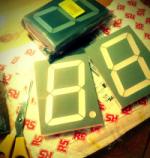
As a small exercise in my progress towards to ultimate tweetshirt, I created an interface for a 8x8 LED matrix display.
It doesn't do much at this moment: a program runs on the PC, fetches your latest tweet and controls the USB attached LEDs to show it as scrolling text.
The hardware is from Byvac and is cheap and easy, but also a bit limited.
The software is by me and uses their IASI-2 protocol
The scrolling is in fact much smoother then appears in the video.
Maybe I'll rework the hardware interface to control a 4x4x4 LED cube.
I ordered an Arduino today, which will allow much more low level processing and control for these kind of things
a 8x8 RGB display seems a nice project to start with, hoping to scale up to a 16x16 grid if things are going well.
Koekentrein
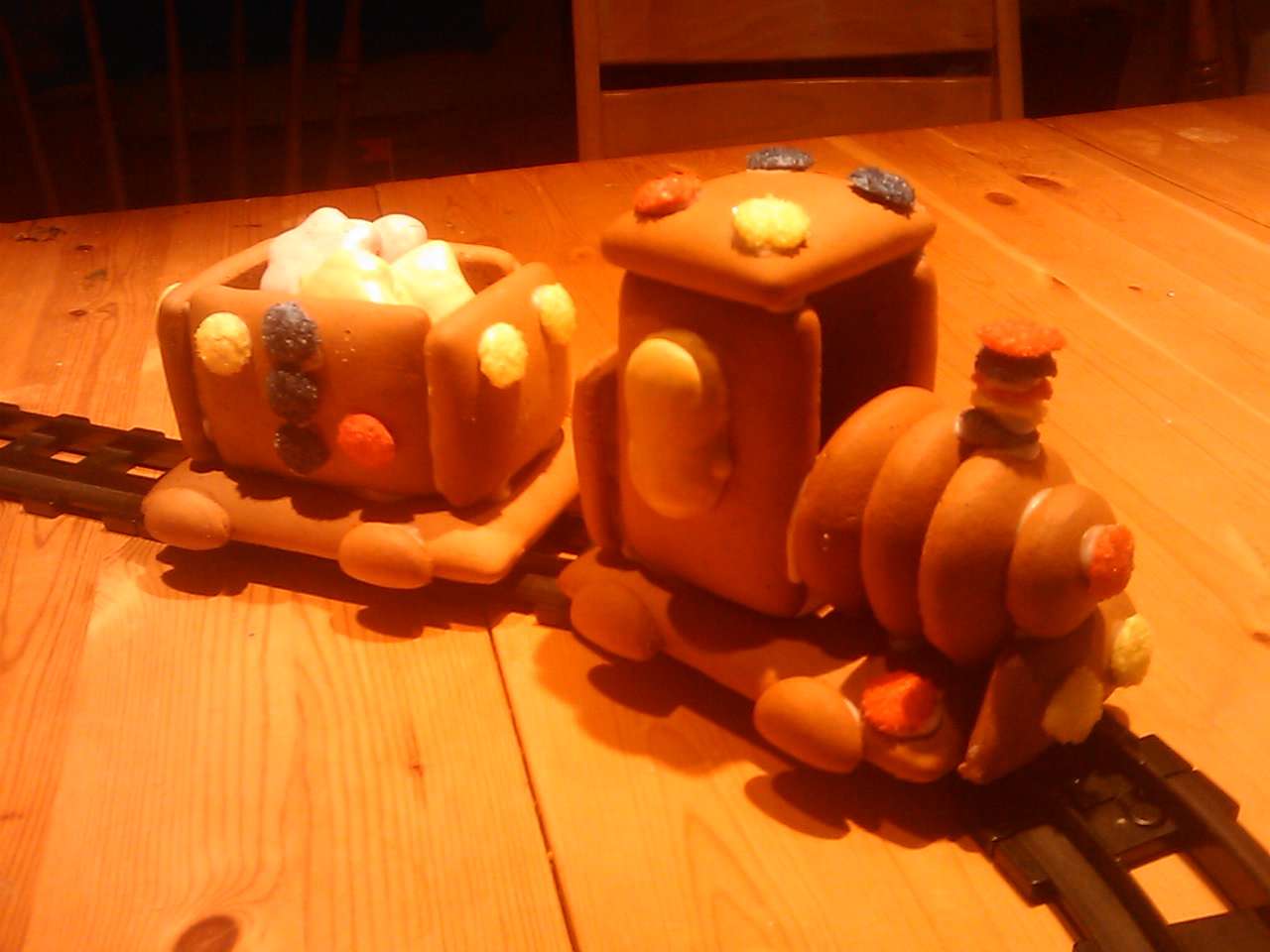
Suikerkoeken trein gemaakt. Berefun!
En eigenlijk was dit ook een test voor een twitter/blog client voor windows mobile dat ik in elkaar flansde, mét ondersteuning om rechtreeks foto's en video's vanop je mobiele telefoon te posten.
Het post of naar je blog, of naar twitter/plurk/facebook, of naar alletwee tegelijk.
Mooi, dat schijnt netjes te werken. Nu nog een naam verzinnen
Twitter op Radio 1
Terwijl vorige week op Studio Brussel nog over Twitter werd gesproken in termen als "De spiegel van de oppervlakkigheid" en "Zeffbevrediging" en "transhumanisme" gooit radio1 het vandaag over de journalistieke boeg, zoals we dat van hen gewend zijn.
@netlash en @bnox zaten in de studio bij Peeters & Pichal om de zin en onzin van twitter toe te lichten.
De (nieuws)impact van twitter werd meteen aan de praktijk getoetst door een experimentje: gisteren werd via @bnox deze tweet de wereld ingestuurd. 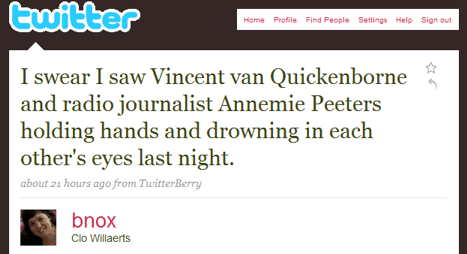
Het werdt veelvuldig opgepikt en bereikte dan ook snel de nieuwsredacties, wat (gelukkig) resulteerde in wat telefoontjes naar de heer van Quickenborne en mevrouw Peeters in kwestie.
Experiment geslaagd, zou ik zeggen!
Interessante reportage, hieronder te beluisteren. (Met dank aan @mreys voor de opname)
(Of download de .mp3 hier)
Hier nog war screenshots van het bericht dat (even) op de site van de Gazet van Antwerpen stond. Tags: Cultuur, in 't Nederlands, Lifelog, TwitterGeef je reactie (2)
Twappy Twistmas !
Instead of sending out mass emailings or Christmas Cards,
This year I decided to give everyone (and especially my fellow tweeple) a nice christmas hat as present.
They're yours so ... enjoy !
Click on your image and a very Twappy Twistmas !
Tags: in English, Pulp, Twitter, Web 2.0Geef je reactie (1)
Tweetshirt video
The nice folks of MultimediaMakers made a video report of Barcamp.
Above is the part where I talk about the tweetshirt.
You can find the full video here featuring also @tijs about Tweetthrough and @robinwauters about Happnr