Steffest Digitale Pulptuur

Tag: in English

91 berichten

Now THIS is coffee

Deze afbeelding in een nieuw scherm openenThe reason why I like the UK so much?
It's the size of their coffees.

really: they are HUGE!

It's a bit hard to see on a picture, so for your contextual pleasure I've put them next to some contextable objects: a 2 euro coin and a 10 cent euro coin.

2 euro is a big coin, right?
not compared to this regular coffee on the left and a (double) cappuccino on the right.

and if you kid yourself that prices are in euro too instead of pounds, they are not that expensive !

I know what my brekkie will look like tomorrow morning!in English, Lifelog, PulpReacties (0)

The Future of Web Apps

I'll be attending the "Future of Web Apps" conference in London later this week.
The list of speakers is pretty impressive and I'm sure I'll get a superboost out of it.

I learned only recently for sure that I could go so I had to book travel and accommodations fairly late.

The last minute Eurostar train fares are really ridiculous: I refuse to pay 150+ euros for a single 2 hour train trip.
There was a not-too-expensive flight from Antwerp to London early Thursday morning which was perfect, but a flight back late Friday night is non existent.
Damn you airport neighbours that have put a stop to nightflights ! (just kidding - they deserve to sleep like anyone else ...)

After some digging I settled for a weird return trip: I'll take the ferry Friday night to Hoek van Holland - a 7 hour bed-and-breakfast boat trip, and hop on the train from there. (Man, those ferries are cheap !)
Off course they are slow too and it's a big D-tour, but spending Friday night on a ferry boat should be fun as well ;-)

Looking forward to it: traveling always gives me a sense I'm doing some meaningful with my life, like pursuing new insights or explore a mysterious terra incognita.
One thing I know: I'm traveling ultra-lightweight and there will be wifi at the venue and in the hotel. (and for the rest, i'll bring enough movies and tv-shows to last 3 days)

What more does one needs ? (Ah: spare batteries off course)in English, Web 2.0Reacties (0)

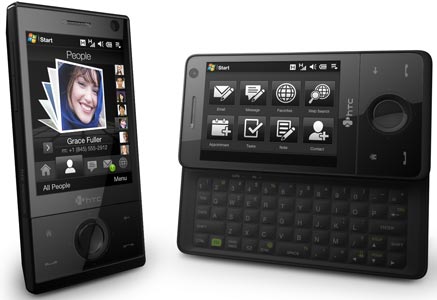
HTC Touch Pro review

htc-touch-pro-main.jpg

Yeah!

It’s finally available in europe.


I’ve been waiting for the HTC touch pro from the moment it was announced, so I was first in line to get one. Here’s a quick review.
No unpacking video as I ripped open the box the moment I was outside the store.

The Pros

  • Awesome keyboard: the slide out keyboard was a must have for me and it doesn’t disappoint: with 5 rows of keys you can do some serious writing on the move. Tactile feedback is good and the spring-aided slide-in/slide-out  feels snappy.
  • Extremely sharp screen: although its only 2,8 inch, its 640 x 480 pixels which makes it one of the sharpest screens I have ever seen.
  • Touch Flo: I was expecting my First step would be to install SPB mobile Shell, but the Touch Flo 3D interface works really well. The finger gestures are nicely expanded in the applications: to zoom in a picture you draw a circle around the detail you want to enlarge. Zoom out is a double tap.
    The round button in the middle doubles as as 5-way navigation button and as a  iPod-like scroll button (usually also to zoom in/out)
  • Features features features features. About any possible option you can think of is present. The even didn’t forget the FM-radio, which is an option I use all the time personally.
  • The one thing I can’t think of that is not there is an infrared-port.
  • Eye for details. A great deal of effort has been put into the finishing touches: things like how the status light under the navigation button flashes to indicate whats happening, things like the packaging and the interface changes to make a better one-hand use experience. Even the power adapter is very stylish and smart.
    When you hook it up to your PC with a standard mini-USB cable; you get 3 options: Function as Active Sync, Remote storage or as external modem. (Ok, the Nokia devices had this for ages, but still: nice to know it can function as standard remote storage wherever you are)
  •  Enough graphic and processing power for smooth full screen video and large datasets (like the TomTom Western Europe Map)

The Cons
No big flaws but nevertheless some little points that could be better, although that’s probably more due to personal taste that something else.

  • Lack of hardware buttons: My previous device had some dedicated buttons for camera, email, browser, connection status. The HTC touch pro has none of those, which makes sense aesthetically … but I’ll miss them.
  • No standard 3,5 inch audio socket. The phone only has 1 port: a mini USB that triples as audio socket, data port, power in and TV-out. Off course you have a nice stereo Bluetooth audio, but a standard 3,5 inch audio socket would be nice.
  • The screen is a bit small(ish) – it could cover more of the phone
  • Multitasking – well, since when is multitasking a flaw? Ok, it’s great that you can check your email, find your way, watch a video and be a wifi hotspot all at the same time, but it’s so easy to have a slew of programs running at the same time that it’s equal easy to drain your battery and notice some sluggish performance. Offcourse that’s an OS-feature, but still … you have to actively remember to close some programs once in a while.
  • That TV-out is all and well but where can you buy the frigging cable for that?
  • The switch from landscape to portrait still is a bit slow at times and it doesn’t work equally well in all applications. (Like the Youtube player: the main interface always is in portrait, the video always plays in landscape)
  • The Touch Flo interface in Landscape mode is bit weak. Or rather nonexistent. In general the Touch Flo interface lacks a bit of customizability.

Battery Life

  • Battery Life will always be a weak point for very active mobile people and this battery still is a lot smaller then e.g. the Tytn or TytnII battery … hmmm …
    Off course Bluetooth, 3G and Wifi are all known to drain your battery and it’s too early to have some real-world experience with the device but I expect it to only last a day – which is reasonable. (nevertheless, I usually keep a spare battery in range)

GPS

  • It seems that a lot of people think this an overkill-feature, but not for me.
    It works great with Google Maps and Geo-tagging your pictures with Shozu is a breeze.
    I installed TomTom7 on the device, which worked flawlessly: the internal GPS was found automatically and a fix was reached very fast.

Video Playback

  • Luckily the Touch pro doesn’t suffer from the same lack of drivers as the TytnII did: video playback is very smooth. A “normal” size DivX file (720×576 pixels) is played back smoothly, seeking is fast. (I use the free TCPMP player, which plays about anything you throw at it, including flv flash video)
    Transcoding your video to play on a mobile device really is something of the dark ages.
    I purchased an 8 GB MicroSD with it, which is big enough to hold the entire Chick Carter, Detective collection in good quality Divx. Chick Carter rules!

Camera

  • 3,2 Megapixel … well … a bit disappointing. The autofocus is slow as hell, and the actual capture is even slower. (faster than the iPhone though …)
    The LED flash light is rubbish – as all LED flash lights are.
    Here are some pics shot with the phones camera(daylight,indoor and nighttime)


  • The maximum video resolution is CIF ( 352x288 pixels)
    Here are some video’s (daylight and nighttime)


Power-usage

  • Windows mobile has it good points and weak points and out of the box it lacks some applications.  (for a complete list of must have applications, see this post)
    For some reason, the remote desktop client is not installed, but you can get it from here.
    This is where especially the screen really excels: connect to your home PC or your server from anywhere over 3G, and you get a snappy 640x480 desktop on your device that’s fast enough to be fun to work with
  • Mobile TV is all the craze these days; but why should you pay your mobile operator extra for that service if you’re already paying for a data-subscription?
    If you have a slingbox or Windows media center at home, you can live-stream your cable-TV signal, or any other video source you connect to it, straight to your mobile. Sweet.
  • WMWifiRouter: just active this app and your phone will build a bridge between Wifi and your 3G connection, so that any Wifi enabled device can connect to the internet through it.

All in all I’m extremely happy with this device. It really was worth the wait. I’m pretty certain it will hold up well in real-life usage. My only concern is that with so much high tech in such a small package, some issues sooner or later are bound to appear. So: Please don’t break!

Oh, and one more thing … this entire article was typed on … a HTC Touch Pro

Gadgets, in English, MobileReacties (2)

twitter2identica and plurk2identica

Another day, another social network.

Today all the buzz was about Identi.ca, a twitter clone, but based on the open source Laconica

the 140 char limit posting thing made it an ideal target to hook up to Feedtweeter: Keeping track of all those social networks gets a little insane, so it makes sense to have a tool that syncs all your networks, no ? Post something in twitter or plurk, and it will appear in Identi.ca too.
Here's the post-to-idetica script in VB Identi.ca has no official API yet, but the approach is the same as the Plurk posting: just hit the website and simulate the login and posting forms.


<%
identicaAccount = "Steffest"
identicaPass = "*********"
	
identica("hello identicaworld!")
	
	
function identica(message)
	
	' based on http://monkey.linuxworld.com/scripts/twit
		
	url_login = "http://identi.ca/main/login"
	url_post = "http://identi.ca/notice/new"
	
	' first: login
	useragent = Request.ServerVariables("HTTP_USER_AGENT")
	poststring = "nickname=" & identicaAccount & "&password=" & identicaPass
	set objXMLHTTP = Server.CreateObject("MSXML2.SERVERXMLHTTP")
	objXMLHTTP.Open "POST", url_login, false
	objXMLHTTP.setRequestHeader "User-Agent",useragent 
	objXMLHTTP.setRequestHeader "Content-Type", "application/x-www-form-urlencoded"
	objXMLHTTP.Send poststring
			
	' then send the message
		message=server.URLEncode(message)
	poststring  = "status_textarea=" & message
	
	objXMLHTTP.Open "POST", url_post, false,plurkAccount,plurkPass
	objXMLHTTP.setRequestHeader "Content-Type", "application/x-www-form-urlencoded"
	objXMLHTTP.Send poststring
		
	identica = objXMLHTTP.responseText
end function

in English, Programming, Scripting, Twitter, Web 2.0Reacties (0)

twitter2plurk

Damn, I can't believe I haven't tought of this approach myself, but Ryan Lim did some digging and pulled an unofficial Plurk API out of his sleeve :-)
I's written in PHP.
Here's the original copyright notice.

I translated the bits needed to post a plurk from a 3th party application to vbscript, for use in feedtweeter.
So a few days after plurk2twitter, twitter2plurk is a fact. (And it works!)
Tomorrow I'll update feedtweeter to be able to post to Plurk.


<%

	plurkAccount = "Steffest"
	plurkPass = "*********"
	
	plurk("hello plurkworld!")
	
	
	function plurk(message)
	
		' big thanks to Ryan Lim for doing the digging
		' translated from http://code.google.com/p/rlplurkapi/
		' this is just a small function to send a plurk
		' for a more complete API: http://code.google.com/p/rlplurkapi/
		
		url_login = "http://www.plurk.com/Users/login?redirect_page=main'"
		url_post = "http://www.plurk.com/TimeLine/addPlurk"
	
		' first: login
		poststring = "nick_name=" & plurkAccount & "&password=" & plurkPass
		set objXMLHTTP = Server.CreateObject("MSXML2.SERVERXMLHTTP")
		objXMLHTTP.Open "POST", url_login, false,plurkAccount,plurkPass
		objXMLHTTP.setRequestHeader "Content-Type", "application/x-www-form-urlencoded"
		objXMLHTTP.Send poststring
	
		' then send the plurk
		lang = "en"
    	qualifier = ":"
    	nocomments = "0"
	
		' get the ISO8601date
		postdate = ISO8601date(now(),"+02")
		
		message=server.URLEncode(message)
	
		poststring  = "posted="&postdate&"&qualifier=" & qualifier& "&content="&message&"&lang="&lang&"&no_comments=" & nocomments & "&limited_to="
	
		objXMLHTTP.Open "POST", url_post, false,plurkAccount,plurkPass
		objXMLHTTP.setRequestHeader "Content-Type", "application/x-www-form-urlencoded"
		objXMLHTTP.Send poststring
		plurk = objXMLHTTP.responseText
		set objXMLHTTP=nothing
	
	end function
	
	function ISO8601date(dt,timezone)
		ISO8601date = year(dt) & "-" &  padding(month(dt)) & "-" &  padding(day(dt)) & "T" & hour(dt) & ":" & minute(dt) & ":" &  second(dt) & timezone & ":00"
	end function
	
	function padding(s)
		if len(s)=1 then
			padding="0" & s
		else
			padding = s	
		end if
	end function

in English, Programming, Scripting, Web 2.0Reacties (2)

Feedtweeter


Yesterday I launched a lttle service: www.feedtweeter.com
It's about RSS and about Twitter and about mixing several social medai networks together.
Basically it's a system that keeps track of an RSS feed and processes any new items that appear.
For example: if you post a video on youtube, this will end up in your youtube RSS feed, it gets picked up by tweetfeeder that decides what to with it, like posting it to your blog for example.
So you upload a video to Youtube, and it will appear on your blog automatically.
These days RSS, and XML in general, is the data-glue that ties about any data-driven website together and it's become the standard for moving data between sites or services.
Tweetfeeder tries to be different by adding some spice: it adds a processing layer to the mix so that every item can be slightly altered. For example:
  • when posting to twitter, images and html will be stripped because twitter doesn't display that
  • commercial messages can be stripped
  • you can define some special chars like: "when a tweet starts with *, post it to my blog" or "when a flickr image contains the tag "granny", send it by email to grandma"
  • and endless other variations

The twitterstream on the left is an example of that also.
At the moment feedtweeter focuses on getting messages from Plurk to Twitter: You write something in Plurk and it also appears in Twitter.
It's in closed beta for the moment, so if you want an invite: send me a tweet (And follow me on twitter so I can send you your login by direct message, offcourse you can unfollow me after that)
it's based on this code I put together 2 days ago, allthough its heavely modified and optimised (and ported to .net)
I spend 1 evening building the website (graphics and HTML) and 1 night doing the code (user accounts, feed management, message queue management)
It has launched yesterday, has currently about 40 users and has processed 1100 messages.
Now ... if only Plurk and Twitter would stay up and running, as both platforms have had hickups today ... *sigh*

Rrradiogirrrl posted a nice little review.
Blogging, in English, Programming, Scripting, Twitter, Web 2.0Reacties (5)

Google earth 3D in your browser

earthbrowser.jpgHoly Cow!
Google made a smashing announcement today and provided some nice frameworks and examples to play with: Google earth in full 3D in your browser nicely integrated with google maps.
Really: this is going to be huge!
did you see those examples?

I planned a trip to Paris a few days ago and already Google Maps proved to contain about everything you need to do some decent geo-planning, imagine the possibilities when you have that in 3D, especially with the 3D models of some major cities available.

OK, this is it ... Google most definitely has won the maps-war: time to focus on something else MS and yahoo ... (update, or not ?)
Heck, on my mobile I don't even bother to open up tom-tom sometimes: last week we were looking for a specific store. When I looked it up in Google Mobile, it instantly asked if I wanted a map with driving directions: Hell yes!
5 seconds later we were on our way ...

Small update: Oh smack ....
I checked out Microsoft Virtual Earth again, and I must say: not too bad also! The birds eye view on http://maps.live.com/ is really nice and more important: if you have Virtual earth 3D installed, the 3D view is also integrated in the browser !
Dang - Why didn't I know this? looks pretty sweet also, but at first sight it doesn't seem to have the same open API then Google does. AND is also has a very extensive SDK: hmmm ... looks even a tad better :-)
Sigh, if I only had time to check these things out more thorough :-)in English, Scripting, Web 2.0Reacties (0)

Ikea versus engineering

aversusb.jpgI'm not a very good developer, you know: I have little or none traditional developer training, there are tons of coding techniques I have never heard of, and probably I'm doing all sorts of things completely wrong.
All the things I know and use everyday are born from my common sense and with trial and error.
That being said, it's nice to find that some of the so called "inferior" concepts I keep using sometimes pop up at other software minds, advocating they are not that inferior at all!
Some examples:
Everybody knows you have to normalize your database, right? I mean, if Ted Codd said so, it's a law!
But do you?
Maybe not always, as Hank williams points out: Normalized databases don't scale
Ah, that's nice to read :-)

Another thing I welcomed is the new Access 2007 database format that enables "multi-valued fields"
Not a new concept, and considered harmful by many, but I use them all the time because they are soooo flexible and easy.

My focus is on "getting things done fast and flexible"
Some people call that the difference between engineering and hacking something together.
So be it!
But does an engineer always have the resources to do that? Resources like time, budget, a proper project description, and even interest?
I certainly don't !
A hollywood example: The way an engineer like Michael Scofield escapes from Sona, wouldn't you call that "hacking something together until it works" ? :-)
(Sorry about that - I spend half the night watching Prison Break 3x08 till 3x13: Yeah! he gets out!)

Peter Christensen compares this to the difference between Ikea and quality design furniture. I like it!
Is there a house in this world that is Ikea free ? :-)

On twitter there was some talk to have a (un)conference on this - or a session on an existing conference - or even a little competion !
I don't know: On a subject I rant that easy about, it's hard to keep my cool :-)


in English, Programming, ScriptingReacties (0)

Dark Dungeons

0046_02.gifThis must be the weirdest story I have read in a loooong time. haha. It took me completely off guard (evidence that one doesn't read or even notices the top 3 inches of a website anymore, since its mostly useless anyway: it contained a clue though: it's GOSPEL !)

http://www.chick.com/reading/tracts/0046/0046_01.asp

It's like eating an apple when after the third bite you suddenly realise it's not an apple but a piece of soap.
LOL!in English, PulpReacties (0)

Trip

hohenfels.jpgAnd I'm off to the Eifel region in Germany.
Like every average belgian in every average family, I'll be spending this long weekend abroad.
The perfect oportunity to geotag some pictures.
See you all next week!in English, LifelogReacties (0)

Twistory with a twist

For some time now, I was looking for some fine decoration to enlighten our freshly painted white walls.
I'm a DIY-guy - and that includes the things I like to put on the wall. (Next to the sometimes huge paintings of the kids)
I don't want to call it art - and most certainly not ART - but more like "expression"
But what?
It should be abstract - yet meaningful
It should be playful - yet not too swirly
It should be colorful - but not too much
It should be about me - yet not too geeky in an obvious way
It should be about the idea - not the craft of making it.
a bit like Conceptual Art - but without the big theories, after all .. I hardly take myself seriously that often.

Returning from mobilewebcamp with a head full buzzing ideas - I was fiddling around with the excellent Twistory from Tijs Vrolix.
I made a quick and dirty iCalender parser in asp/VBscript last year to display an Outlook year schedule on a school website, so I tweaked the script somewhat to display the twistory iCalendar output.
Great! an overview of all ones tweets of a full year on one calendar page. Maybe interesting for some future project.

And then it hit me: that's it!
I really like twitter, and it's the perfect not-too-serious input for some graphical views.

The plan: After 1 year of twittering, I'll collect the whole bunch in a 1-year calendar view.
The number of tweets a day get a color, the more tweets, the darker the color.
So you get a grid of colored blocks that represent a full year of your life.
If I would look at it - I'll see that dark spot and remember - Ah yes! that was the webcamp-day - great fun!
Or that was the week I didn't twitter because I was walking the nevada desert .. or something.
Perfect! Geeky, but only if you know what it means and - very important - not to be taken too seriously.
Twitter Art !


Of course twistory has to run for some time to collect data, and mine is only 4 days old. Tijs' twistory goes back 1 month so let's take that as example: week-view, month-view, week-view with less detail, coloured view (which will grow in time)
It's there for your enjoyment - works with all twistory accounts, or with any other iCalendar data for that matter (so you could graphicalise your outlook) - or, as it was meant to do: view your entire twitter backlog on a simple page.

http://www.stef.be/twistoryviewer/


I'll post the iCalendar parsing script after I cleaned it up (a bit)
Any nice ideas for other usages? lemme know!Cultuur, Graphics, in English, Scripting, Twitter, Web 2.0Reacties (1)